
I haven't used any of these mice, and nothing on this page pretends otherwise. What I did do is put Logitech's own spec sheets, box contents and November 5, 2026 prices for five MX pointing devices side by side. That turned up something most "which MX mouse" lists miss: the $89.99 MX Master 3S on Logitech's US store right now is the Bluetooth Edition, and its box holds the mouse and a manual. No receiver, no cable.
That one fact changes the answer for a lot of desks, so it comes first.
Research note: AI-assisted research and writing, not hands-on tested. Written by Rhett Varley. No mouse or trackball was held, set up or tested for this page. Every call below is a judgment from Logitech's official product pages and support specification pages, checked on November 5, 2026, plus OSHA's Computer Workstations eTool. Prices change often; treat them as "as of Nov 5, 2026." There are no affiliate links on this page. Product links go to Logitech's own pages, and nobody paid for placement (how we research).
Quick answer
For most home-office desks, the MX Master 3S is the best Logitech MX mouse: $89.99 at Logitech as of Nov 5, 2026, with the same 8,000 DPI sensor, quiet clicks and thumb wheel as the $119.99 MX Master 4, as long as your computer has Bluetooth.
- Pick the MX Master 3S if your laptop or desktop has working Bluetooth. Logitech's store sells it as the Bluetooth Edition, with no receiver or charging cable in the box.
- Pick the MX Master 4 ($119.99) if you need a receiver (a desktop without Bluetooth, a locked-down work laptop, a crowded 2.4 GHz office) or you'll actually use haptic feedback and the Actions Ring. It ships with a Logi Bolt USB-C receiver.
- Pick the MX Anywhere 3S ($89.99) only if the mouse leaves the desk most weeks, or your mouse space is tiny. At the same price as the 3S, it's the worse desk mouse on paper.
- Pick the MX Vertical ($99.99, list $119.99) or MX Ergo S ($119.99) if wrist or forearm posture is the reason you're shopping. The Ergo S also solves "no room to move a mouse."
MX Master 3S vs MX Anywhere 3S: the $0 difference
This is the comparison people search for, and the price makes it blunt. As of Nov 5, 2026, Logitech lists both at $89.99. The 3S shows a $99.99 list price with 10% off; the Anywhere 3S is simply $89.99.
So you're not choosing a budget option. You're choosing a shape and a feature set at the same price:
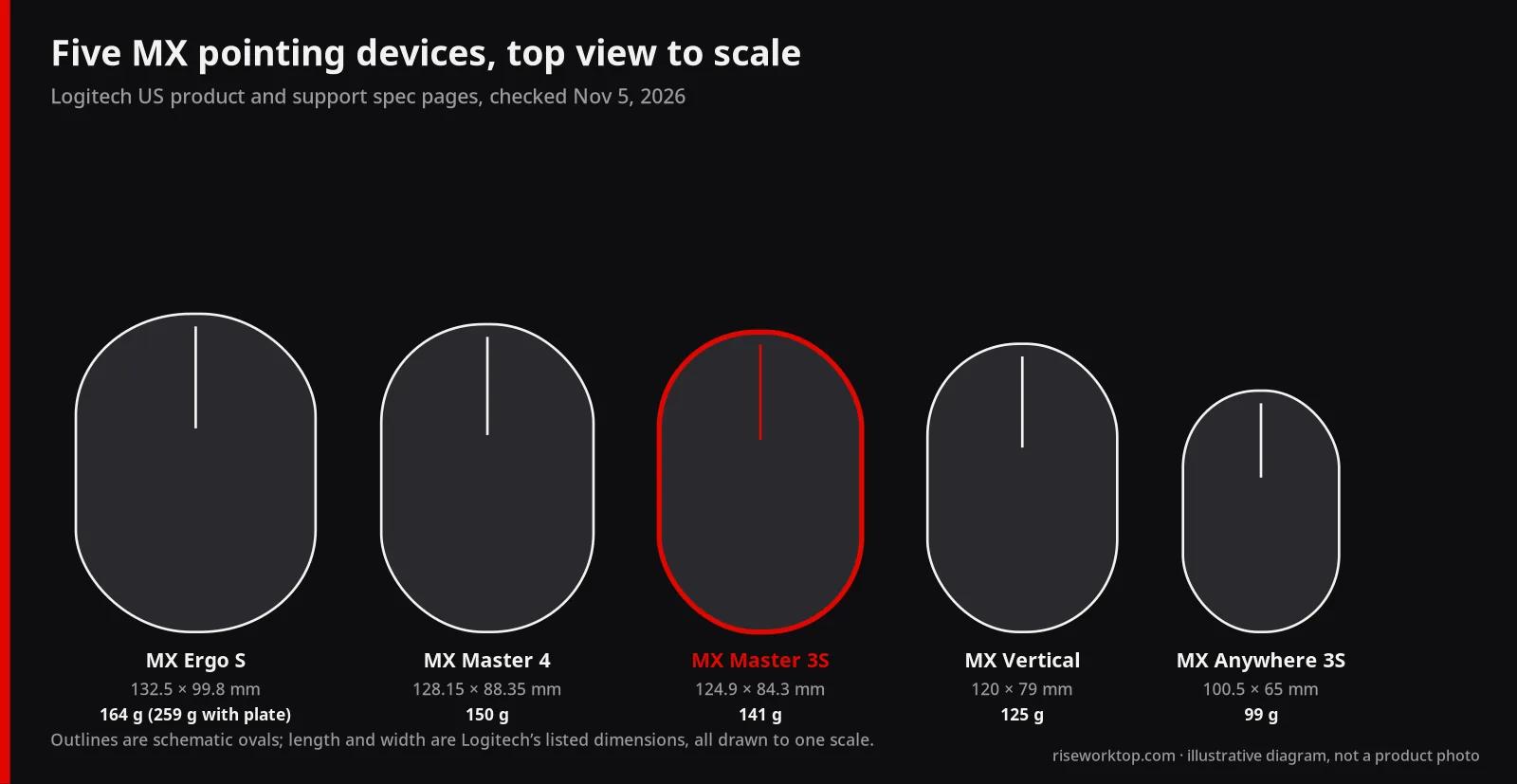
- Size. The 3S is 124.9 × 84.3 mm and 51 mm tall (4.92 × 3.32 × 2.01 in). The Anywhere 3S is 100.5 × 65 mm and 34.4 mm tall (3.96 × 2.56 × 1.35 in). That's almost an inch shorter, about 0.8 in narrower and 0.65 in lower, a much smaller thing to wrap a hand around.
- Weight. 141 g vs 99 g on the product pages. (Logitech's support spec page for the Anywhere 3S says 95 g with battery; the store page says 99 g.)
- Buttons. The 3S has 7 buttons, a gesture button and a dedicated thumb wheel. The Anywhere 3S has 6 buttons and no thumb wheel; Logitech says you scroll sideways by holding a side button while turning the main wheel.
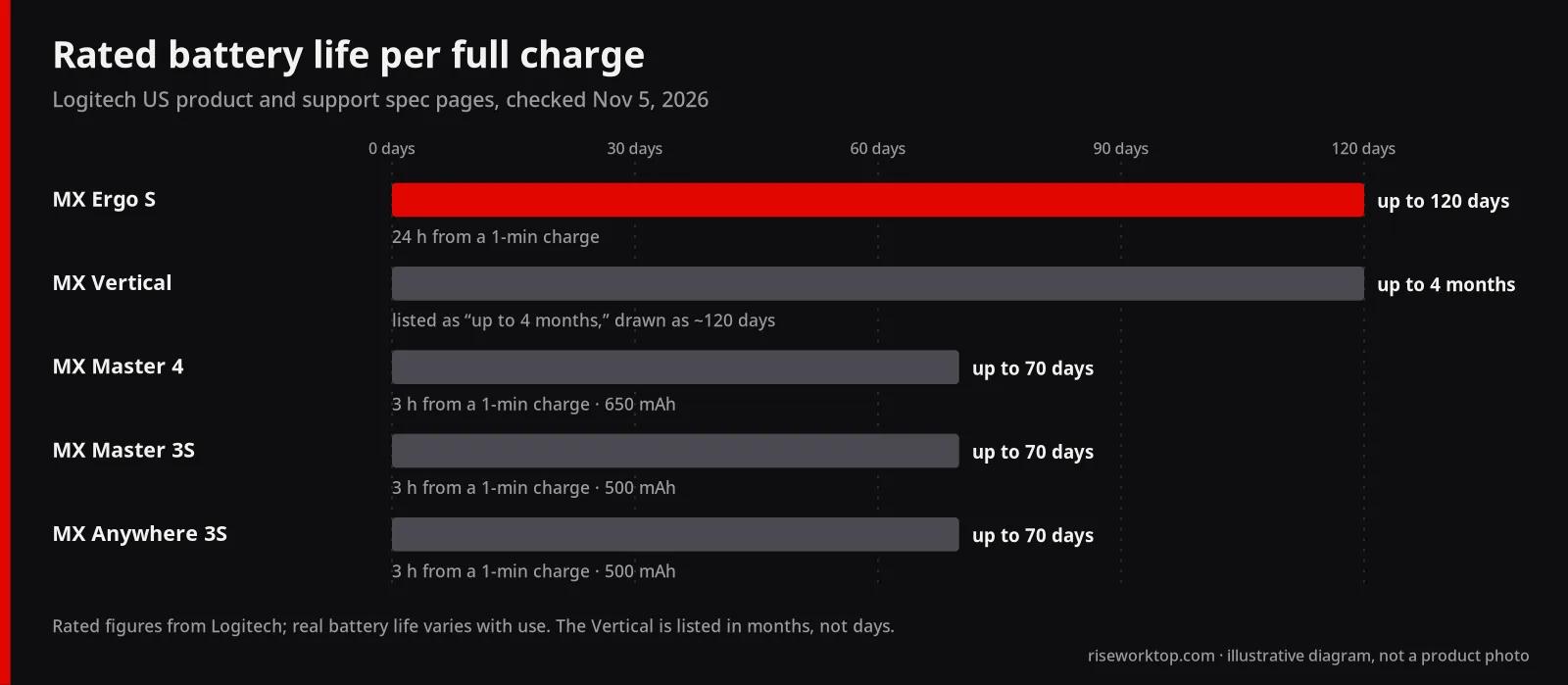
- What's the same. The Darkfield sensor (200–8,000 DPI on both store pages), MagSpeed scrolling at up to 1,000 lines per second, quiet clicks, a 500 mAh battery rated for up to 70 days, and Logi Bolt compatibility.
- What's in the box. The Anywhere 3S includes a USB-C charging cable but no receiver ("receiver not included," per Logitech). The 3S Bluetooth Edition includes neither.
My call: if the mouse lives on a desk, the 3S. It's the shape built for a full hand and a whole day. The thumb wheel matters if you scroll wide spreadsheets or timelines, and at the same price there's nothing to save. The Anywhere 3S earns its place in a laptop bag. Logitech is also throwing in a free MX Travel Case ($22.99 value) with the Anywhere 3S or MX Master 4 right now, which tells you who it's for.
The receiver catch on the $89.99 MX Master 3S
Logitech's support specification page spells out two editions of the 3S:
- Standard Edition: mouse, Logi Bolt USB receiver, USB-A to USB-C charging cable, documentation.
- Bluetooth Edition: mouse, documentation.
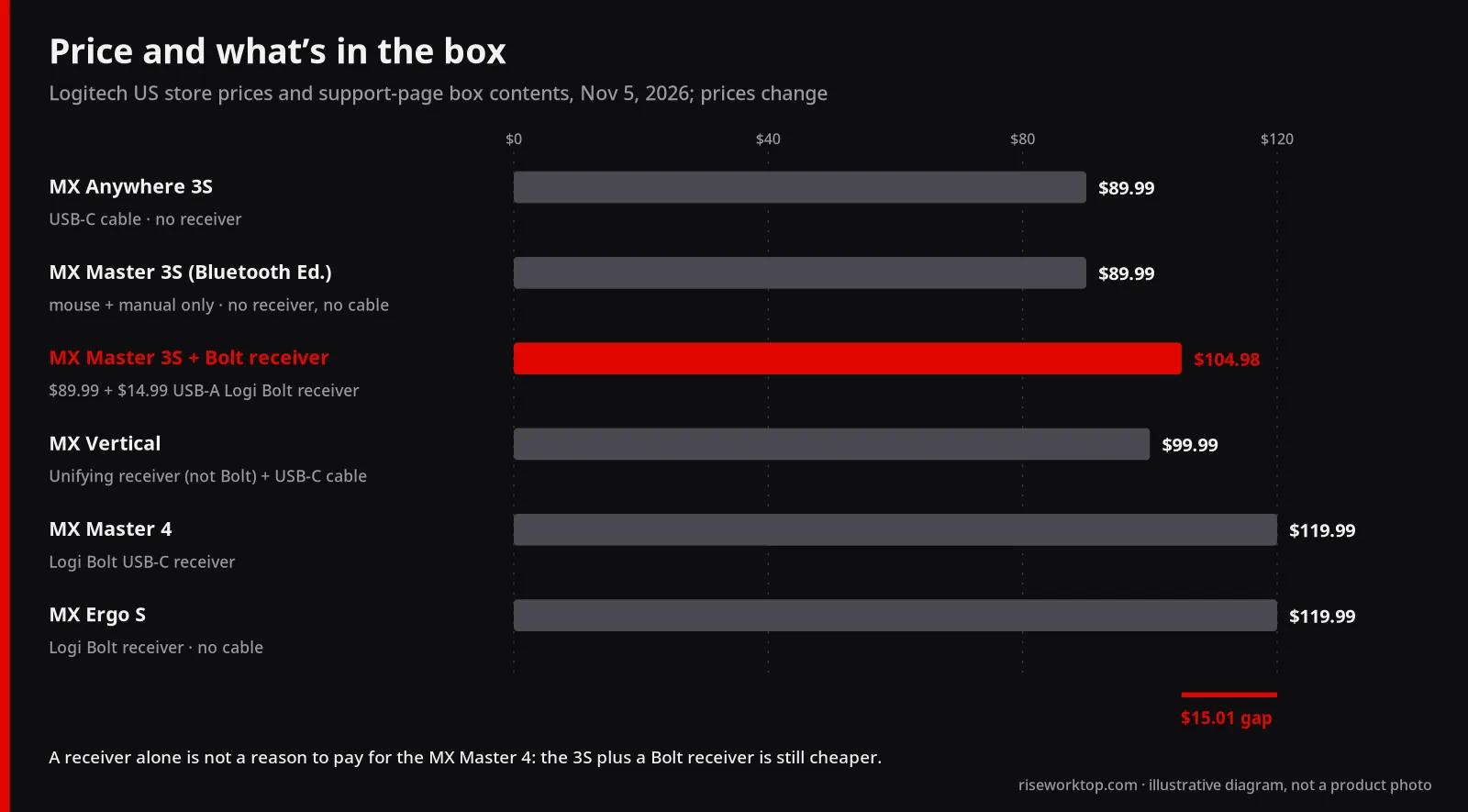
The product page on Logitech's US store, checked Nov 5, 2026, sells the Bluetooth Edition in Black and Graphite. If you buy it there, you're on Bluetooth unless you add a Logi Bolt USB receiver ($14.99, USB-A). You'll also need a USB-C cable to charge it; most people already have one, but it's not in the box.
When does that matter? Three situations I'd take seriously:
- A desktop tower without Bluetooth. Many don't have it. Then you need the receiver either way.
- A work laptop with Bluetooth turned off or restricted. That's common on managed machines. Logitech's MX Master 4 business data sheet sells Bolt as an "encrypted, FIPS-compliant connection," which is exactly the argument an IT department wants to hear. Ask before you buy.
- A dock-based desk. If your laptop lives closed on a USB-C dock or hub, a receiver plugged into the dock means the mouse follows the dock, not the laptop's radio. That's a real convenience. Just note the MX Master 4's receiver is USB-C, while the standalone Bolt receiver is USB-A, so check which ports your dock has free.
Now the math: 3S Bluetooth Edition ($89.99) plus a Bolt receiver ($14.99) is $104.98. That's still $15.01 under the MX Master 4. So "I need a receiver" alone isn't a reason to buy the 4. You need to want what else it adds.
MX Master 4 vs MX Master 3S: is $30 worth it?
On the parts you touch every minute, the spec sheets read almost the same. Both list a Darkfield high-precision sensor at 200–8,000 DPI, MagSpeed scrolling, a gesture button, a thumb wheel and up to 70 days per charge. Both get Logitech's quiet clicks; Logitech quotes "90%" less click noise for each, and on the 3S page that figure is measured against the old MX Master 3.
What the 4 adds, per Logitech:
- A Haptic Sense Panel that buzzes for actions, notifications and snapping, plus native Advanced Haptics on Windows 11 (Logitech notes this needs the Windows 11 update from late March 2026 onward).
- The Actions Ring, a radial shortcut menu at your cursor. Logitech claims it saves "up to 33%" of time, from its own 2025 Ergo Lab study of 37 MX Master users across 8 actions. That's a vendor study with a small sample, so I'd treat it as a sales pitch, not a measured result.
- 8 buttons vs 7, a bigger 650 mAh battery (the 3S has 500 mAh) rated for the same 70 days, Bluetooth 5.1, and what Logitech calls "2x better connectivity."
- The receiver in the box. A Logi Bolt USB-C receiver.
What it costs you besides $30: it's 9 g heavier (150 g vs 141 g) and a little bigger (128.15 × 88.35 mm vs 124.9 × 84.3 mm). It also has newer system requirements. Its Bluetooth listing says Windows 11 or later and macOS 13 or later, where the 3S lists Windows 10 and macOS 10.15. On an older machine, read that line before you order.
My take: the MX Master 4 is the better product and the worse deal for a typical desk. If your day is in Photoshop, Lightroom or Zoom, which Logitech names as haptic plugin apps, or you want a receiver in the box without thinking about it, the extra $30 is defensible. If you mostly live in a browser, email and docs, I'd keep the $30. Or put it toward a desk mat big enough to actually move the mouse.
When the right MX mouse isn't a Master at all
If you're shopping because your wrist or forearm complains, the Master shape isn't the whole answer. Logitech sells two MX alternatives built around posture, and they're very different machines.
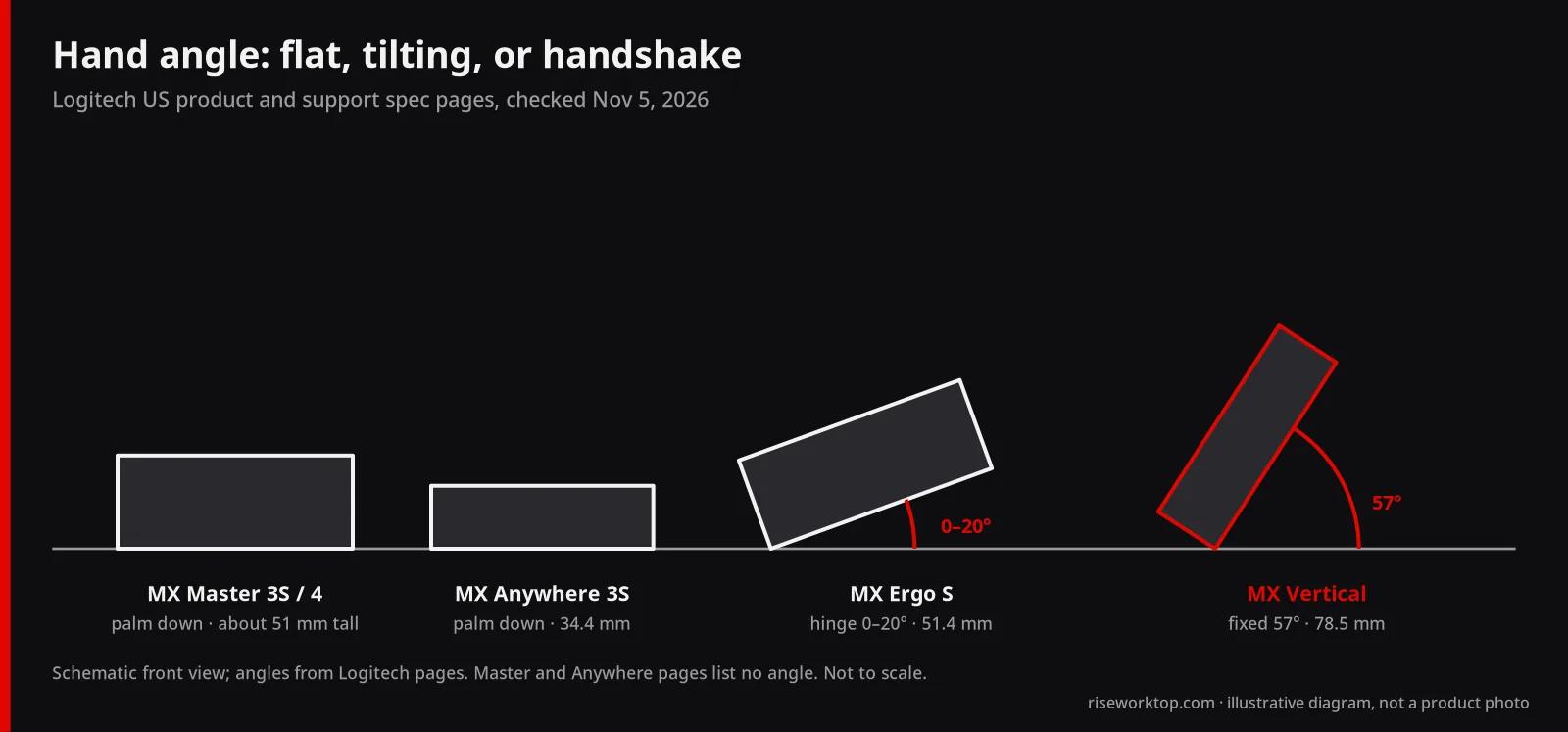
MX Vertical ($99.99, list $119.99). It holds your hand at a 57° "handshake" angle. Logitech says it's for medium to large hands and claims "10 percent" less muscular strain. The specs are older than the rest of the line: a 400–4,000 DPI sensor, 4 customizable buttons, Bluetooth 4.2 and a Unifying USB receiver, not Bolt. That last part matters if you already own other Bolt devices, because Logitech lists the 3S and Anywhere 3S as "not compatible" with Unifying. Battery life is listed as up to 4 months. It's also tall at 78.5 mm (3.09 in), so check clearance if it'll go under a monitor shelf or on a keyboard tray.
MX Ergo S ($119.99). A thumb trackball with a hinge that tilts it from 0 to 20°. Logitech claims a 27% reduction in forearm muscle strain at the tilt. It has 8 buttons (6 customizable), a precision-mode button, a 512–2,048 DPI range, a Logi Bolt receiver in the box (no charging cable), and the longest listed battery life here: up to 120 days per charge, with 24 hours from a 1-minute charge. It's right-handed only. The base is heavy, 259 g with its metal plate, which is the point: it doesn't move.
If your hands are small: Logitech positions the non-MX Lift ($79.99) for small to medium hands, with the same 57° angle, a Bolt receiver included and a left-handed version. It runs on one AA battery, not a rechargeable.
One honest limit: none of these angles is a medical treatment. OSHA's workstation guidance says a trackball "may be less fatiguing for certain tasks" and recommends trying any device before long-term use. Logitech's US store lists free returns within 30 days, which is the closest thing you'll get to a trial. Buy direct if you're unsure.
The desk-space question nobody asks
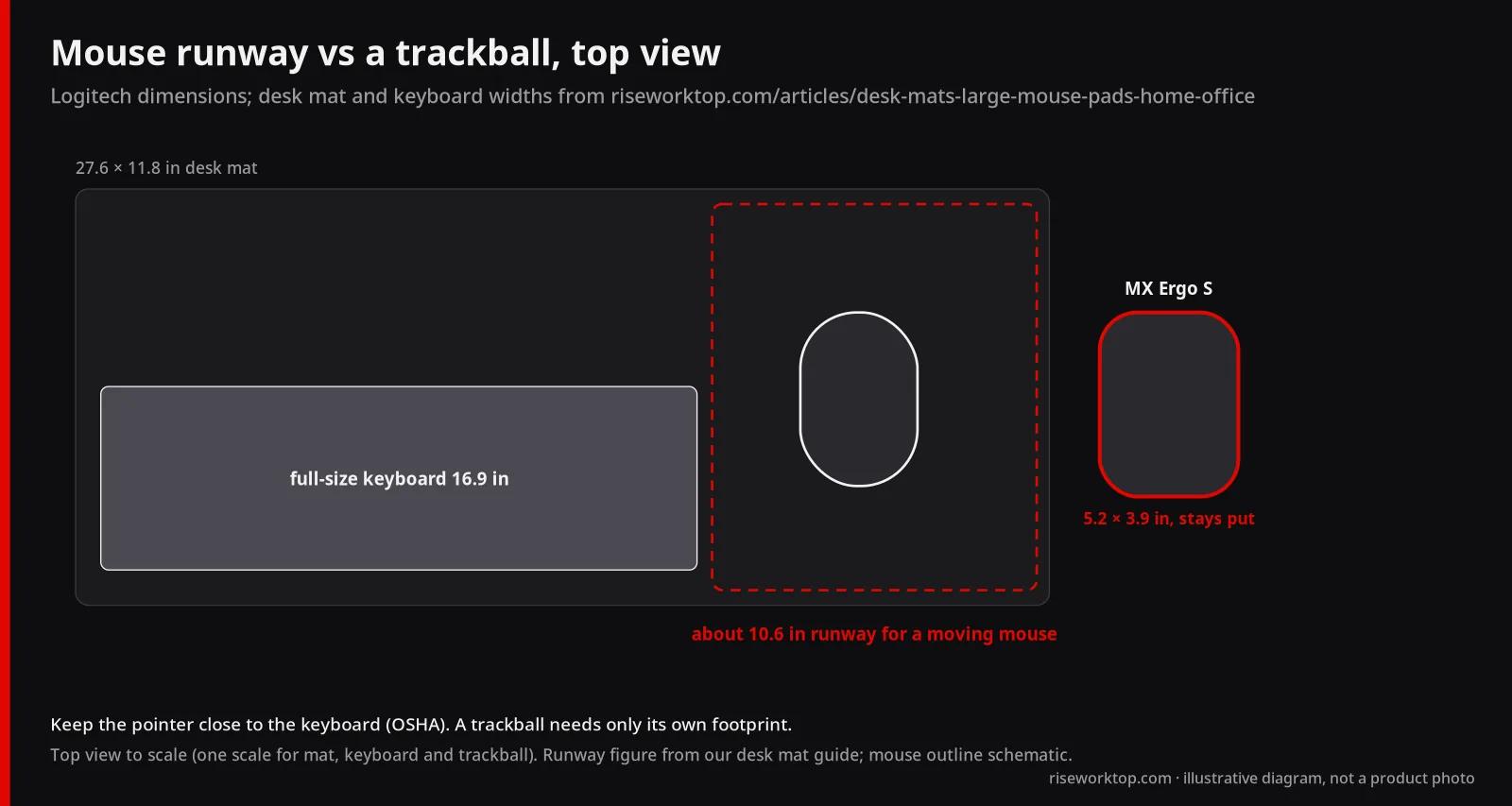
Here's where a home office differs from a review bench. A mouse needs runway, and most desks give it less than you'd think. OSHA's first tip is to keep the pointer "close to the keyboard." A mouse parked out past a full-size keyboard pulls your elbow away from your body.
Two ways the MX line helps:
- A trackball needs no runway. The MX Ergo S takes up its own 132.5 × 99.8 mm and nothing more, because your thumb moves the ball, not your arm the device. If your mouse lives on a narrow keyboard tray or a cramped corner desk, that's the strongest argument for it, stronger than any comfort claim.
- High DPI means less movement for the same cursor travel. All three Master/Anywhere models list up to 8,000 DPI, adjustable in 50 DPI steps in Logi Options+. On a large monitor, raising sensitivity shrinks the hand movement you need. OSHA's caution applies, though: too sensitive and you grip harder to stay in control. Set it so the pointer crosses the screen with your wrist straight.
Measure before you buy. With a full-size keyboard on a 27.6 in mat, our desk mat guide works out about 10.6 in of mouse runway; a compact keyboard frees about 5.3 in more. And your mouse and keyboard should share the same height, which starts with the desk. Get your seated and standing numbers from the desk height calculator before you blame your wrist on the mouse. If your chair can't bring your elbows level with the desk, start with our office chair guide instead.
Official spec comparison table (as of Nov 5, 2026)
Every value is from Logitech's US product pages and support specification pages, checked November 5, 2026. Where the two Logitech pages disagree, I note it. Dimensions are length × width × height as Logitech lists them (it calls length "height" and height "depth").
| Model | Price at Logitech (Nov 5, 2026) | Type | Size (L × W × H) | Weight | Buttons | DPI range | Battery (rated) | Receiver in the box |
|---|---|---|---|---|---|---|---|---|
| MX Master 3S (Bluetooth Edition) | $89.99 (list $99.99) | Full-size mouse | 124.9 × 84.3 × 51 mm | 141 g | 7, plus gesture button and thumb wheel | 200–8,000 | 500 mAh, up to 70 days | None, and no cable (Bluetooth Edition) |
| MX Master 4 | $119.99 | Full-size mouse, haptic panel | 128.15 × 88.35 × 50.8 mm | 150 g | 8 | 200–8,000 | 650 mAh, 70 days | Logi Bolt USB-C |
| MX Anywhere 3S | $89.99 | Compact mouse | 100.5 × 65 × 34.4 mm | 99 g (95 g on support page) | 6, no thumb wheel | 200–8,000 (400–8,000 on support page) | 500 mAh, up to 70 days | None (Bolt compatible); USB-C cable included |
| MX Vertical | $99.99 (list $119.99) | Vertical mouse, 57° | 120 × 79 × 78.5 mm | 125 g | 4 customizable | 400–4,000 | 240 mAh, up to 4 months | Unifying USB (not Bolt); USB-C cable included |
| MX Ergo S | $119.99 | Thumb trackball, 0–20° tilt | 132.5 × 99.8 × 51.4 mm | 164 g (259 g with metal plate) | 8 (6 customizable) | 512–2,048 | 500 mAh, up to 120 days | Logi Bolt; no cable |
All five list Bluetooth Low Energy. Logitech's Ergo S FAQ says it's made right-handed only.
Who I'd skip, and why
- MX Anywhere 3S as your only desk mouse. Same price as the 3S, smaller, no thumb wheel. It's a great second mouse. It's an odd first one.
- MX Vertical if you own Bolt gear. Its Unifying receiver can't share a dongle with Bolt keyboards, and its Bluetooth 4.2 and 4,000 DPI ceiling are a generation behind. It still makes sense for a large hand that wants 57°. If your hand is small, look at the Lift instead.
- MX Master 4 for a browser-and-email day. It's not bad. You're paying $30 for haptics and a ring menu you may never open.
FAQ
Is the MX Master 3S or MX Anywhere 3S better for a home office?
The MX Master 3S, for a mouse that stays on the desk. Both are $89.99 at Logitech as of Nov 5, 2026, with the same 8,000 DPI sensor and 70-day battery rating, but the 3S is a full-size shape with a thumb wheel and 7 buttons vs 6. Pick the Anywhere 3S if the mouse travels.
Is the MX Master 4 worth it over the MX Master 3S?
Only if you'll use its haptic feedback and Actions Ring, or want a receiver in the box. Otherwise the 3S matches it on sensor, scrolling and rated battery life for $30 less ($89.99 vs $119.99 as of Nov 5, 2026).
Does the MX Master 3S come with a USB receiver?
The Standard Edition does; the Bluetooth Edition doesn't. Logitech's US store currently sells the Bluetooth Edition, whose box holds only the mouse and documentation. A Logi Bolt USB receiver is $14.99 separately.
Does the MX Anywhere 3S work with a Logi Bolt receiver?
Yes, but it doesn't include one. Logitech lists it as compatible with the Logi Bolt USB receiver only, not older Logitech receivers. It does include a USB-C charging cable.
Which Logitech MX mouse is best for wrist pain?
Logitech positions the MX Vertical (57° angle, medium to large hands) and the MX Ergo S trackball (0–20° tilt) for posture. Neither is a medical fix. OSHA recommends trying a pointing device before long-term use, and Logitech's store lists free returns within 30 days.
Can the MX Ergo S be used left-handed?
No. Logitech's FAQ says it's made in a right-handed configuration only. Logitech's Lift vertical mouse has a left-handed version.
Sources
- Logitech US product pages, checked November 5, 2026: MX Master 3S, MX Master 4, MX Anywhere 3S, MX Vertical, MX Ergo S, Lift and Logi Bolt USB receiver
- Logitech support specification pages: MX Master 3S, MX Master 4, MX Anywhere 3S, MX Vertical and MX Ergo S (checked November 5, 2026)
- Logitech MX Master 4 for Business data sheet (Logi Bolt USB-C receiver and box contents)
- OSHA Computer Workstations eTool: Pointer/Mouse
- Runway and height figures from our desk mat guide and desk height calculator
If it were my money
I'd check one thing first: does the computer I'll use this with have Bluetooth I'm allowed to use? If yes, I'd buy the MX Master 3S from Logitech for $89.99 and stop there. If no, I'd still price the 3S plus a $14.99 Bolt receiver before reaching for the MX Master 4. I'd only pay the extra $15 over that combo if I wanted haptics, or a USB-C receiver for a dock with no USB-A port left. If my wrist were the reason I was shopping, I'd skip the Masters, order the MX Ergo S or the MX Vertical (or the Lift for smaller hands) direct from Logitech, and use the 30-day return window as the test. Then I'd fix my desk height, because no mouse fixes a desk that's two inches too high. More setup tools are on our /setups/ page.