Most people shopping for a keyboard tray should raise their chair and add a footrest first. A tray earns its place when the desk can't come down and the chair can't go up: a fixed 29 in desk, a shorter user, armrests that hit the desk edge, or a standing desk whose lowest setting is still too high. And here's the catch nobody prints on the box: the cheap slide-out tray most people buy only drops the keyboard about 1.5–2.75 in, while the people who need a tray most often need 5 in or more.
Research note: AI-assisted research and writing, not hands-on tested. Written by Rhett Varley. No keyboard tray was installed, used or tested for this page, so every call below is a judgment from published specs, list prices and public guidance. Tray dimensions, drop ranges and prices come from VIVO, UPLIFT Desk and FlexiSpot product pages checked on October 22, 2026; posture rules come from OSHA's Computer Workstations eTool; body dimensions come from the ANSUR II rows in our desk height calculator (how we research).
Quick answer
| Your situation |
What I'd do |
Why |
| Fixed desk 1–3 in too high, flat front edge |
Clamp-on slide-out tray, about $50–$70 (VIVO MOUNT-KB05E or FlexiSpot KT2B) |
Cheap, no drilling, and the drop you need is inside its range |
| Fixed desk 4–7 in too high (many people under about 5′6″ at a 29 in desk) |
Track mount with height and negative tilt (VIVO MOUNT-KB27P-B, UPLIFT Big Standard) or VIVO's height-adjustable clamp-on KB05HB |
A fixed 1.5–2.75 in drop simply can't get there |
| Renting, can't drill, thick or odd desktop |
VIVO MOUNT-KB35CP pneumatic clamp arm, about $130 |
Clamps to 0.4–3.1 in tops and moves 10.6 in |
| Sit-stand desk that lowers to your seated height |
No tray |
The desk is already the adjuster; a tray just adds wobble and crossbar conflicts |
| Sit-stand desk whose minimum is still too high |
Raise the chair + footrest first; tray second, with a spacer for the crossbar |
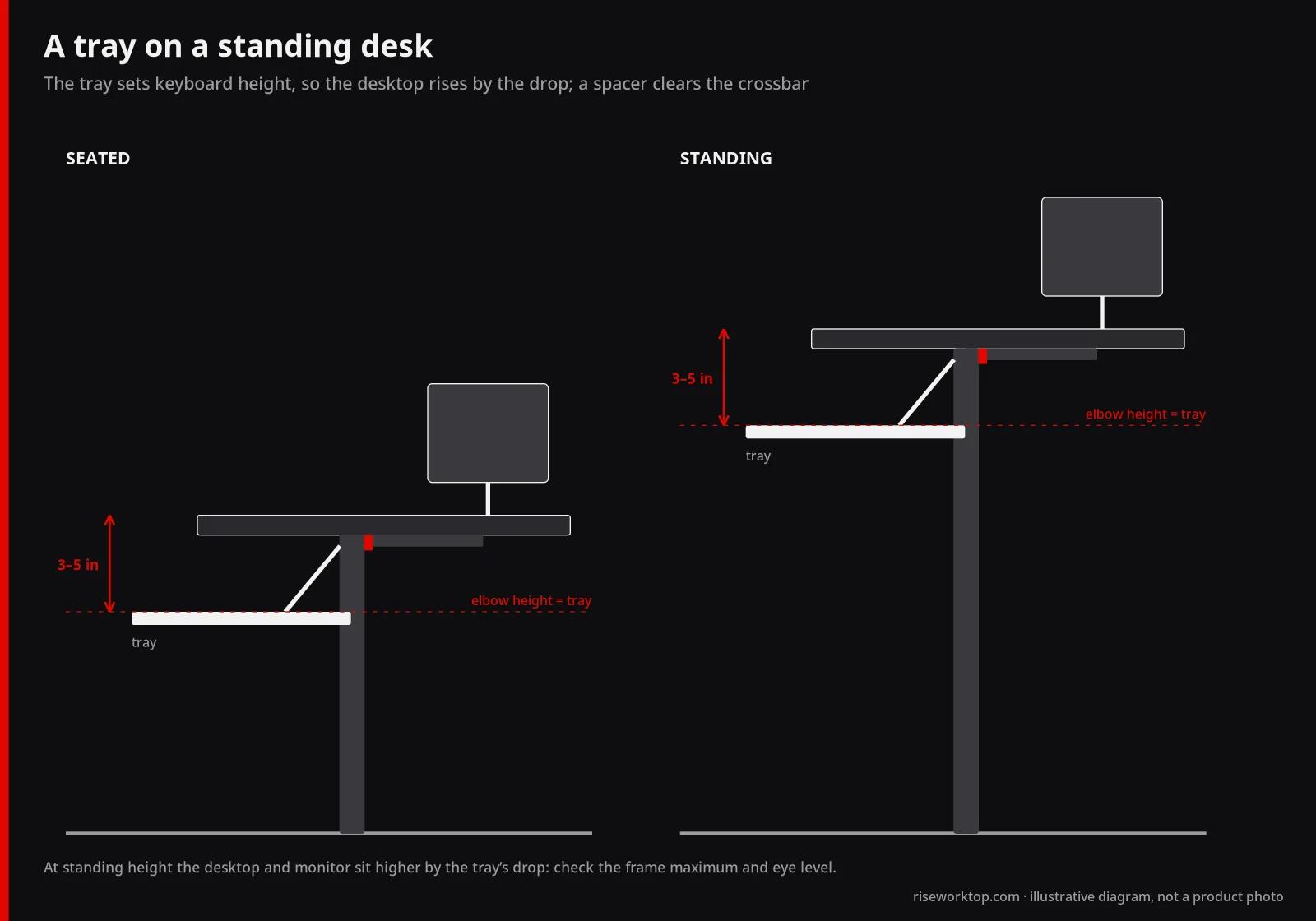
A tray works, but it pushes the desktop and monitors higher at standing height |
| Full-size keyboard and a big mouse |
34 in tray width class (VIVO KB15EB or KB36B) |
A 25 in tray leaves only about 8 in for the mouse |
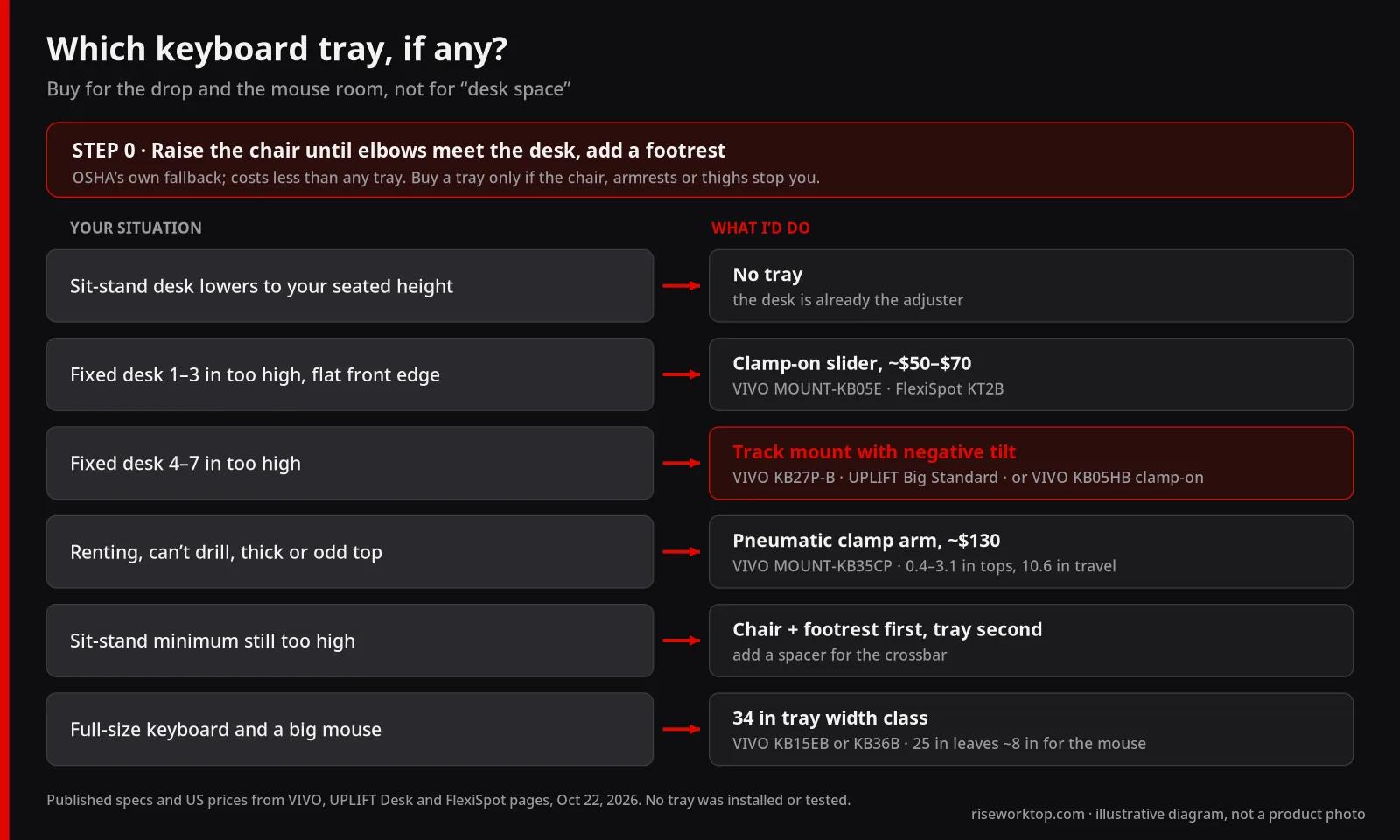
My short version: buy a tray for the drop and the mouse room, not for "desk space." If a product page doesn't tell you how far below the desktop the tray sits, it hasn't told you the one number that matters.
How far does the keyboard need to drop?
OSHA's rule for keyboard height is simple: elbows at about keyboard height, shoulders relaxed, wrists straight. OSHA also says a keyboard tray "may be needed if the work surface or chair cannot be properly adjusted," and lists three tests for one: it should be adjustable in height and tilt, leave adequate leg and foot clearance, and have room for both the keyboard and the mouse.
The drop you need is arithmetic. Our desk height calculator uses published ANSUR II rows for seated keyboard height (popliteal height plus sitting elbow height). Subtract about 1 in for the keyboard itself and you get where the tray surface should sit. Against a 29 in fixed desk, that works out to:
| Published body row |
Stature |
Seated keyboard height |
Tray surface target |
Drop below a 29 in desk |
| 5th percentile women |
60.0 in (5′0″) |
21.2 in |
20.2 in |
8.8 in |
| 50th percentile women |
64.0 in (5′4″) |
24.4 in |
23.4 in |
5.6 in |
| 50th percentile men |
69.1 in (5′9″) |
26.6 in |
25.6 in |
3.4 in |
| 95th percentile men |
73.6 in (6′2″) |
30.0 in |
29.0 in |
0 in |
Two things fall out of that table. First, a tall person at a standard desk doesn't need a tray at all. Second, the 50th percentile woman at a typical desk needs about 5.6 in of drop, which is double what a basic clamp-on slider offers. That's why I treat the $50 slider as a fix for small errors, not as a default.
The alternative is OSHA's own fallback: raise the chair until elbows meet the desk, then put a footrest under the feet. It costs less than any tray here and keeps the keyboard on a rock-solid desktop. I'd only skip it when the chair can't go high enough, the armrests collide with the desk, or the thighs hit the underside first. The footrest guide covers that route.
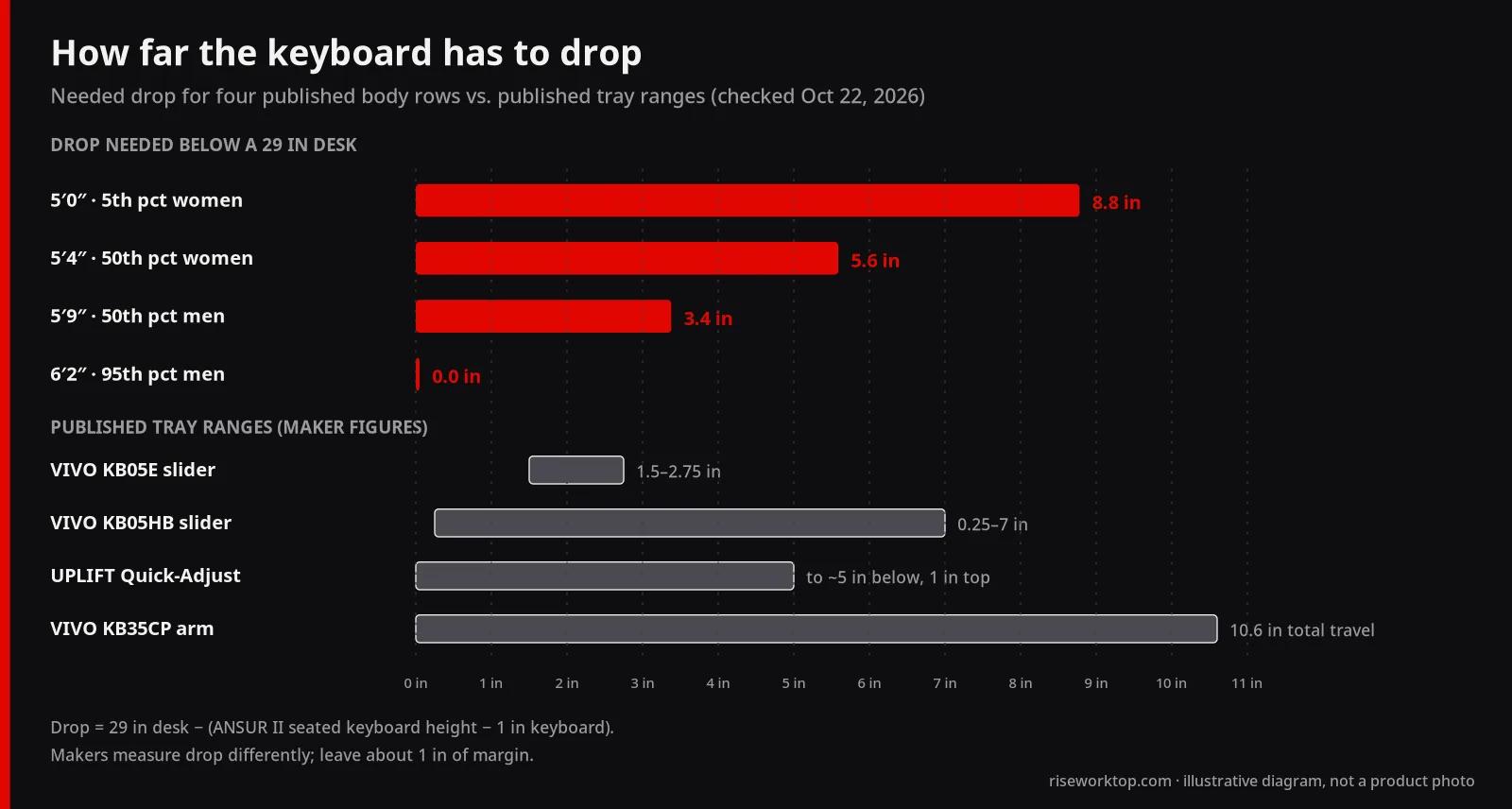
One caution on that chart: makers don't measure drop the same way. VIVO quotes where the tray sits below the desk surface; UPLIFT quotes its mechanism range relative to a 1 in desktop. Treat the numbers as close, not identical, and leave yourself an inch of margin.
Clamp-on or track mount: what actually differs
Clamp-on slide-out trays grip the front edge of the desk with two C-clamps and slide on short rails. VIVO's MOUNT-KB05E clamps to 0.5–1.25 in desktops, spans 32.5 in clamp to clamp, slides out 8.5 in, sits 1.5–2.75 in below the desk surface, and holds 11 lb. VIVO says it isn't compatible with beveled edges. FlexiSpot's KT2B (the live product page now brands it KT3B, same URL) is the same idea: a 25 × 12 in tray, 8.5 in extension, 15 lb load and clamps for tops up to 2.1 in.
The trade is clear. No drilling and an easy return, but no tilt, a small fixed drop, and clamps that occupy the front edge where your forearms, a standing-desk keypad or a drawer might want to be.
Track-mounted trays screw a long rail to the underside of the desk. An arm and mechanism ride that rail, so the tray can drop, tilt and swivel away. VIVO's MOUNT-KB03B needs 14.25 in of free underside to mount, adjusts 5 in in height and tilts from +6° to −22°. UPLIFT's Economy mechanism moves 6 in (1.75 in above to 4.25 in below the underside of the desktop) with ±15° tilt, and its Quick-Adjust moves 8 in with −20° to +10° tilt. Both come with 21 in and 11 in tracks.
That negative tilt matters more than it sounds. OSHA notes that people who type with the keyboard lower may keep wrists straighter by raising the front of the keyboard, not the back. A tray that tilts away from you does that without stacking wrist rests.
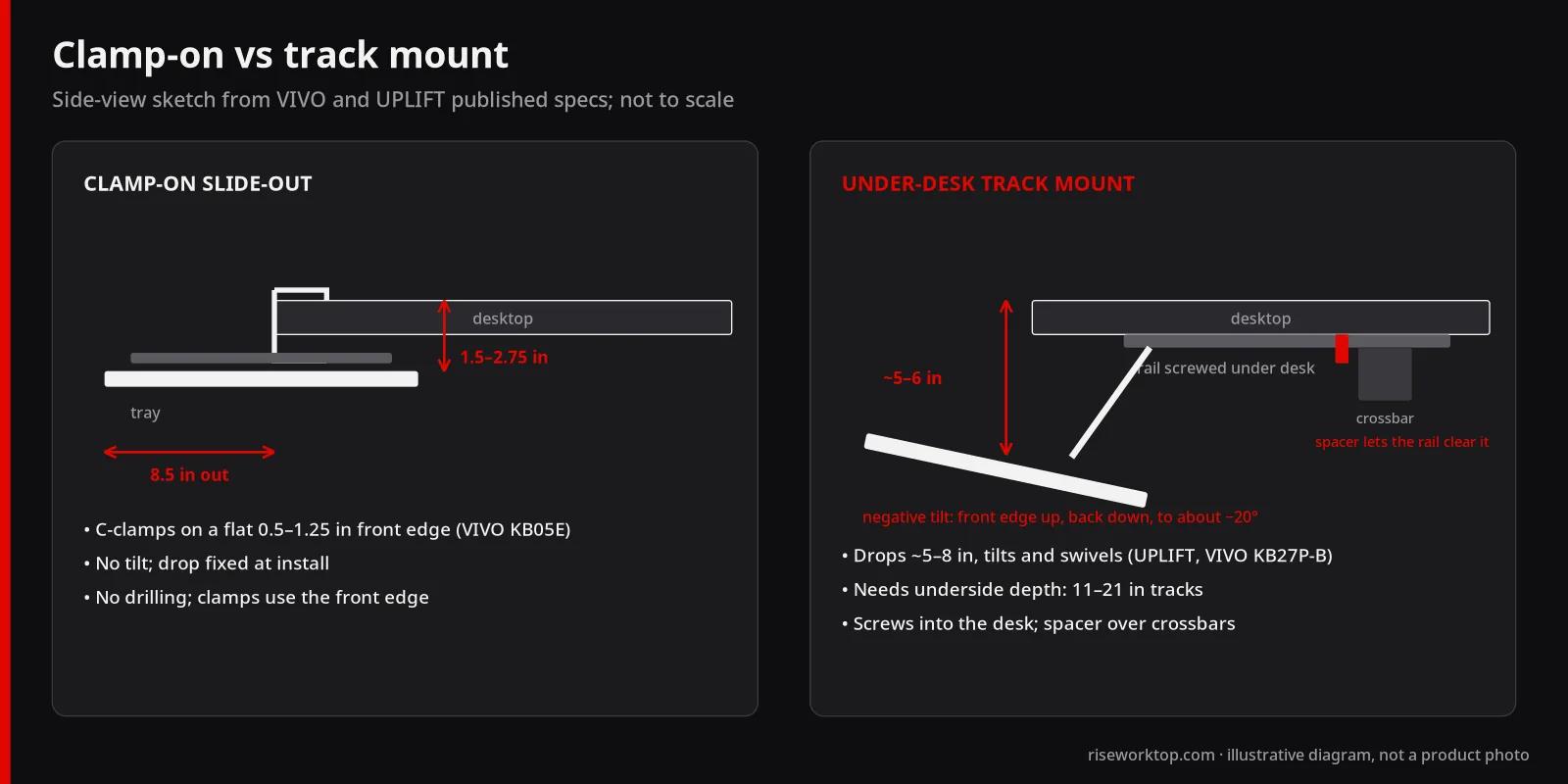
My call: on a fixed desk where you need more than about 3 in, buy a track mount and accept the screws. On a desk you can't drill, buy the pneumatic clamp arm rather than forcing a slider to do a job it can't.
The models, side by side
Prices are the makers' own US list or sale prices on October 22, 2026, for the black 27 in class unless noted. Prices change often, so check the product page before you buy.
| Model |
Mount |
Tray size |
Published height range |
Tilt |
Load |
Desktop fit |
Price (Oct 22, 2026) |
| VIVO MOUNT-KB05E |
Clamp-on slider |
26.8 × 11 in (34 in KB15EB: 33.9 × 11) |
Sits 1.5–2.75 in below desk surface |
None |
11 lb |
0.5–1.25 in, no bevel |
$49.99 (KB15EB $69.99) |
| FlexiSpot KT2B / KT3B |
Clamp-on slider |
25 × 12 in |
Not listed |
None |
15 lb |
Up to 2.1 in |
$64.99 sale ($75.99 regular) |
| VIVO MOUNT-KB05HB |
Clamp-on slider, adjustable brackets |
26.8 × 11 in |
0.25–7 in below desk surface (2.4 in bracket travel, 5 steps) |
None |
11 lb |
0.5–3.4 in (black) |
$69.99 |
| VIVO MOUNT-KB03B |
Under-desk track |
25 × 10 in (KB36B: 33.8 × 10) |
5 in adjustment |
+6° to −22°, 360° rotation |
4.4 lb |
Top 5/8 in or thicker; 14.25 in of underside |
$69.99 (KB36B $89.99) |
| VIVO MOUNT-KB27P-B |
Under-desk track, premium |
26.8 × 11.2 in, wrist pads |
6.3 in adjustment; 12.8 in extension |
30° tilt, 360° rotation |
4.4 lb |
Top 0.7 in or thicker; 17.5 in track |
$89.99 (34 in $99.99) |
| UPLIFT Big Standard system |
Under-desk track |
27 × 11 × 0.37 in, 8 in mouse pad |
Economy 6 in; Quick-Adjust 8 in (+$50) |
±15° (Economy); −20° to +10° (Quick-Adjust) |
10 lb |
21 in or 11 in track; spacer +$49 |
$114 |
| VIVO MOUNT-KB35CP |
Clamp-on pneumatic arm |
23.6 × 9.5 in |
10.6 in arm travel; 13.5–37.5 in reach |
+90° to −20°, 15° side leveling |
11 lb |
0.4–3.1 in |
$129.99 sale ($149.99 regular) |
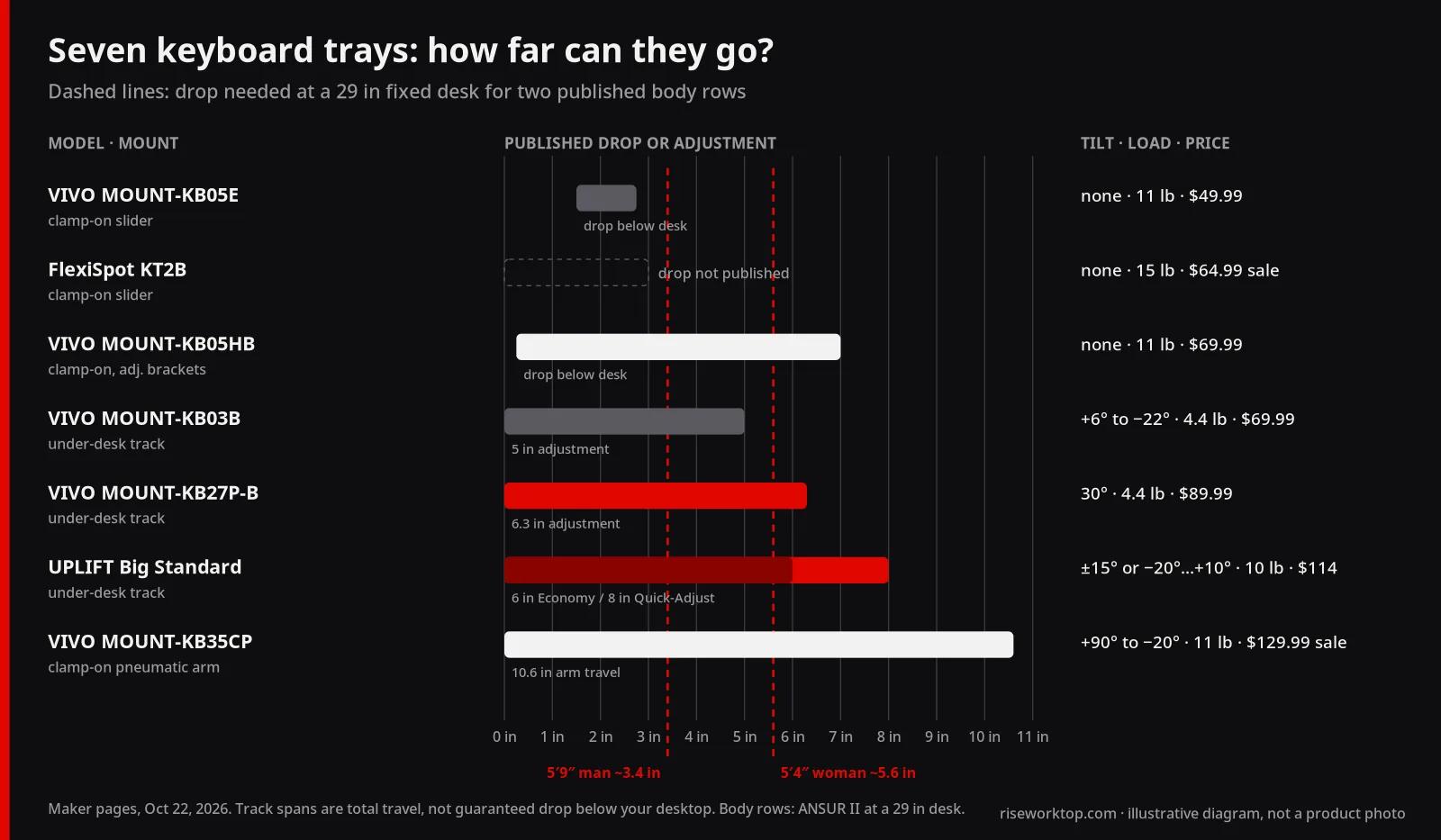
A few calls from that table:
- VIVO KB05E is the right buy only for a small correction on a thin, square-edged desk. It's the cheapest way in, but it fails OSHA's first test on its own: no tilt and no real height adjustment once installed.
- FlexiSpot KT2B / KT3B is the slider I'd pick for thicker tops (up to 2.1 in) or a slightly heavier keyboard (15 lb). FlexiSpot doesn't publish how far below the desktop it sits, so measure from the photos and manual before you count on a specific drop.
- VIVO KB05HB is the most interesting cheap option. For $20 more than the KB05E, it claims up to 7 in of drop without drilling. That covers the 5.6 in an average-height woman needs at a 29 in desk. No tilt, though.
- VIVO KB03B gets you negative tilt for $69.99, but the 4.4 lb load and 10 in tray depth are tight. A low-profile wireless keyboard and mouse are fine; a heavy metal-case mechanical board is the thing to weigh first.
- VIVO KB27P-B is the VIVO I'd actually choose for a fixed desk. It has more drop (6.3 in), a longer 12.8 in extension and wrist pads, for $20 more than the KB03B. It carries the same 4.4 lb limit, and VIVO says the desk must support 16.4 lb in total.
- UPLIFT Big Standard costs the most among the track trays, but it has the longest warranty here (15 years against VIVO's 3) and a 10 lb load. I'd pay the $50 for Quick-Adjust, because the extra negative tilt is the whole point.
- VIVO KB35CP is the renter's answer and the only clamp-on with real range. The 23.6 in tray is narrow, though, so a full-size keyboard leaves little mouse room.
Mouse room: the width trap
OSHA warns that a tray that's too small pushes the mouse somewhere you have to reach for it. That pulls your elbow away from your body and holds your arm up. It's also the easiest tray problem to predict, because it comes down to one subtraction.
A full-size keyboard like the Logitech MX Keys S is 430.2 mm (16.9 in) wide; the compact MX Keys Mini is 296 mm (11.7 in). Subtract that from the tray width:
| Tray width |
Mouse room with a 16.9 in full-size |
With an 11.7 in compact |
| 23.6 in (VIVO KB35CP) |
6.7 in |
11.9 in |
| 25 in (VIVO KB03B, FlexiSpot KT2B) |
8.1 in |
13.3 in |
| 26.8–27 in (VIVO KB05E, KB05HB, KB27P-B; UPLIFT Big) |
9.9–10.1 in |
15.1–15.3 in |
| 33.8–33.9 in (VIVO KB36B, KB15EB) |
16.9–17.0 in |
22.1–22.2 in |
My rule of thumb, and it's a judgment rather than a standard: keep at least about 8 in beside the keyboard for a normal mouse, more if you use low sensitivity. On a 25 in tray, that means a compact keyboard. With a number pad, I'd buy the 34 in class, provided your desk is wide enough for the longer clamp span or track.
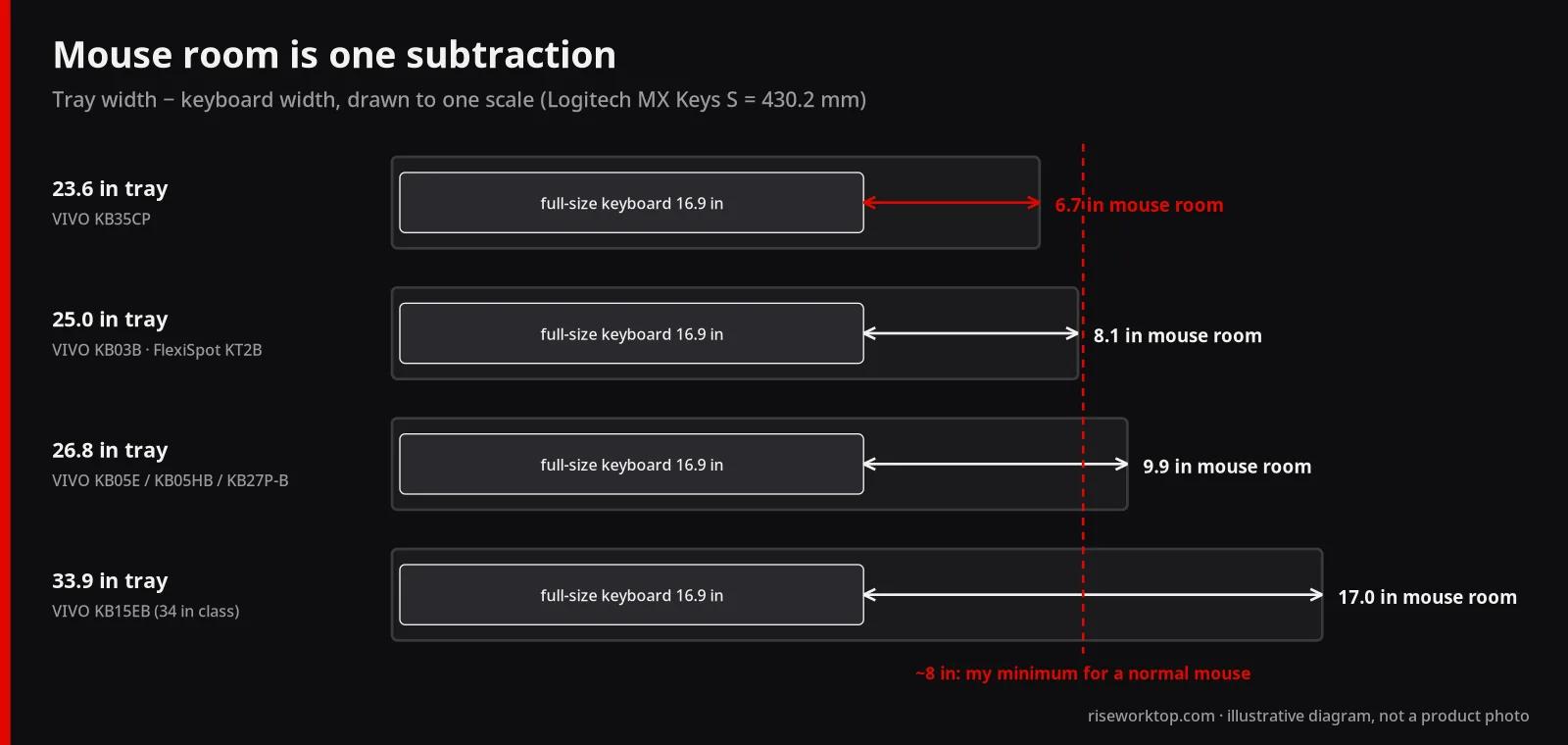
The same arithmetic, applied to the desktop instead, is in the desk mat and keyboard fit guide. If the tray is too narrow and the keyboard has to stay full-size, the mouse goes back on the desk. That defeats half the point. A thumb trackball is the other way out, because it needs no runway; Logitech's MX Ergo S is in our MX mouse comparison.
On a standing desk, you usually don't need one
A sit-stand desk already does what a tray does: it moves the work surface to your elbow height. If the frame goes low enough for your seated height, a tray only adds bounce, a second thing to adjust, and a collision with the frame's crossbar. Both VIVO and UPLIFT sell spacers for exactly that crossbar problem: VIVO says its track tray needs the MOUNT-SPACER01 ($24.99) on a height-adjustable desk, and UPLIFT's Track Spacer is a $49 add-on.
Where it does make sense is a shorter user whose desk bottoms out too high. FlexiSpot's E7 frame, for example, is published at 22.8–48.4 in without a top. Add a 1 in top and you're near 23.8 in. For the 5th percentile woman's 20.2 in surface target, that's still about 3.6 in too high, and a tray can close that gap.
But think through what happens at standing height. You'll set the desk so the tray, not the desktop, is at elbow height. That lifts the desktop, and your monitors, by the same drop. With a 3–5 in drop, check that the frame's maximum still reaches your standing keyboard height plus the drop, and that your screens don't end up above eye level. Before buying a tray for a standing desk, run your numbers through the desk height calculator. If you're still choosing a frame, pick one whose minimum fits you; the standing desk buying guide lists published height ranges. If you're deciding between a converter and a full frame, read converter vs standing desk first; a converter can't lower your seated height at all.
What to spend
Here's how I'd split the money, from the list prices above (October 22, 2026):
- $0: raise the chair and add a cheap footrest first; this fixes many "desk too high" problems outright.
- About $50–$75: a clamp-on slider (VIVO KB05E, FlexiSpot KT2B) for a 1–3 in correction on a flat edge.
- About $70–$100: the useful middle, either VIVO's height-adjustable clamp-on KB05HB if you can't drill, or VIVO's KB27P-B track mount if you can.
- About $114–$213: UPLIFT's system with Quick-Adjust and a track spacer, for the longest warranty and the best tilt range.
- About $130–$150: VIVO KB35CP pneumatic arm, for thick tops, renters and big height swings.
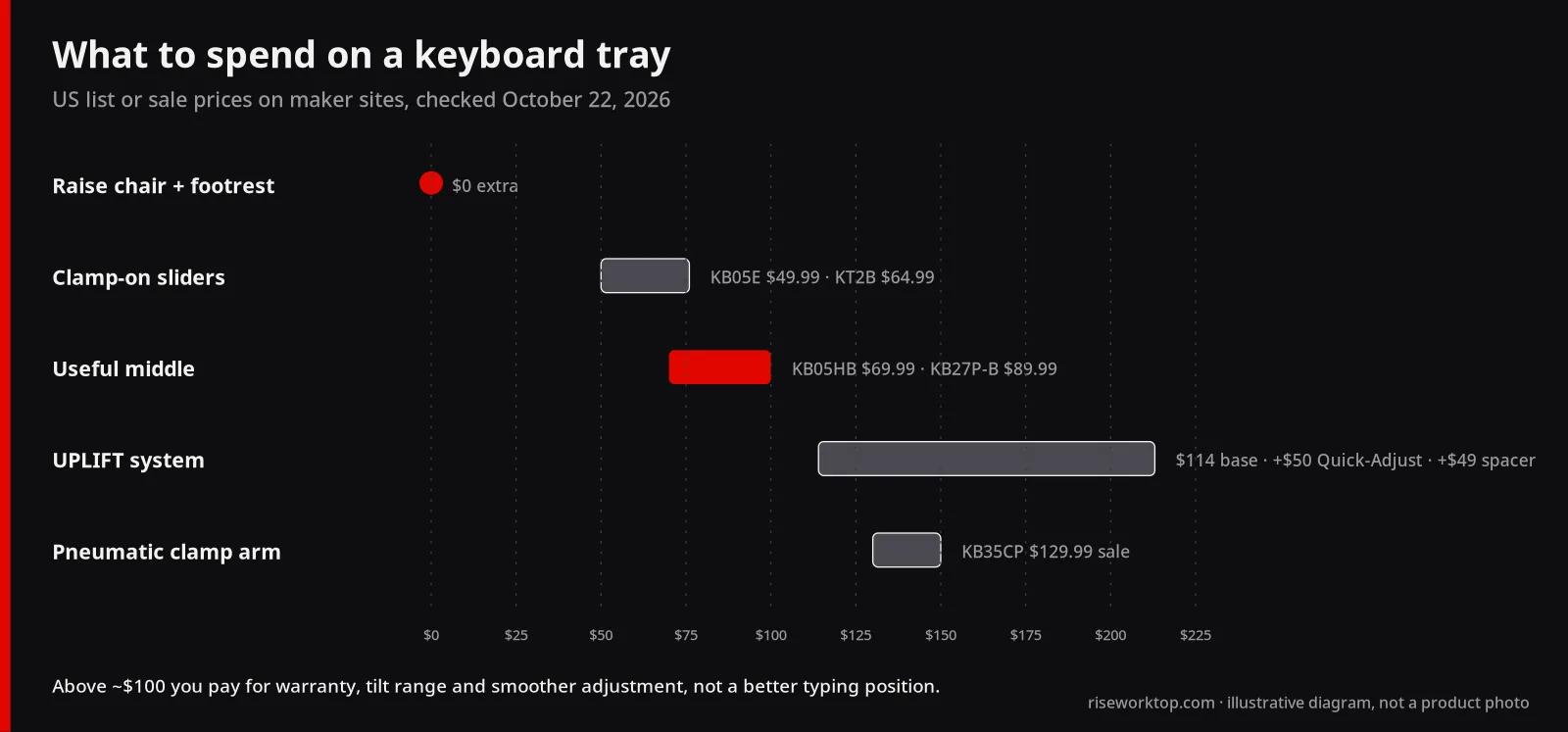
Above about $100, you're paying for warranty, tilt range and smoother adjustment, not for a better typing position than a correctly set $90 tray. Below $50, I'd be wary of any tray that doesn't publish its drop, load and desktop thickness.
Measure these before you order
- Seated keyboard height from the calculator, then the drop: desk top minus (keyboard height − about 1 in)
- Desktop thickness at the front edge, and whether the edge is beveled or rounded
- Free underside depth for a track: VIVO KB03B needs 14.25 in; UPLIFT ships 21 in and 11 in tracks
- Crossbars, drawers, keypads and grommets in the path of clamps or rails
- Thigh clearance with the tray at its working height; OSHA puts leg clearance under the desk at generally 20–28 in high
- Keyboard width plus at least about 8 in for the mouse, against the tray width
- Keyboard and mouse weight against the load rating, especially for 4.4 lb track trays
- Desk width for the clamp span (32.5 in on VIVO's 27 in KB05E) and corner-mount options if it's an L-shaped desk
FAQ
Are keyboard trays good for ergonomics?
They can be when the desk is too high and you can't lower it. OSHA says a keyboard tray may be needed if the work surface or chair can't be adjusted properly, and that it should adjust in height and tilt, leave leg clearance, and fit both keyboard and mouse. A tray that does none of those, such as a fixed slider with no tilt that's too narrow for the mouse, mostly just moves the clutter.
How far below the desk should a keyboard tray be?
Far enough that the keyboard sits at your seated elbow height. Using published ANSUR II rows and a 29 in desk, that's about 3.4 in of drop for an average-height man (5′9″), 5.6 in for an average-height woman (5′4″), and close to 9 in for a 5′0″ user. A tall user around 6′2″ needs none.
Clamp-on or under-desk track: which is better?
Track mounts are better when you need more than about 3 in of drop or want negative tilt; they screw into the desk underside. Clamp-on sliders are better for small corrections, renters and quick returns, but most have no tilt and a fixed 1.5–2.75 in drop. VIVO's KB05HB (up to 7 in) and KB35CP pneumatic arm (10.6 in of travel) are the clamp-on exceptions.
Can you put a keyboard tray on a standing desk?
Yes, but you often don't need one. If the frame lowers to your seated height, skip the tray. If it doesn't, a track tray needs a spacer to clear the crossbar: VIVO's MOUNT-SPACER01 is $24.99 and UPLIFT's Track Spacer is $49. Remember that the desktop and monitors rise by the tray's drop at standing height.
Will a full-size keyboard and mouse fit on a keyboard tray?
On a 27 in tray, a 16.9 in full-size keyboard leaves about 10 in for the mouse, which is workable. On a 25 in tray, it leaves about 8 in, which is tight. On 23.6 in, it's under 7 in. For a full-size keyboard with a number pad, I'd buy a 34 in class tray such as VIVO's KB15EB or KB36B.
Is a keyboard tray better than raising my chair?
Not usually. Raising the chair and adding a footrest is OSHA's standard fix, it's cheaper, and the keyboard stays on a stable desktop. A tray wins when the chair can't go high enough, armrests or thighs hit the desk, or several people share the chair.
Sources
If it were my desk
At a fixed 29 in desk and average height, I wouldn't buy the $50 slider. I'd raise the chair, add a footrest, and try that for a week. If my arms still hit the desk, I'd buy a tray that publishes at least 5 in of drop and some negative tilt, in the 27 in width or wider, and I'd measure the underside before I ordered anything.
