
We may earn a commission if you buy through links on this page, at no extra cost to you. How we make money
Most people shopping for a monitor arm need about five inches of lift and nothing else. A $34.99 riser does that. The arm is a better tool, but it's a better tool for problems a lot of desks don't have, and it comes with three compatibility checks a riser never asks you to pass.
So this isn't "arms good, risers cheap." It's a measuring job first, then a short list of reasons that justify the arm.
Research note: AI-assisted research and writing, not hands-on tested. Written by Rhett Varley. No riser, arm, monitor or desk was set up or tested for this page. Every call below is a judgment from manufacturer product pages and spec sheets (VIVO, Branch, FlexiSpot, Autonomous and Apple), checked on November 9, 2026, plus OSHA's Computer Workstations eTool. Prices change often; treat them as "as of Nov 9, 2026." The Autonomous links on this page are affiliate links (we may earn a commission); the VIVO, Branch, FlexiSpot and Apple links are not, and nobody paid for placement (how we research).
Quick answer
Buy a monitor riser if your screen needs a fixed 2 to 6 inches of extra height and nothing more; buy a monitor arm only if you need more lift than that, want the screen off the desk surface, or are lining up two monitors, and only after your monitor's VESA holes, its weight and your desktop's thickness all fall inside the arm's published range.
- Pick a riser (from $34.99 for VIVO's Tabletop Monitor Riser as of Nov 9, 2026) if your monitor has no VESA holes, weighs more than a budget arm's limit, or just sits 4 to 6 inches too low.
- Pick an arm (from $34.99 for VIVO's STAND-V001 pole mount, $39.99 for its spring-arm STAND-V001O) if you need more than about 6.5 inches of lift, want back the 8 to 11 inches of desk depth a riser takes, or have two screens of different heights to align.
- Pick neither if your monitor's own stand already covers the gap. Measure before you buy anything.
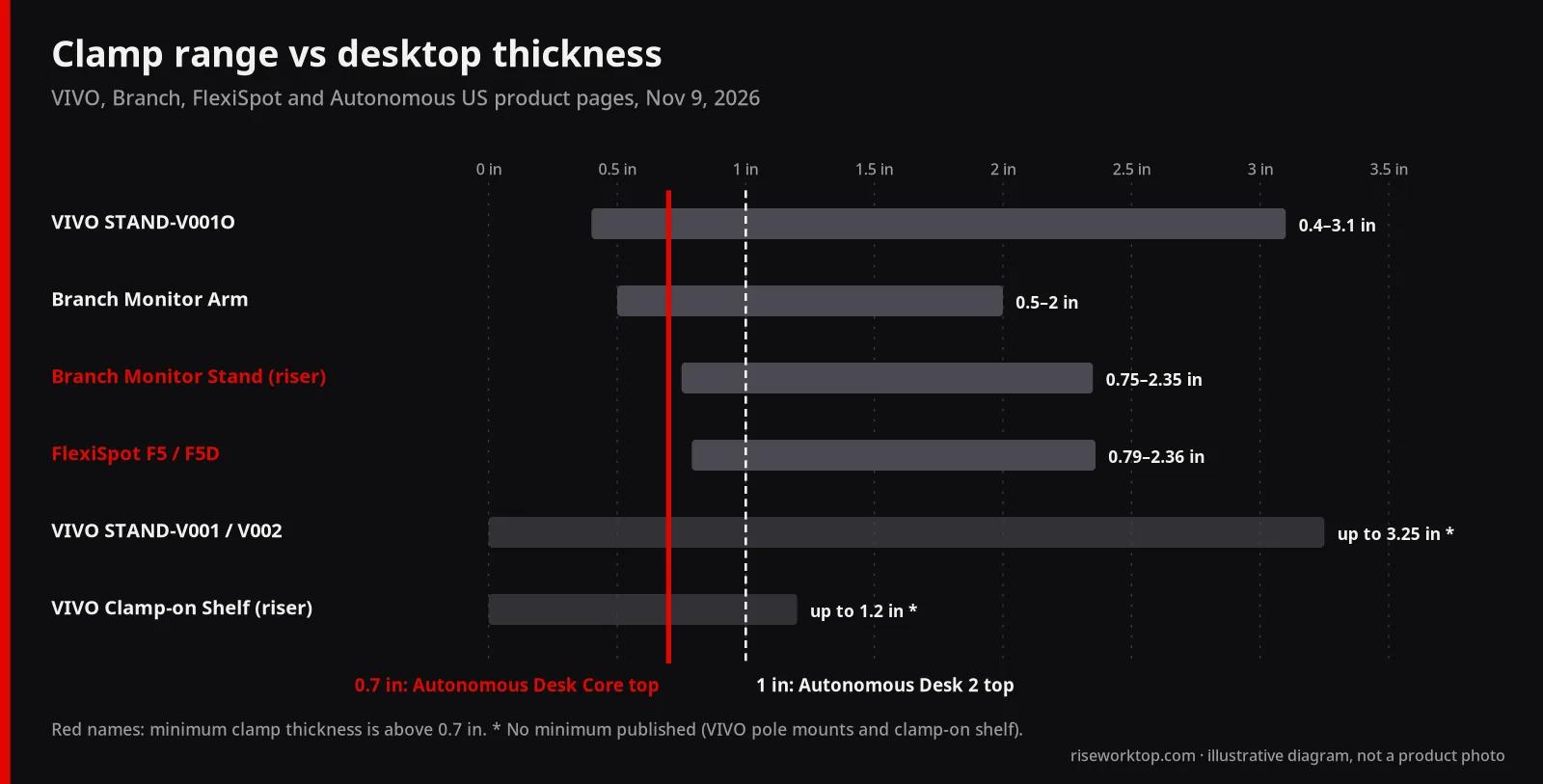
- On a standing desk, both ride up and down with the top. The arm's real catch there is the clamp: Autonomous's Desk Core has a 0.7-inch top, thinner than the minimum clamp range on two products in this guide.
First, measure the gap (it takes two minutes)
Everything else depends on one number: how far the top of your screen sits below where it should be.
OSHA's guidance is simple. The top of the monitor should be at or slightly below eye level, the screen at least 20 inches away (OSHA calls 20 to 40 inches the generally preferred range), and the center of the screen about 15 to 20 degrees below horizontal eye level. If you wear bifocals, OSHA says to go lower than that, not higher.
Here's how I'd turn that into a buying number:
- Set the desk and chair first. Your keyboard height decides where you sit, and where you sit decides your eye height. Use our desk height calculator to get your seated and standing desk heights before you touch the monitor.
- Sit normally and measure from the desk surface to your eyes. Not your best posture. Your normal one.
- Measure from the desk surface to the top edge of the picture with the monitor's stand at its highest setting.
- Subtract. That's the lift you need. If it's under an inch, you need nothing. If it's negative, your monitor is already too high.
Do this before you read any product page. Most "monitor arm vs riser" debates skip this step and end up buying 16 inches of adjustment for a 5-inch problem.
A worked example, from Apple's spec page: the Studio Display with its standard tilt-only stand is 18.8 inches tall and has no height adjustment at all. Apple's optional tilt-and-height stand adds a total of 105 mm (about 4.1 inches) of travel, topping out at 23.0 inches. A 4.6-inch riser under the tilt-only version puts the top edge at about 23.4 inches, roughly where the upgraded stand's top position is. And because the tilt-only model has no VESA mount (Apple sells the VESA mount adapter as a separate configuration), a riser is the only one of the two that fits it at all.
What a riser does better than an arm
I'd buy a riser in four situations, and I don't think it's the compromise choice in any of them.
Your monitor has no VESA holes. Every arm in this guide lists VESA 75 × 75 or 100 × 100 mm only. A riser doesn't care what's on the back of the screen. That covers the tilt-only Studio Display above, plenty of monitors with built-in stands, and laptops on a stand (our laptop stand vs external monitor guide covers that case).
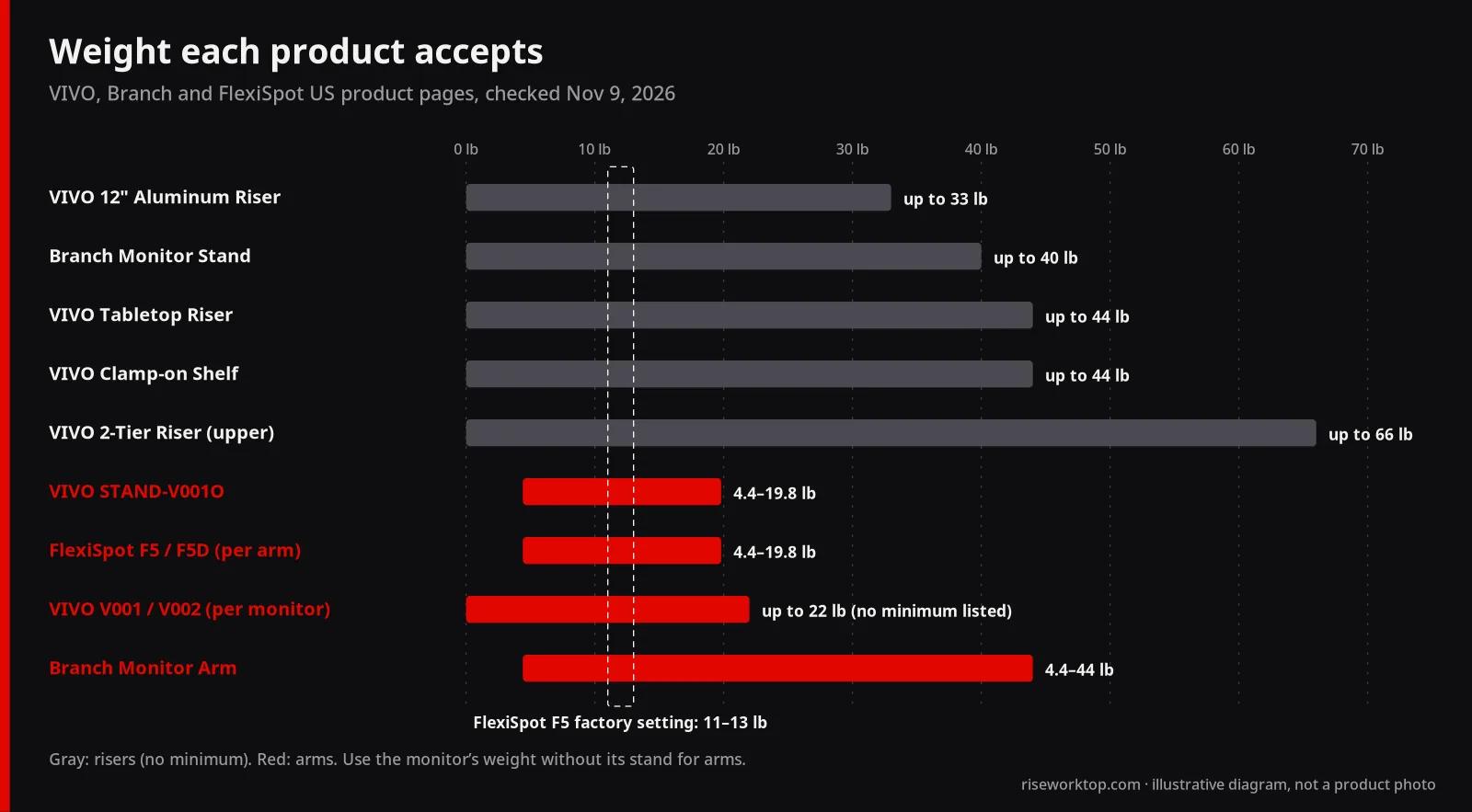
Your monitor is heavy. VIVO's Tabletop Monitor Riser is rated for 44 lb, its 12-inch Aluminum Riser for 33 lb, and its 2-Tier Premium Monitor Riser for 66 lb on the upper tier. Compare that with 19.8 lb on VIVO's STAND-V001O and on FlexiSpot's F5, and 22 lb on VIVO's pole mounts. If your monitor weighs more than about 20 lb without its stand, it's past both budget arms; on a riser it isn't close to the limit.
There's no minimum weight. Spring and gas arms have a floor as well as a ceiling. VIVO's V001O, FlexiSpot's F5 and Branch's Monitor Arm all list 4.4 lb as the minimum. FlexiSpot also says the F5 ships calibrated for 11 to 13 lb monitors and needs its tension adjusted for anything else. A riser has no tension screw to get wrong.
You want the cheapest fix that's done in five minutes. $34.99 for VIVO's 24-inch riser is the price of the cheapest arm in this guide too, but the riser has no clamp, no VESA plate and no cable to re-route.
Where a riser stops:
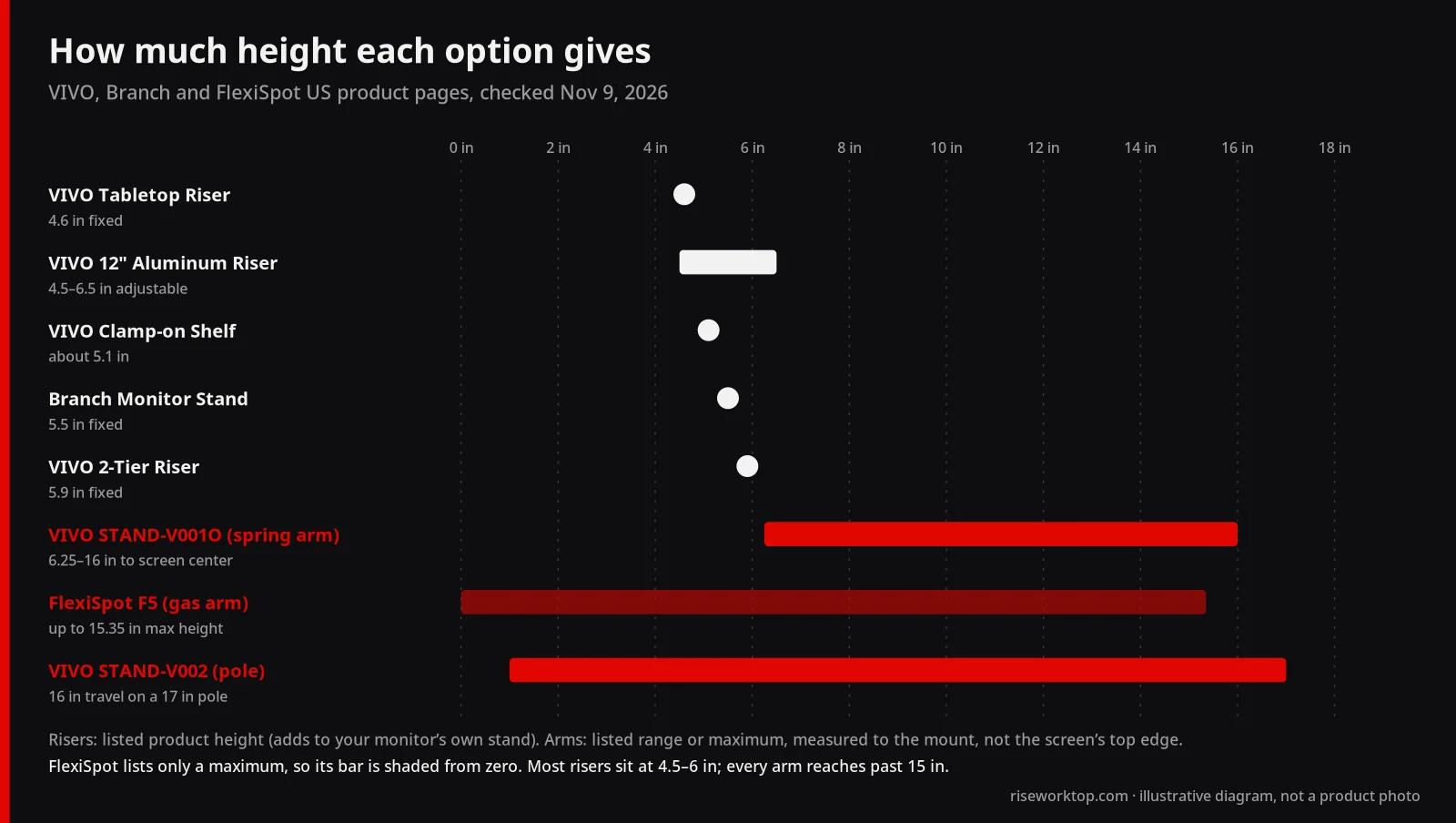
- The lift is fixed. Only VIVO's 12-inch Aluminum Riser adjusts, and only between 4.5 and 6.5 inches. If you need 9 inches, a riser isn't the answer. Don't stack them.
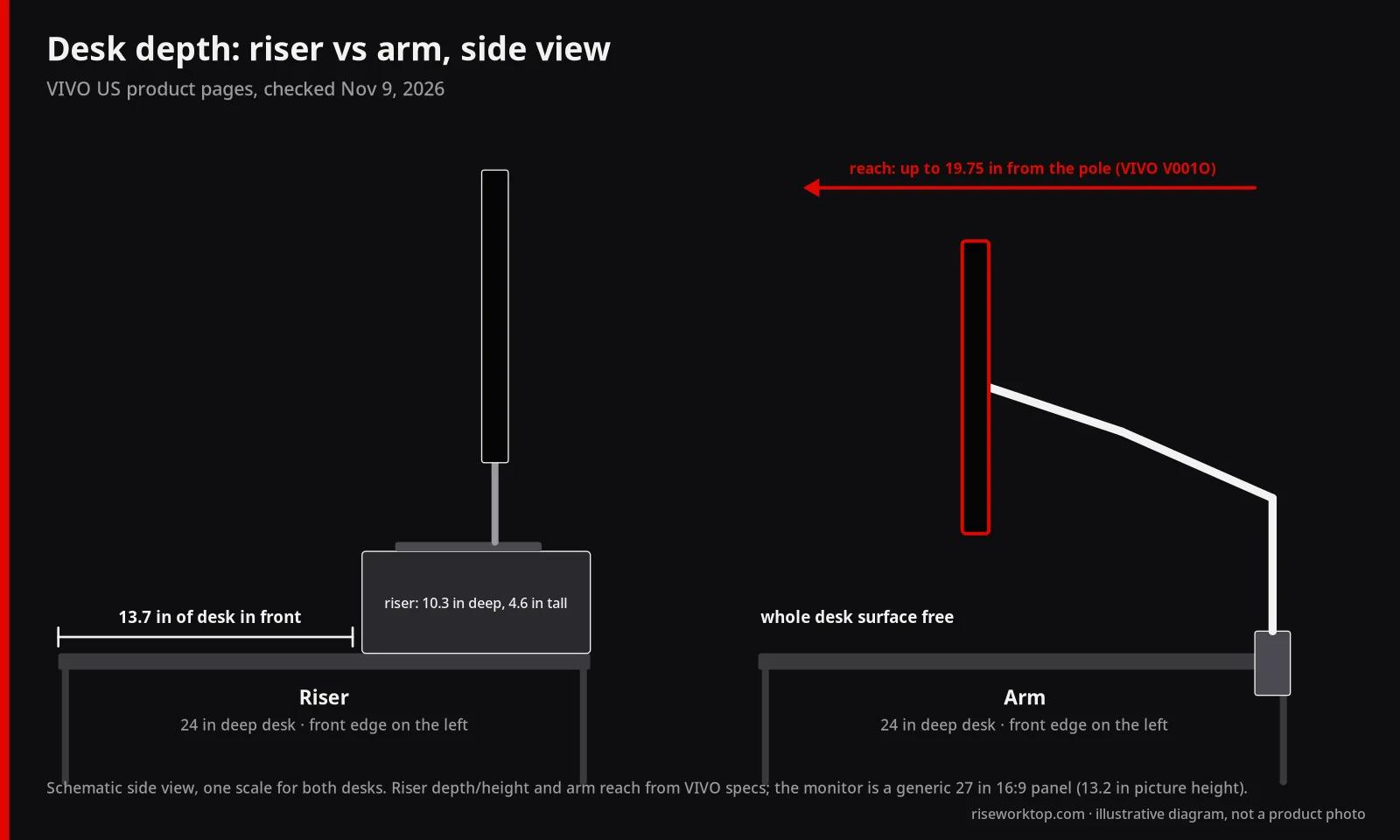
- It eats a strip of desk. VIVO's tabletop riser is 10.3 inches deep, its 2-tier riser 10.8 inches, Branch's stand 8 inches. The monitor's own stand still sits on top of that.
- The screen can't come forward. It stays wherever the riser sits. On a deep desk that can leave the screen past OSHA's 40-inch outer limit; on a shallow one it can be too close.
The upside of that strip is storage. Branch's Monitor Stand has a second tier underneath, and VIVO's clamp-on shelf raises the screen about 5.1 inches with space below it. If your keyboard needs somewhere to go at the end of the day, a riser gives it a garage.
What an arm does better, and the three checks it makes you pass
An arm earns its price in three situations:
- You need more than about 6.5 inches of lift. VIVO's spring-arm V001O moves the screen center between 6.25 and 16 inches above the desk. FlexiSpot's F5 lists a 15.35-inch maximum height. VIVO's pole mounts give 16 inches of travel along a 17-inch pole. No riser comes close.
- You want desk depth back. An arm's footprint is its clamp. The screen floats, and you can pull it forward (up to 19.75 inches of extension on the V001O, 19.69 on the F5, 16 on the V001) or push it back toward the wall. On a 24-inch-deep desk, that's the difference between a cramped keyboard and a usable one. See our desk depth guide for dual monitors for the numbers.
- You have two screens to line up. A riser lifts both screens by the same amount, so if one sits higher on its own stand, it stays higher. VIVO's dual STAND-V002 lets each VESA plate move up or down 0.5 inch for exact alignment, and both arms move independently along the pole.
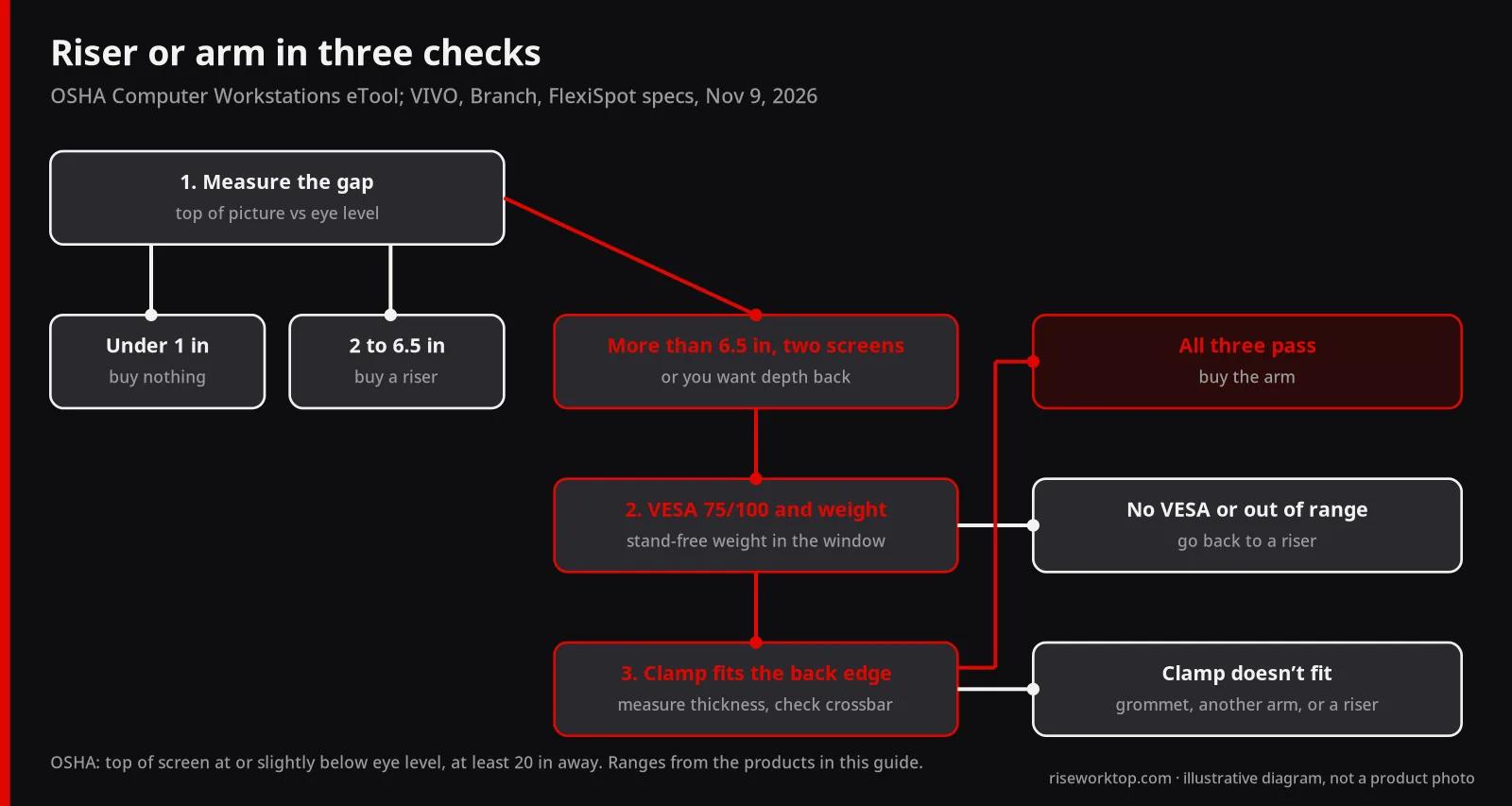
Now the three checks. Fail any one and the arm doesn't belong on your desk.
Check 1: VESA holes and pattern
All five arms here list 75 × 75 and 100 × 100 mm. If the back of your monitor has no holes, or a 200 × 100 pattern, stop. An adapter plate is possible, but it's another part with its own weight rating. Our dual monitor arm guide goes through VESA patterns in detail.
Check 2: weight, without the stand
Use the monitor weight without its stand, from the monitor's spec sheet. For the VESA-mount Studio Display, Apple lists 11.9 lb, which lands inside the F5's 11 to 13 lb factory calibration. A 20-plus-pound monitor rules out the V001O and the F5 and leaves Branch's arm (44 lb) or a riser.
Check 3: the desktop has to fit the clamp
This is the check I'd worry about most, because it's the one people find out about on install day.
- Branch Monitor Arm: clamp 0.5 to 2 inches.
- FlexiSpot F5 / F5D: clamp 0.79 to 2.36 inches; grommet 0.79 to 3.15 inches.
- VIVO STAND-V001O: clamp 0.4 to 3.1 inches; grommet 0.4 to 1.9 inches.
- VIVO STAND-V001 and V002: maximum 3.25 inches (no minimum listed).
- Branch Monitor Stand (a clamp-on riser): 0.75 to 2.35 inches.
- VIVO Clamp-on Monitor Riser Shelf: maximum 1.2 inches.
Now put two real desktops against that list. Autonomous lists the Desk Core top at 0.7 inches thick. That's below the F5's 0.79-inch clamp minimum and the Branch Monitor Stand's 0.75-inch minimum. On paper, neither is in spec on that desk. The Autonomous Desk 2 top is listed at 1 inch, which fits every clamp here.
Thin tops show up even on name-brand desks, so measure yours with a ruler at the back edge, where the clamp actually goes, before you order. Also check for a frame crossbar or cable tray under that edge; a clamp needs a clear patch of underside.
Standing desks: both go up with you
A common belief is that you need an arm if you have a standing desk. You don't. A riser sits on the desktop and an arm clamps to it, so both rise with the top. If you set the desk to elbow height sitting and standing, your eyes end up in roughly the same spot relative to the keyboard both times, and a fixed riser can be right for both.
Where the arm helps on a sit-stand desk is fine-tuning. Some people want the screen a little lower or further back when standing, and an arm makes that a two-second push. Whether that's worth $40 to $130 more is a personal call; I wouldn't buy an arm for it alone.
Two standing-desk costs people forget:
- Load. Autonomous rates the Desk Core at 176 lb and the Desk 2 at 250 lb. Even Branch's double arm, at 14 lb on its own, plus two monitors at or under a budget arm's 20-lb class, is a fraction of either. Weight isn't the problem.
- Cable slack. An arm's cable has to travel with the arm and the desk. Leave a service loop, as in our cable management guide for standing desks.
Two monitors: where the arm finally pulls ahead
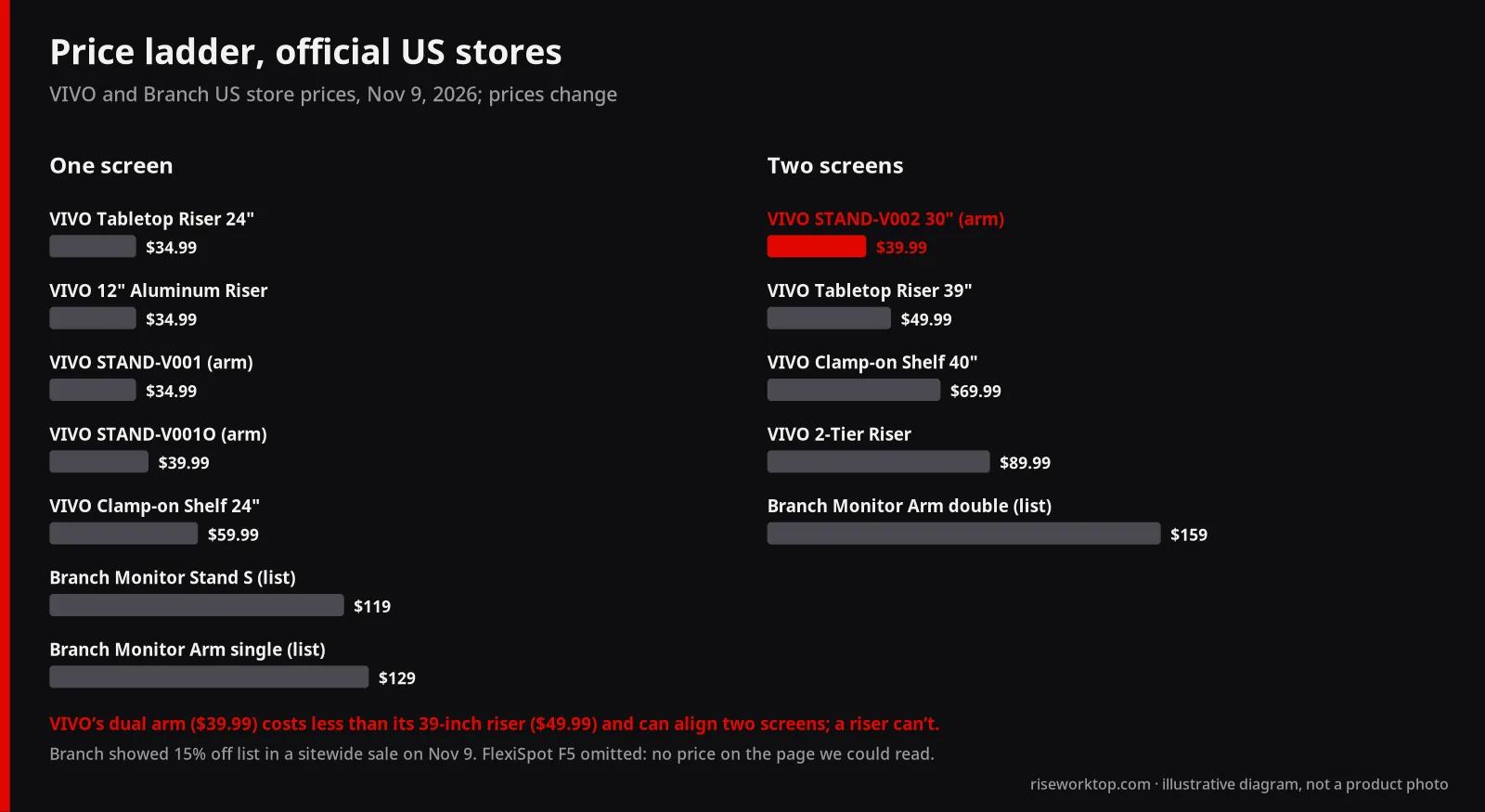
For one screen, I'd default to a riser. For two, I'd lean toward an arm, and the price gap nearly disappears at VIVO's prices.
- Riser route: VIVO's 39-inch Tabletop Riser is $49.99, its 40-inch Clamp-on Shelf is $69.99 (44 lb), and its 2-Tier Premium Riser is $89.99 (41.7 inches wide, 66 lb upper tier). All lift both screens by the same fixed amount.
- Arm route: VIVO's STAND-V002 dual mount is $39.99 for screens up to 30 inches, $49.99 for 32 inches and $69.99 for 38 inches, 22 lb per monitor. Branch's double arm is $159 list. FlexiSpot's F5D is the dual version of the F5 with the same per-arm limits.
The VIVO dual arm costs less than the 39-inch riser and solves the alignment problem a riser can't. That's the clearest win for an arm on this page. If you're still deciding between two screens and one wide one, start with ultrawide vs dual monitors first; a single ultrawide often goes back to being a riser question because of weight.
Brand by brand: what I'd actually buy
VIVO: the cheapest answer on both sides
VIVO is the only brand here with a full line of both. For one monitor, I'd start with the Tabletop Monitor Riser (24 inches wide, 4.6 inches tall, 44 lb, $34.99) or the adjustable 12-inch Aluminum Riser ($34.99, 4.5 to 6.5 inches, 33 lb), which is the one to get if you aren't sure of your exact number. If you need an arm, the STAND-V001O ($39.99) is the one I'd pick over the $34.99 pole mount: VIVO describes it as a counterbalance arm with tool-free height adjustment, which the pole mount's listing doesn't claim, and it has the wider clamp range. VIVO lists a 3-year warranty on these pages.
Branch: you're paying for the furniture match
Branch's Monitor Stand ($119 small, $139 large, list) is a clamp-on steel riser with a felt top and a second storage tier, rated 40 lb, 5.5 inches tall. Its Monitor Arm ($129 single, $159 double, list) has the widest monitor range here: 17 to 49 inches, 4.4 to 44 lb. On Nov 9, 2026, Branch's site showed both 15% off in a sitewide sale ($101.15 and $109.65 for the small stand and single arm). Both carry a 2-year warranty. The stand costs more than three VIVO risers. I'd buy it only to match a Branch desk, and only after checking the 0.75-inch clamp minimum. The arm is the one I'd consider on its specs alone, for a heavy screen that rules out the budget arms.
FlexiSpot F5: a solid spec sheet with a clamp catch
FlexiSpot's F5 / F5D lists 17 to 32-inch screens, 4.4 to 19.8 lb, 15.35 inches maximum height and 19.69 inches of extension, with clamp or grommet mounting. Its product page didn't show a price in the version I could read on Nov 9, so check it there. My hesitation is the 0.79-inch minimum clamp thickness, which rules out thin budget tops; if your desktop is thinner than that, the grommet doesn't help (it has the same 0.79-inch minimum), so pick a different arm.
Autonomous: the desk underneath
Autonomous doesn't make the riser or arm in this comparison; its role here is the desktop the riser or arm sits on. The Desk Core ($349 as of Nov 9, 2026) has a 48 × 24-inch, 0.7-inch top, so check clamp minimums; a riser has no such issue. The Desk 2 ($449) has a 53 × 29-inch, 1-inch top that fits every clamp in this guide, and its 29-inch depth gives a riser more room. If you're choosing the desk too, our standing desk under $500 guide compares both with FlexiSpot.
Official spec comparison (as of Nov 9, 2026)
Every value is from the brand's own US product page, checked November 9, 2026. "Lift" for risers is the product's listed height; for arms it's the listed height range or maximum, which is measured to the mount, not to your screen's top edge.
| Product | Type | Lift / height | Weight capacity | Desktop fit | VESA | Price (Nov 9, 2026) | Warranty |
|---|---|---|---|---|---|---|---|
| VIVO Tabletop Monitor Riser (24 in) | Riser | 4.6 in fixed; 23.8 × 10.3 in top | 44 lb | Sits on desk | Not needed | $34.99 | 3 years |
| VIVO 12" Aluminum Monitor Riser | Riser | 4.5–6.5 in adjustable; 12 × 8 in top | 33 lb | Sits on desk | Not needed | $34.99 | 3 years |
| VIVO 2-Tier Premium Monitor Riser | Riser | 5.9 in; 41.7 × 10.8 in | 66 lb upper, 22 lb lower | Sits on desk | Not needed | $89.99 (black) | 3 years |
| VIVO Clamp-on Monitor Riser Shelf | Clamp-on riser | about 5.1 in; 25.8 or 39.4 in wide | 44 lb | Clamp, up to 1.2 in | Not needed | $59.99 (24 in), $69.99 (40 in) | 3 years |
| Branch Monitor Stand | Clamp-on riser | 5.5 in; 24 or 36 in wide, 8 in deep | 40 lb | Clamp, 0.75–2.35 in | Not needed | $119 small, $139 large (list) | 2 years |
| VIVO STAND-V001 | Pole arm | 17 in pole; 16 in max extension | 22 lb | Clamp, up to 3.25 in | 75, 100 | $34.99 (black) | 3 years |
| VIVO STAND-V001O | Spring arm | 6.25–16 in (screen center); 19.75 in extension | 4.4–19.8 lb | Clamp 0.4–3.1 in; grommet 0.4–1.9 in | 75, 100 | $39.99 (black) | 3 years |
| VIVO STAND-V002 | Dual pole arm | 16 in travel on 17 in pole | 22 lb per monitor | Clamp or grommet, up to 3.25 in | 75, 100 | $39.99 (30 in), $49.99 (32 in), $69.99 (38 in) | 3 years |
| FlexiSpot F5 / F5D | Gas-spring arm | up to 15.35 in; 19.69 in extension | 4.4–19.8 lb (per arm) | Clamp 0.79–2.36 in; grommet 0.79–3.15 in | 75, 100 | Not shown on page we read | Not listed for arms |
| Branch Monitor Arm | Arm, single or double | not listed; tilt ±90°, rotation ±180° | 4.4–44 lb | Clamp 0.5–2 in (grommet included) | 75, 100 | $129 single, $159 double (list) | 2 years |
FlexiSpot's F5 page says the arm is factory-calibrated for 11 to 13 lb monitors. VIVO's dual mount lists 22 lb per monitor and an arm span of 29 to 39.5 inches depending on size.
Mistakes I'd avoid
- Buying an arm to fix a 4-inch problem. That's a riser's job, and the arm brings three compatibility checks with it.
- Using the monitor's weight with the stand. The arm carries the panel without its stand. Use the "without stand" number.
- Ignoring the minimum weight. A light 22- or 24-inch panel can sit below a spring arm's 4.4 lb floor or far below FlexiSpot's 11 to 13 lb factory setting, and the arm may not hold its height until you adjust the tension.
- Measuring the desk at the front. Clamps go at the back edge. Measure there, and look underneath for a crossbar or tray.
- Raising the screen to eye-center height. OSHA puts the top of the screen at or slightly below eye level, not the middle. Too high is as bad as too low. A riser that overshoots by two inches is worse than none.
- Forgetting the light bar. If you use a clip-on monitor light bar, it rides on the top edge either way; just route its cable with the monitor cable. Our desk lamp vs monitor light bar guide covers which one helps more.
FAQ
Is a monitor riser or a monitor arm better for neck pain?
Whichever puts the top of the screen at or slightly below eye level, as OSHA recommends. If you need 2 to 6 inches of lift, a riser such as VIVO's $34.99 Tabletop Monitor Riser (4.6 inches) does it as well as an arm. You need an arm only if the gap is bigger than a riser's fixed height or you need to move the screen often.
Do I need a monitor arm with a standing desk?
No. A riser sits on the desktop and an arm clamps to it, so both move with the desk. An arm only helps if you want a different screen position sitting and standing. On thin tops, check the clamp: the Autonomous Desk Core top is 0.7 inch, below the FlexiSpot F5's 0.79-inch clamp minimum.
Can I use a monitor arm if my monitor has no VESA holes?
Not without an adapter. Every arm in this guide lists VESA 75 × 75 or 100 × 100 mm only. Apple's Studio Display, for example, has VESA only in its VESA-mount configuration; the standard tilt-only stand version has no VESA mount and no height adjustment, so a riser is the simple fix.
How much does a monitor riser raise the screen?
Between about 4.5 and 6 inches for the models here: 4.6 inches for VIVO's Tabletop Riser, 4.5 to 6.5 inches for its adjustable aluminum riser, 5.1 inches for VIVO's clamp-on shelf, 5.5 inches for Branch's Monitor Stand and 5.9 inches for VIVO's 2-tier riser, per each maker's page on Nov 9, 2026.
Is a monitor arm worth it for one monitor?
Only if you need more than about 6.5 inches of lift, want desk depth back, or move the screen a lot. VIVO's spring arm STAND-V001O ($39.99) covers 6.25 to 16 inches to screen center, which no riser can. For a fixed 4 to 6-inch gap, a $34.99 riser is the better buy.
Will a monitor arm clamp fit my desk?
Check the top's thickness at the back edge against the arm's range. Branch's arm takes 0.5 to 2 inches, FlexiSpot's F5 0.79 to 2.36, VIVO's V001O 0.4 to 3.1, and VIVO's pole mounts up to 3.25 inches. Also check for a crossbar or cable tray under the edge.
Sources
- VIVO product pages, checked Nov 9, 2026: Tabletop Monitor Riser, 12" Aluminum Monitor Riser, 2-Tier Premium Monitor Riser, Clamp-on Monitor Riser Shelf, STAND-V001, STAND-V001O, STAND-V002
- Branch product pages, checked Nov 9, 2026: Monitor Stand, Monitor Arm
- FlexiSpot, Monitor Mount F5/F5D, checked Nov 9, 2026
- Autonomous, Desk Core and Desk 2 product pages, checked Nov 9, 2026
- Apple, Studio Display technical specifications, checked Nov 9, 2026
- OSHA, Computer Workstations eTool: Monitors
- Desk heights from our desk height calculator; more tools on /setups/
If it were my money
One monitor, a gap of 4 to 6 inches: VIVO's $34.99 riser, and I'd spend the difference on a better keyboard. A gap I can't measure with confidence: the adjustable aluminum riser. More than 6.5 inches, a shallow desk or two screens: an arm, after checking VESA, weight and the clamp range against my actual desktop. The arm is the nicer object. The riser is the right answer more often than the internet suggests.