
For dual monitors in a US home office, desk depth often matters more than width. A 24-inch-deep desk fits tight rooms and works well when monitor arms push screens to the back edge; a 30-inch-deep desk gives more natural viewing distance for dual 27-inch displays or an ultrawide, plus keyboard and notebook space. Neither depth is “OSHA-approved” by default — treat the numbers below as planning notes, and follow employer rules only when they apply.
Use this with the desk size chart, the monitors topic hub, and our dual monitor arm guide.
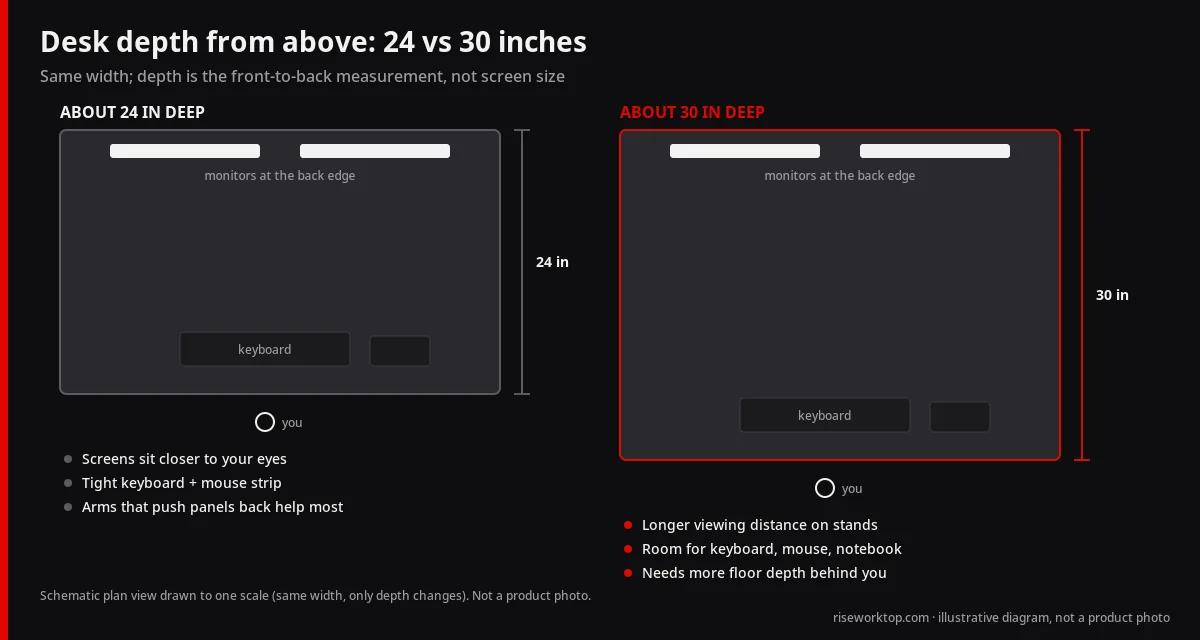 Plan view: same width, different depth — monitors at the back edge with eye-to-screen distance marked. — RiseWorktop diagram (original)
24 vs 30 decision table
| Factor | About 24 in deep | About 30 in deep |
|---|---|---|
| Best room fit | Studios, narrow walls, limited walkway | Dedicated offices with floor depth to spare |
| Dual 27s on stands (no arms) | Often too close; cramped keyboard zone | More comfortable viewing distance |
| Dual 24–27s on arms | Common, workable layout | Extra ease; arms still help |
| Ultrawide 34 in class | Tight unless arms pull the panel back | Usually more natural |
| Keyboard + large mousepad | Competing for front edge | More generous |
| Document stand / dock / mic | Easy to crowd | Easier to park beside keyboard |
| Standing-desk frames | Wider frame selection at shallow depths | Confirm knee clearance and crossbar |
| Walkway behind chair | Easier to protect | Needs more room depth |
What 24 inches of depth buys you
A 24-inch-deep desk fits tight rooms and many standing-desk frames.
Strengths:
- Fits studio apartments and narrow walls
- Easier walkway clearance behind your chair
- Works well when monitor arms push screens toward the back edge
Limits without arms:
- Two 27-inch displays can sit too close
- Less room for a full-size keyboard plus a generous mouse pad
- Document stands and mic bases compete for the same real estate
With arms that retract toward the rear, many people run dual 24–27 inch setups successfully on 24-inch depth — especially if the chair tucks fully under the desk. For apartment-scale desks overall, see the standing desk buying guide for small apartments.
When 30 inches is worth it
Thirty inches of depth gives a more natural viewing distance for dual 27s or a single ultrawide, plus room for a notebook, dock, or document stand.
Choose 30 inches when:
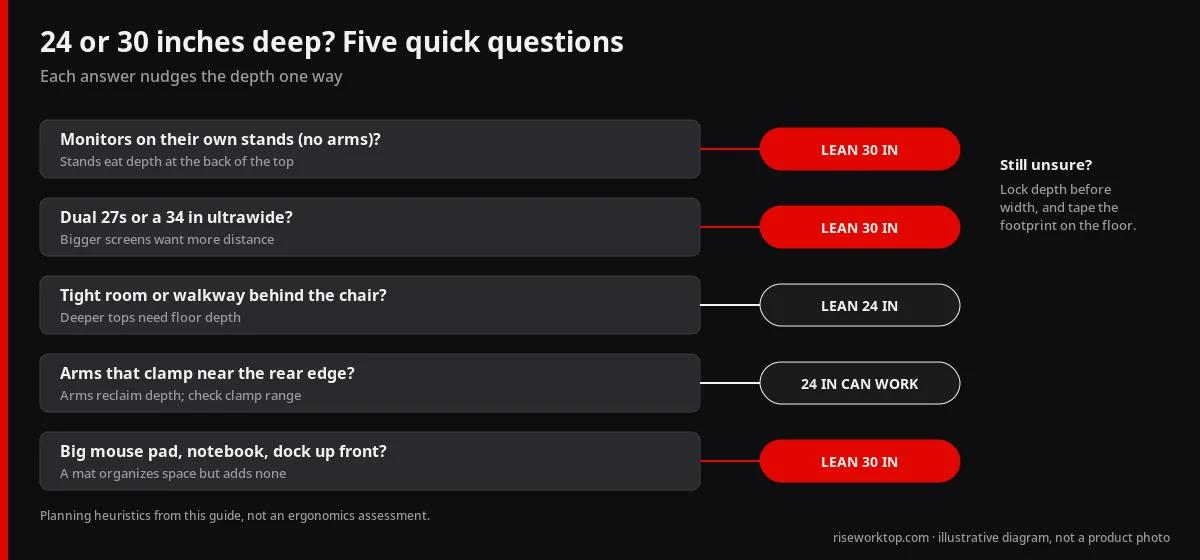
- You keep monitors on stands (no arms) and need distance
- You use a desktop tower dock, audio interface, or large mousepad
- You dislike keyboards hanging off the front edge
- Your room already has the walkway clearance
Trade-offs:
- Deeper tops need more floor depth
- Standing-desk frames must clear knees; check crossbar placement
- Heavier tops may push you toward stronger (often dual-motor) frames — see how to choose a standing desk
Viewing distance and eye comfort (practical, not clinical)
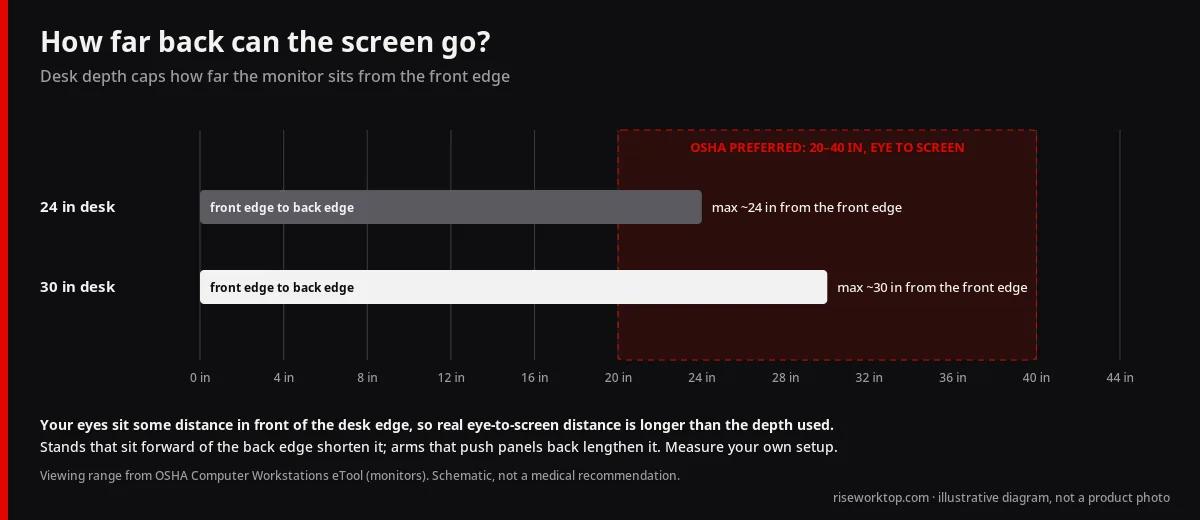
A simple starting point: OSHA’s monitor guidance gives a preferred viewing distance of 20–40 inches (50–100 cm) from your eyes to the front of the screen, then adjust. Dual monitors that sit too close encourage constant head turning and a hunched neck. Depth helps because screens can sit farther back and you can keep the keyboard in a neutral zone without fighting the bezels.
These are planning heuristics, not medical advice and not a substitute for workplace assessments. OSHA and similar agencies publish materials for covered workplaces; a home office buyer still needs personal fit, lighting, and break habits. If you have ongoing neck or eye discomfort, talk with a qualified professional.
For screen size trade-offs, see 24 vs 27 vs 32 inch monitors, plus ultrawide vs dual.
Keyboard, mouse, and front-edge reality
On 24-inch depth without arms, monitor stands take up depth at the back of the desk (measure your stand’s footprint to see how much). That leaves a shallow typing strip. Signs you need more depth or arms:
- Wrists hang off the front edge
- The mouse runs out of pad before your arm is comfortable
- A notebook only fits by overlapping the keyboard
A large desk mat can organize the front zone, but it cannot invent missing inches — see desk mats and large mouse pads.
Standing desks and depth
Shallow standing tops are common in compact kits. Confirm:
- Published top depth (not just frame width)
- Knee clearance at seated height with your chair
- Cable path under a shallow top (trays still need room)
Cable travel guidance: cable management for standing desks. Budget context: home office budget resource.
FAQ
Can a 24-inch-deep desk fit dual 27-inch monitors?
Yes for many people if you use monitor arms that place the screens near the back edge and free the front for keyboard and mouse. On stock stands, dual 27s on a 24-inch-deep top often feel too close. Measure your actual stand depth, or plan arms from the start.
Is 30 inches of desk depth always better for dual monitors?
Not always. Thirty inches is more comfortable for viewing distance and peripherals, but it needs more floor depth and can shrink walkways in small rooms. If space is scarce, 24 inches plus arms is often the better system.
Does OSHA require a 30-inch-deep desk?
No universal “30-inch desk depth” rule applies to every US home office. Treat depth guidance here as planning notes. Follow your employer’s ergonomics policy when you are a covered worker, and use published agency materials as background — not as a product certification for consumer desks.
What depth works with an ultrawide instead of dual monitors?
A 34-inch class ultrawide often feels better on about 30 inches of depth so you are not making large head turns at close range. Arms still help on shallower desks. Compare layouts in ultrawide vs dual monitors.
Should width or depth come first when I measure?
Measure both, but if dual monitors are the goal, lock depth early. Extra width cannot fix screens that sit too close to your eyes. Use the desk size chart to cross-check width × depth pairs.
Do monitor arms change which depth I should buy?
Yes. Arms reclaim depth by moving panels toward the rear edge and can make 24 inches viable. Confirm clamp range, desk thickness, and weight capacity in the dual monitor arm guide.
Bottom line
Pick about 30 inches of desk depth when dual 27s or an ultrawide need natural viewing distance without arms; pick about 24 inches when the room is tight and monitor arms reclaim the rear edge.
Sources
- OSHA computer workstations: monitors: preferred viewing distance of 20–40 in (50–100 cm) from eye to screen; monitor directly in front of you.
- OSHA computer workstations: desks: work surface depth should let you view the monitor at least 20 in (50 cm) away; corners can add depth for large or multiple monitors.