Height is where most small-space buyers go wrong
Product photos almost never show the height range. That's a problem, because the range decides whether the desk works for your body at all. You need two numbers: your elbow height sitting and your elbow height standing. Compare both with the manufacturer's published minimum and maximum.
To measure, sit and then stand with elbows at about 90 degrees and measure from the floor to the underside of your forearm. As rough planning targets (not medical advice), seated desk height often lands around 22–28 inches and standing height around 38–48 inches.
| Your height |
Seated desk surface |
Standing desk surface |
Frame range to look for |
| About 5′0″ |
20–21 in |
about 37 in |
Min ≤ 22 in (or plan a keyboard tray / footrest) |
| About 5′4″ |
23–25 in |
39–40 in |
About 23–44 in |
| About 5′9″ |
25–27 in |
42–43 in |
About 25–46 in |
| About 6′2″ |
29–30 in |
about 46 in |
Max ≥ 48 in |
Those are rounded planning numbers from ANSUR II elbow-height data (see the desk size chart). For your exact stature, a shoe allowance and a check against OSHA's keyboard windows, use the desk height calculator. Then trust your own elbow measurement over any table, mine included.
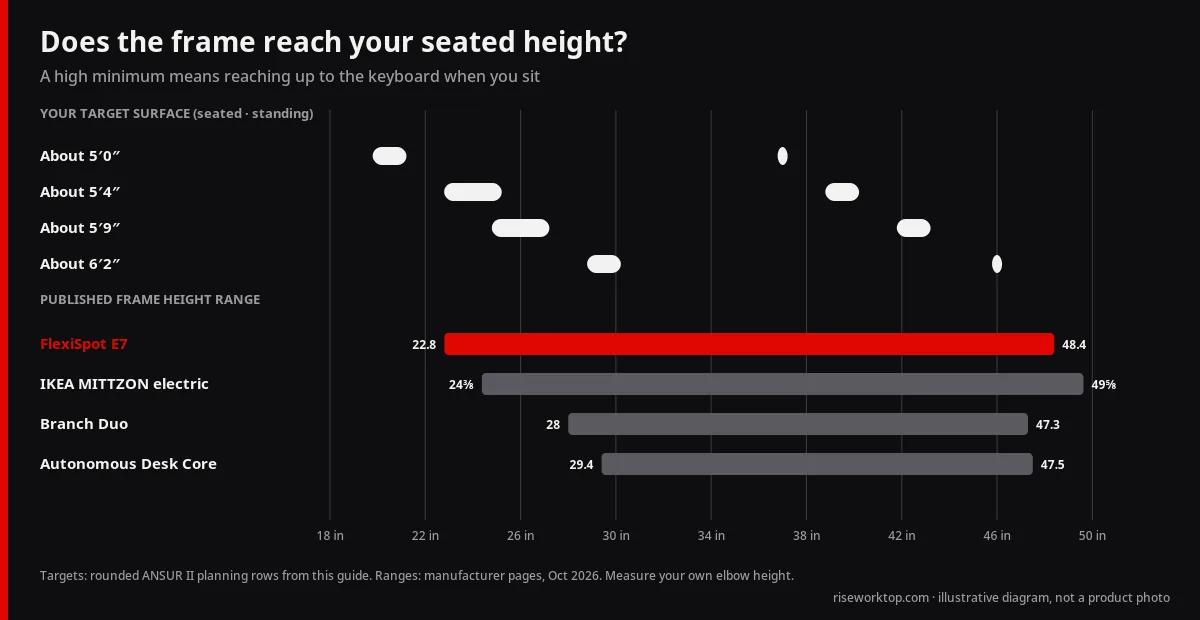
Here's the part I'd underline. A frame with a 28 in minimum can't reach the seated row for anyone in that table except the 6′2″ one. Most of the table sits lower than 28. If you're not tall, a high minimum isn't a spec quirk. It means you'll still be reaching up to the keyboard when you sit, which is the problem you were trying to fix. Three more checks:
- Is the lowest height still low enough to clear your chair's armrests? Arms that won't tuck under force you to sit too far back.
- Is the maximum high enough if you're tall or stand in thick-soled shoes?
- Does the frame have a crossbar that eats knee room when you're seated?
OSHA's general industry materials apply to covered workplaces. Treat the numbers here as personal fit planning unless your employer sets its own policy.
Measure the wall you can actually use before you open a single product page. Then tape the outline (desk plus chair pull-back) on the floor for a day. If the tape annoys you, the desk will too.
| Measure |
Small-space target |
Why it matters |
| Desk width |
40–48 in (laptop + 1 monitor); 55–60 in for 2 monitors |
Leaves walkway and door swing clear |
| Desk depth |
24 in with a monitor arm; 27–30 in without |
OSHA guidance puts monitors about 20–40 in from your eyes |
| Height range |
Covers your seated and standing elbow height (table above) |
The #1 fit mistake for beginners |
| Weight capacity |
Monitors + arms + dock + PC, with margin |
Overloaded frames wobble and strain motors |
| Clearance |
About 3 ft behind the chair for pull-back |
Taped footprint test for one day |
| Return window |
30+ days |
Test noise and wobble during a real work week |
| Space type |
Typical top |
Notes |
| Tight studio wall |
36–48 × 24 inches |
Laptop plus one monitor; arms help |
| One-bedroom nook |
48–55 × 24–30 inches |
Dual monitors possible with arms |
| Dedicated alcove |
55–60 × 30 inches |
Only if walkways still clear |
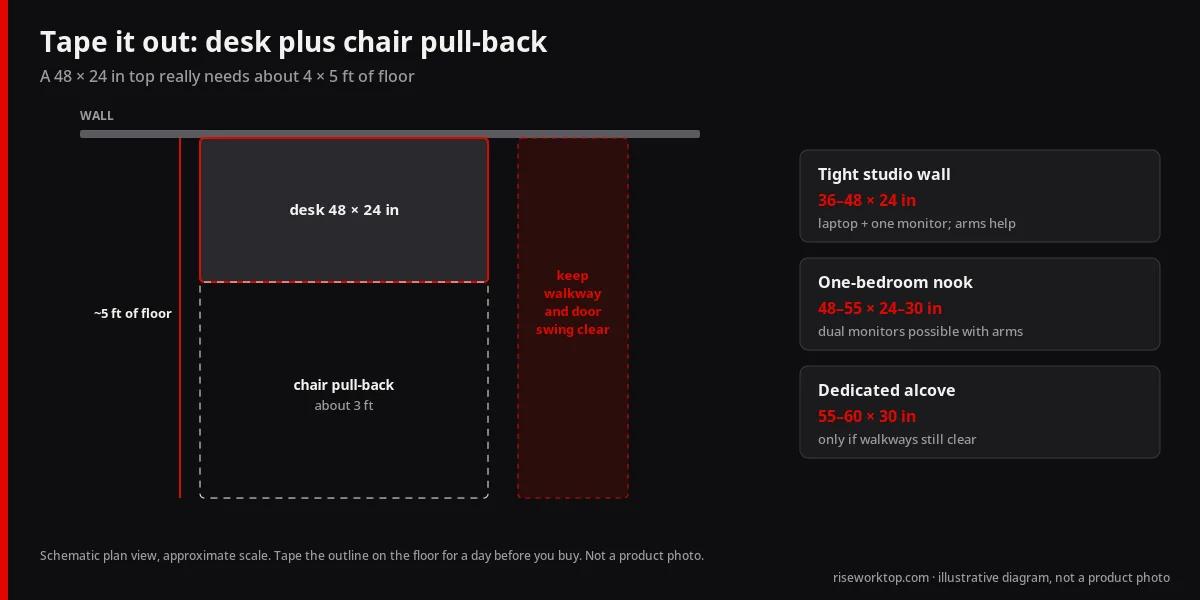
I'd resist the urge to go to 60 inches. Many apartment buyers overshoot there and then regret the blocked path. Start narrower and buy a monitor arm before you add width or depth. The arm gives you more desk than another six inches of laminate will. For the dual-monitor depth trade-off, read 24 vs 30 inch desk depth.
On a 24 in top, a few habits keep the surface usable. Put the monitor on an arm. Keep the laptop on a stand, or store it vertically off to the side. Keep the keyboard close and skip the giant extended mousepad until you know you have room. A slim clamp lamp beats a heavy base lamp. And if you want dual 27-inch monitors with no arms, 24 inches will feel cramped. Buy the arms or accept one bigger screen.
Best standing desks for small apartments (official specs)
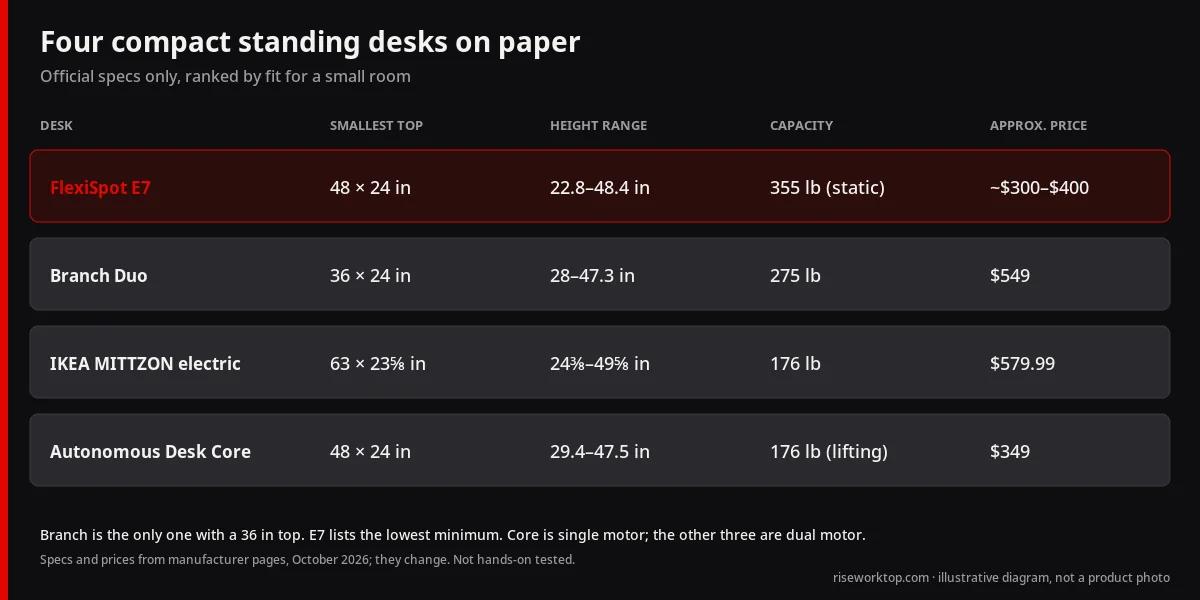
The specs below come from manufacturer pages, not hands-on reviews. Prices were checked in October 2026, and they move.
| Desk |
Smallest top |
Height range |
Capacity |
Approx. price |
| Branch Duo |
36 × 24 in |
28–47.3 in |
275 lb |
$549 |
| IKEA MITTZON electric |
63 × 23⅝ in |
24⅜–49⅝ in |
176 lb |
$579.99 |
| FlexiSpot E7 |
48 × 24 in (laminate) |
22.8–48.4 in |
355 lb |
about $300–$400 |
Read the height column against the table above. A 28 in minimum won't come down to a 23–25 in seated surface for someone around 5′4″. The E7's 22.8 in will.
My ranking, from the spec sheets alone. The FlexiSpot E7 goes first. It lists the lowest minimum, the highest capacity and the lowest price of the three, which is an unusual stack. The caveats are real, though. The price depends on the frame-plus-top bundle you pick. The capacity is listed as a static load, and I'd read that as what the frame holds while it sits still, not what it lifts. I'd want a lifting figure before I treated 355 lb as headroom. The E7 notes here also carry no warranty line, so read that page before you pay.
The Branch Duo is the one I'd pick if a 36 in top matters, because it's the only one of the three that goes that small. It also carries a 10-year warranty on its page. But at $549 with a 28 in minimum, you're paying for a desk that can't sit as low as the E7 does.
The MITTZON is the one I'd skip first. It's the most expensive of the three at $579.99 and lists the lowest load at 176 lb. The version listed here is 63 in wide, which is wider than the 55–60 in ceiling I gave above for small rooms. The 23⅝ in depth is its real selling point. If that matters to you, fine. At this price, I'd buy the E7 first.
Branch Duo Standing Desk
- Approx. US price: $549 (Branch US product page).
- Key specs (per Branch): desktop sizes 36″×24″, 48″×24″, or 58″×27″; height 28″–47.3″ (19.3″ travel); lift capacity 275 lb; dual motors; 2 memory presets; collision detection; operating noise <50 dB; 10-year warranty; BIFMA commercial-grade claim on page.
- Spec source: Branch Duo Standing Desk.
- Not a good fit if… you need a 30″-deep top, more than two height presets for multiple users, or a sit height below 28″ (measure your chair + shoes).
- My take: the "<50 dB" and "commercial-grade" lines are manufacturer claims with no context. I'd note them and not pay extra for them. The warranty is the more useful number.
IKEA MITTZON sit/stand desk (electric), 63×23⅝″
- Approx. US price: $579.99 for the white 63×23⅝″ complete desk on IKEA US.
- Key specs (per IKEA): dual-motor underframe; height 24⅜″–49⅝″; max load 176 lb; depth 23⅝″ (shallow, rental-friendly option); 2 memory settings; collision detection; cable tray / plug-in module; 10-year limited warranty; ANSI/BIFMA testing noted on page.
- Spec source: IKEA MITTZON 63×23⅝″.
- Not a good fit if… your monitors + arms push past 176 lb, you need a deeper surface for dual monitors, or you refuse store pickup / heavy box logistics.
- My take: 176 lb is probably fine for a laptop and one monitor. Dual arms plus a desktop PC would use it up fast. For $579.99, I'd want more.
FlexiSpot E7 with a compact top
- Approx. US price: about $300–$400 depending on frame + top bundle (E7 often listed ~$300–$340 on FlexiSpot).
- Key specs (per FlexiSpot): dual-motor; height 22.8″–48.4″; max static load 355 lb; applicable desktops roughly 47.2″–80″ wide; laminate tops listed including 48″×24″.
- Spec source: FlexiSpot E7.
- Not a good fit if… you need a true 36″-class footprint as a single SKU (Branch Duo's 36×24 is clearer for tiny nooks).
- My take: best on paper for the money. The static-load wording and the missing warranty line are why I'd read the full page before ordering.
Also on paper: Autonomous Desk Core (48 × 24 in)
This one sits outside the three-desk ranking above because it's a different class: a single-motor frame at a lower price.
- Approx. US price: $349 (Autonomous US store, checked October 2026).
- Key specs (per Autonomous): 48″×24″ top; height 29.4″–47.5″ with the top; lifting capacity 176 lb; single motor; noise ≤50 dB; cable tray included; 2-year frame and 1-year top warranty; free 30-day returns.
- Spec source: Autonomous Desk Core (affiliate link; we may earn a commission).
- Not a good fit if… you need a low seated height. The 29.4″ minimum is above the Branch Duo's 28″ and well above the E7's 22.8″, so it suits taller users more than someone around 5′4″.
- My take: 48 × 24 in is exactly the footprint I'd tape out for a small room, and Autonomous lists 176 lb as a lifting capacity, which is the kind of number I said I wanted for the E7. The high minimum height is the catch.
Prices checked Oct 2026; they change. If price is your first filter, see standing desks under about $500.
How to choose a standing desk in 7 steps (buying guide)
If you follow only one order of operations, make it this one:
- Tape the footprint (desk plus chair pull-back) and live with it for a day.
- Pick width and depth from the tables above. Add a monitor arm before you add depth.
- Measure your elbow heights, seated and standing, and compare them with the manufacturer's published min and max. The calculator gives a starting estimate.
- Total your load. Monitors, arms and PC should sit well under the rated capacity.
- Choose single or dual motor by load, and put stability at full height ahead of everything else.
- Plan cables. A power strip that travels with the desk, plus a service loop.
- Read the warranty and the return policy before you pay. Bulky returns are expensive.
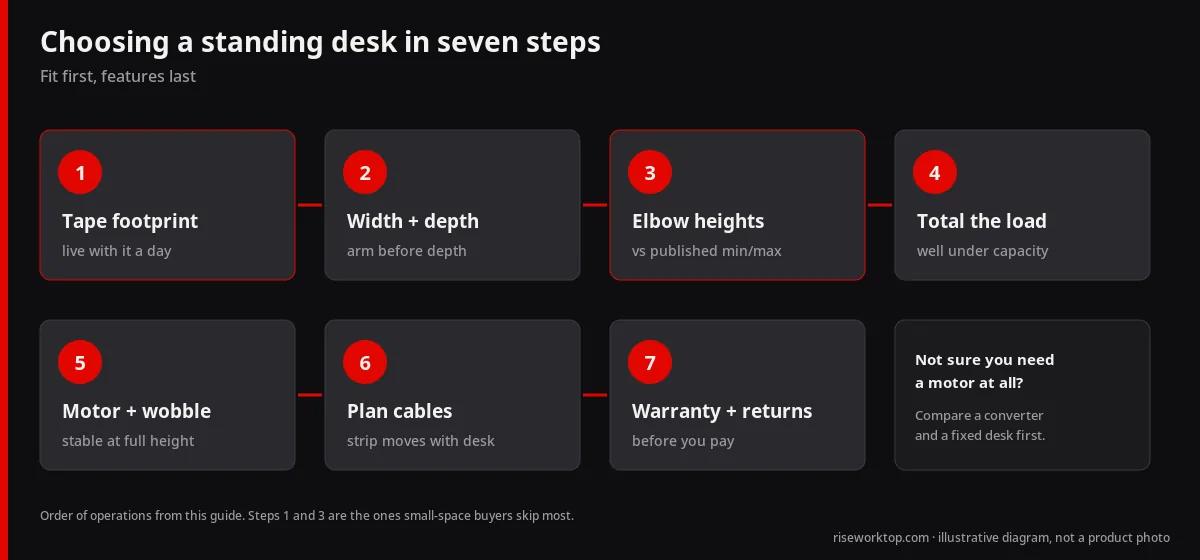
Not sure you need a motor at all? Read sit-stand converter vs standing desk vs fixed desk before you spend anything.
Motors, wobble and what to ignore
Single motor usually means a lower price, and it's fine for lighter tops and simple setups. Dual motor typically lifts more smoothly and copes better with heavy gear such as an ultrawide, dual arms or a desktop PC on the desk. I'd pay for dual if you run arms. For a laptop-only desk, a solid single-motor frame can do the job.
What matters more than motor count is wobble at full height. So I'd rank the questions like this: how rigid is the frame when it's extended, is the weight capacity honest once monitors, arms, speakers and a dock are added up, and is it quiet enough for your walls. A calm, stable lift beats a panel full of presets you'll never use. Presets only earn their place if two people share the desk. If a walking pad will go under it, that full-height test matters twice over, and you'll need several more inches of maximum height; the walking pad desk checklist does the math.
Features worth wanting:
- A compact control panel that doesn't eat the front edge.
- A cable-tray option, or an aftermarket tray that fits your top thickness.
- A lower minimum height if you're shorter, checked against the published range.
- A return policy you can use if the motor is louder than the page implied.
Things I'd avoid: a huge crossbar if your chair has to tuck in tightly, a heavy solid top your frame barely lifts, and a converter stacked on deep furniture that sticks out into the room.
Tops come with their own traps. Laminate / melamine is affordable and easy to clean, but watch for soft edges that crush under a clamp mount. Bamboo / solid wood feels nicer and is often thicker, so confirm the clamp range on any monitor arm. Butcher block is heavy, so confirm frame capacity and lean toward dual motors. Thickness matters for clamps and grommets. The monitor arm guide covers the clamp vs grommet, VESA, weight and desk-thickness checks.
Apartment reality: walls, noise and layout
Five things decide whether a desk works in an apartment. They are footprint, walkways, noise, storage (usually nowhere for a PC tower or printer except under or beside the desk) and the lease (favor clamps over permanent mods where you can). If a desk fails on the first three, it fails the apartment. Full stop.
Noise and neighbors. Apartments amplify lift noise and foot vibration. Run the lift in the daytime after delivery, and use the return window if it's louder than you expected. A soft anti-fatigue mat takes the edge off foot noise (see footrests and anti-fatigue mats). Keep the desk off a shared headboard wall if you can. Soft pads under the frame feet can help on hard floors, but confirm they don't create a tip risk.
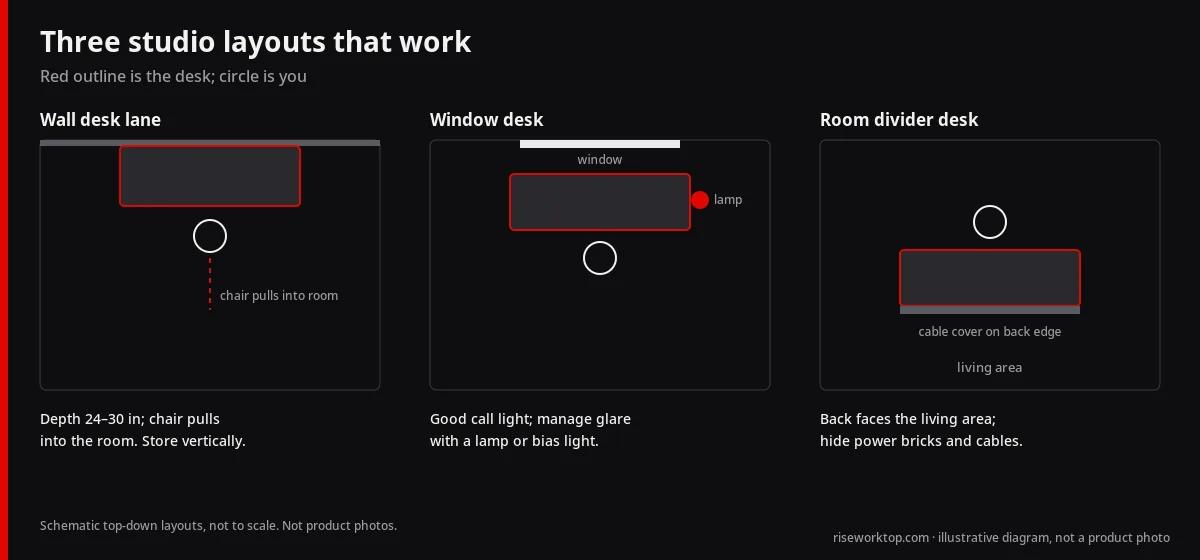
Layouts that work in studios.
- Wall desk lane: desk parallel to the wall, chair pulling into the room. Keep depth at 24–30 inches and store unused items vertically.
- Window desk: great light for calls, but manage the glare. A bias light or lamp keeps camera exposure even.
- Room divider desk: desk back faces the living area. Cable covers on the back edge keep the public side tidy, and a dual-sided shelf can hide power bricks.
Multifunction furniture. Beds with built-in desks, folding wall desks and dining-table hybrids can work for a while. For full-time work, I'd still go with a dedicated sit-stand frame, since it wins on height range and stability. If you have to share the dining table, a sit-stand converter can be a temporary bridge.
Cables: sort them on day one
Standing desks move, and a cable that's snug at seated height will yank at standing height. Mount a power strip or surge protector under the desktop so the outlets travel with the desk and only one cable goes to the wall. Leave a service loop. Bundle the monitor and dock cables into one vertical path. In a rental, pick clamp arms and clamp lamps to limit drilling. Cord covers along the baseboard look cleaner than loose runs across the walkway. More detail in cable management for standing desks.
Six setup habits worth stealing:
- Mount a power strip under the desktop so one cable runs to the wall and nothing yanks when the desk rises.
- Use a clamp monitor arm to free depth on a 24 in top. No drilling in a rental.
- Set screen distance around arm's length (OSHA suggests roughly 20–40 in), with the top of the screen at or slightly below eye level.
- Save sit and stand presets at your measured elbow heights (start from the calculator).
- Add an anti-fatigue mat. It also cuts foot noise for downstairs neighbours.
- Keep the desk off shared bedroom walls and test lift noise during the return window.
What a small-space desk costs
Prices move constantly, so read these as planning ranges, not quotes (US, as of October 2026).
| Band |
What you typically get |
| About $250–$400 |
Entry electric frames or compact kits; check stability and capacity carefully. Under about $300 you are often looking at converters or very basic frames |
| About $400–$700 |
Stronger dual-motor frames, better tops, more usable warranties |
| Above about $700 |
Heavier tops, wider frames, premium warranties; not required for every small office |
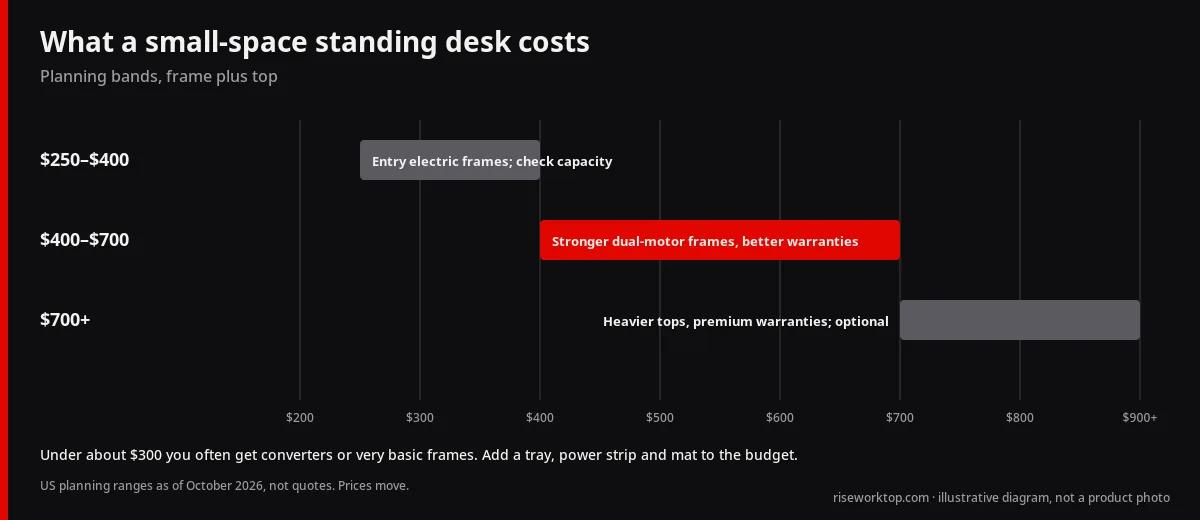
Be wary of anything at the bottom of that table that doesn't publish a capacity and a warranty. A cheap frame with vague numbers is a gamble, and a bulky return costs real money, so I'd only buy from a seller with a clear furniture return policy. Budget for the tray, the power strip and the mat too. In a small space they aren't optional. To build out the rest of the room, use the home office setup checklist and the budget CSV / resource tables.
Before you click buy
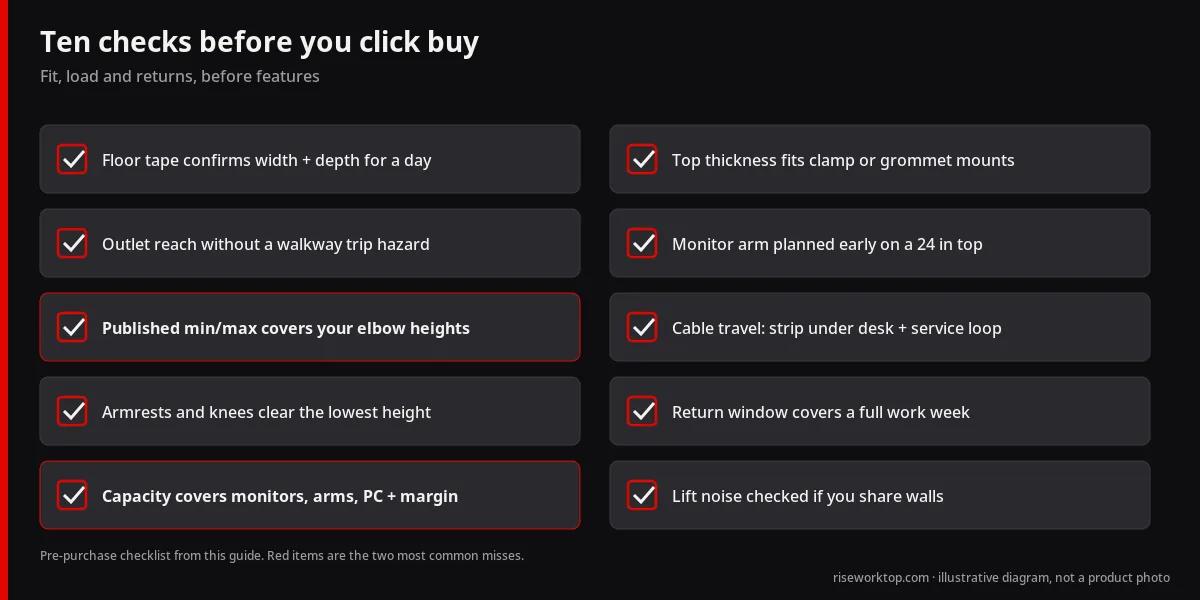
FAQ
How do I choose a standing desk for a small apartment?
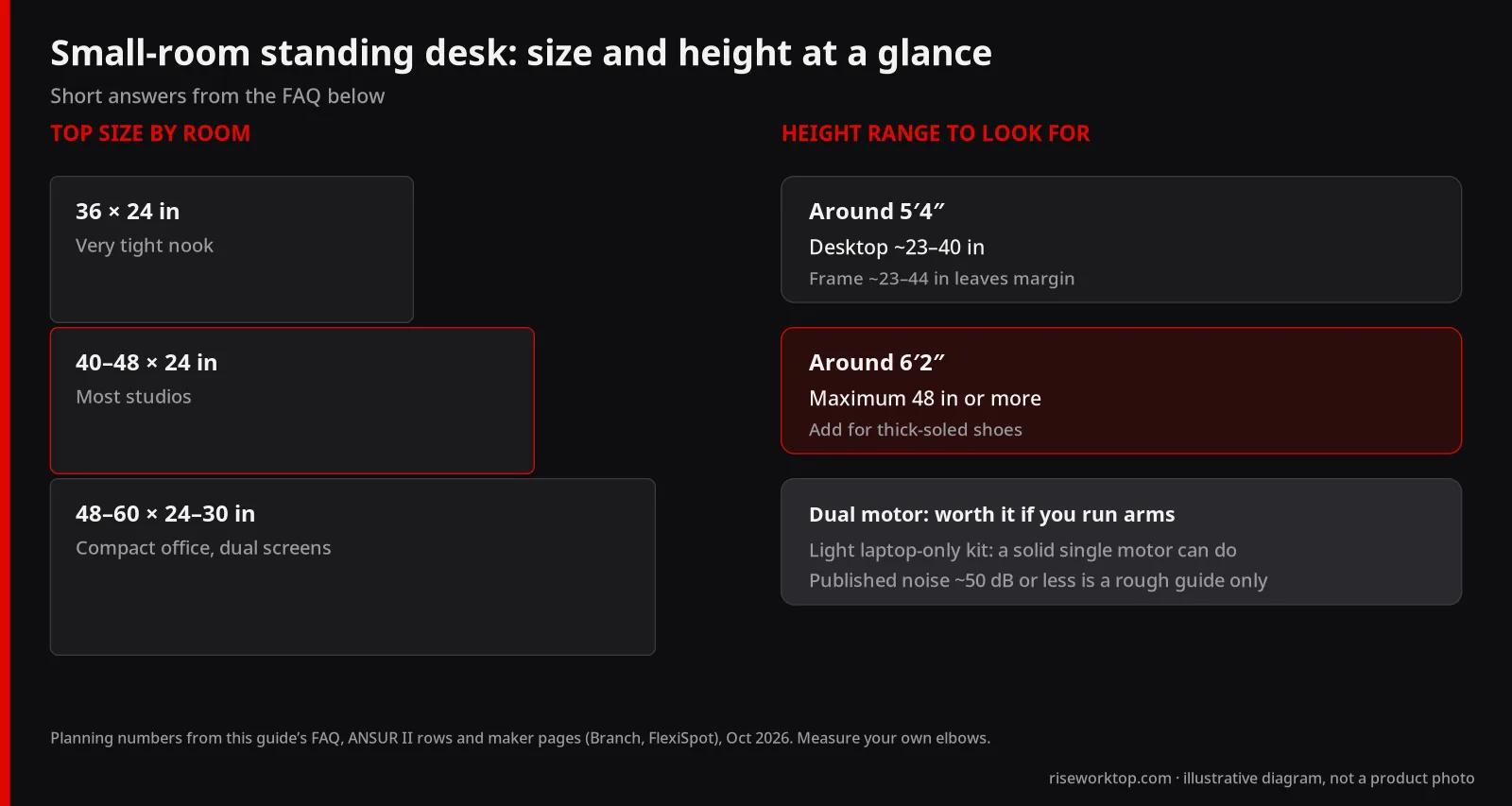
Tape the footprint first. If space is tight, go for a 40–48 in wide, 24 in deep top, then check that the frame's published height range covers your seated and standing elbow height. I'd add a monitor arm rather than extra depth, and I'd read the noise and return policy before buying. For specific compact models, see the official-spec picks above.
What should beginners look for when buying a standing desk?
Five things matter. The footprint has to fit, the height range has to match your body (calculator), the weight capacity needs margin, it should be stable at full height, and the return window should be long enough to test it. Presets, apps and lighting are extras. I wouldn't pay for them first.
What size standing desk is best for a small home office or apartment?
For many compact rooms, a 48–60 inch wide top at 24–30 inches deep is the practical band. In most studios I'd lean toward 40–48 in wide by 24 in deep, and a 36 × 24 in top (like Branch Duo's smallest option) suits a very tight nook. Choose 48 inches if you mostly use a laptop plus one monitor. Go toward 55–60 only if dual monitors, or a dock and notebook pad, need the room and a walkway stays clear.
Do I need a dual-motor standing desk?
Not always. Dual motors usually feel smoother and handle heavier tops and arms better, so I'd pay for them if you're running arms. A light laptop-only kit can work on a solid single-motor frame. Look at the published capacity and the stability at full height before you look at motor marketing.
How tall should my standing desk go?
Match the manufacturer's published range to your seated and standing elbow heights, not to one universal number. Many adults land in the mid-20s inches seated and the high 30s to mid 40s standing, but measure yourself. A user around 5′4″ needs roughly 23–40 in of desktop height (about 23–44 in of frame range leaves margin). Around 6′2″, look for a maximum of 48 in or more. Tall users and thick-soled shoes need extra maximum height.
Is a 24-inch-deep standing desk enough?
Yes for many people, if a monitor arm pushes the screens toward the back edge. Without arms, dual 27-inch displays often feel cramped. See the 24 vs 30 inch depth comparison and the desk size chart before you lock in depth.
Can I put a standing desk in a bedroom or studio apartment?
Yes, if you protect walkways, door swings and sleep. Favor a quieter motor and keep the footprint taped out for a day. Leave enough cable slack that the desk never snags bedding or a closet door. If you can, keep it off a shared bedroom wall.
Are standing desks loud in apartments?
Many electric frames publish operating noise around 50 dB or less (Branch lists under 50 dB for the Duo). I'd treat that number as a rough guide, because a bare dB figure doesn't tell you how it was measured. The lift itself is brief. Vibration carries through floors, though, so use a mat and test within the return window.
Should beginners buy a converter instead of a full standing desk?
A converter is a lower-commitment way to try standing on a desk you already own. A full standing desk usually feels more stable and frees the whole surface. If you're replacing a weak desk anyway, I'd put the money into the full desk. The trade-offs are laid out in sit-stand converter vs standing desk.
Sources
What I'd actually buy
If the room is tight and I wasn't sure about anything else, I'd tape out 48 × 24 inches, check my elbow heights against the E7's 22.8–48.4 in range, and read its warranty and lifting numbers before I ordered. I'd go for the Branch Duo only if I needed that 36 in top. I'd skip the MITTZON at its price. Then I'd spend what's left on a monitor arm, a clamp lamp and a mat. The desk size chart and budget resource have the numbers I'd lean on.
