
We may earn a commission if you buy through links on this page, at no extra cost to you. How we make money
An L-shaped desk gives you more surface in the same wall length; a straight (rectangular) desk is cheaper, easier to move, and simpler to make sit-stand. Choose an L-shaped desk if you have a usable room corner, work across two distinct zones (for example, computer plus paperwork or a second laptop), and can keep about 3 feet of chair clearance behind you. Choose a straight desk if you rent, move often, want an affordable standing desk, or your room has no clean corner.
This is a criteria guide for US home offices, not a ranking of brands we have not tested. Measurements and price bands below are typical market ranges; always confirm the exact product spec sheet. We also include one spec-checked standing L-desk, the Autonomous DuoSpace, using only the manufacturer's published specs.
Quick comparison
| Factor | L-shaped desk | Straight desk |
|---|---|---|
| Usable surface per wall | High — uses the corner | Moderate — one run |
| Room types | Corners, dedicated offices, dens | Almost any wall, apartments, shared rooms |
| Typical sizes | About 55×55 to 72×72 in overall | About 40–72 in wide, 24–30 in deep |
| Sit-stand options | Available, but heavier and pricier | Widest selection at every budget |
| Moving and assembly | Heavier, more parts, awkward stairs | Easier |
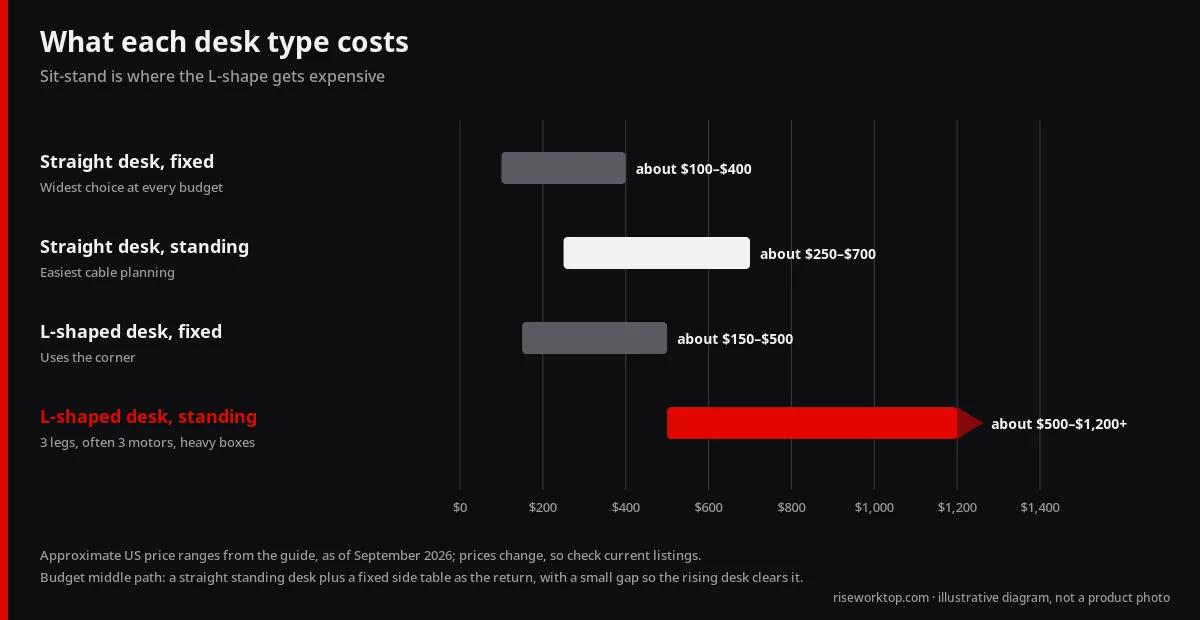
| Approx. price (as of Sep 2026) | Fixed: about $150–$500; standing: about $500–$1,200+ | Fixed: about $100–$400; standing: about $250–$700 |
| Best for | Multi-zone work, lots of gear | Focused screen work, flexibility |
| Spec-checked example (Oct 2026) | Autonomous DuoSpace: 77 × 64 in, 29.4–48 in, 3 motors, 400 lb, reversible return | See our standing desks under $500 |
Start with the room, not the desk
Measure these before shopping:
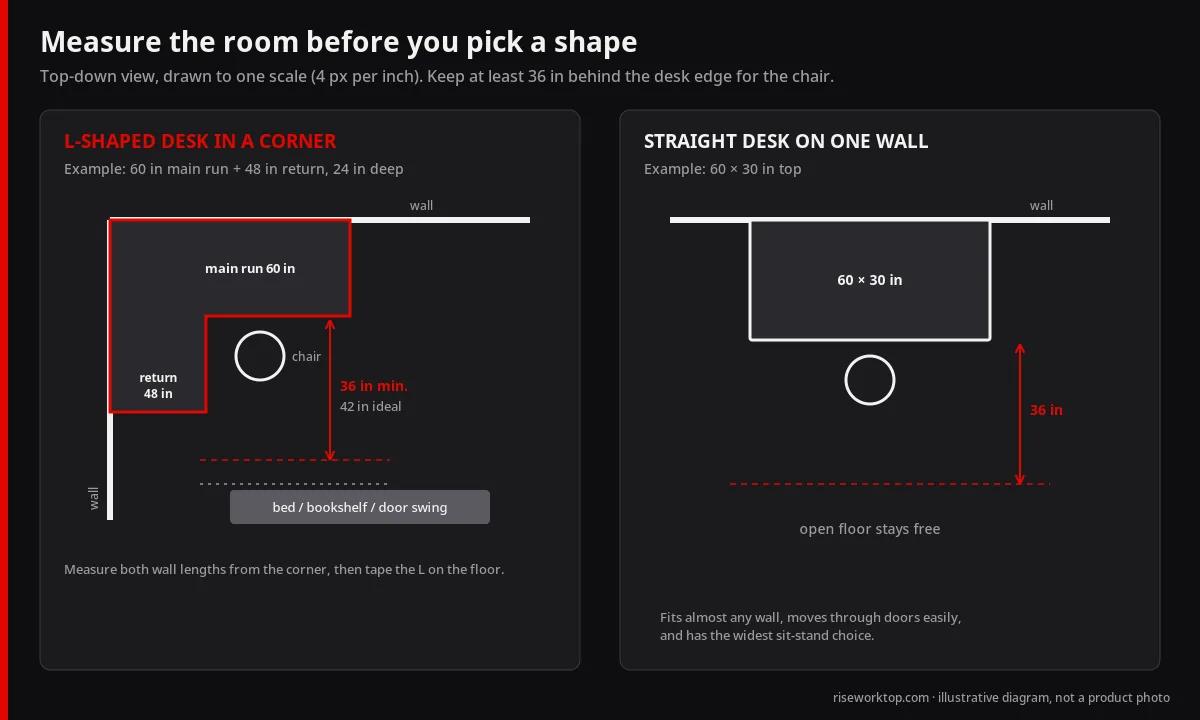
- Both wall lengths from the corner. An L-desk needs two runs — for example, 60 inches along one wall and 48 inches along the other.
- Chair clearance. Plan roughly 36 inches (and ideally closer to 42 inches) from the desk edge to the nearest obstacle behind you, so the chair can roll back without hitting a bed or bookshelf.
- Door swing, closet doors, and windows. A return that blocks a closet door becomes an annoyance within a week.
- Outlets and heat vents. A corner desk can cover the only outlet on a wall; plan cable access.
- Walkway. Leave a comfortable path to the rest of the room.
Tape the footprint on the floor. An L-shape takes more visual space than its numbers suggest, especially in a bedroom office. If you are in a studio or one-bedroom, compare against our standing desk buying guide for small apartments.
When an L-shaped desk is the better choice
- Two work modes. A computer run plus a writing, sewing, drawing, or review surface on the return.
- Two computers. A work laptop on one leg and a personal desktop on the other, without crowding.
- Lots of peripherals. Printer, audio interface, document scanner, or a large drawing tablet.
- You like a “cockpit.” Everything within a swivel of the chair.
- The corner is otherwise wasted space. Many rooms have a corner that is useless for anything but a desk.
A common layout puts the primary monitor on the longer run and uses the return for a laptop, notebook, or reference screen. Putting the monitor diagonally in the corner looks appealing, but it usually needs a deep corner and pushes the keyboard far from the edge — a corner monitor arm can help. See monitor arms: clamp vs grommet and gas-spring basics before drilling or clamping near a corner seam.
When a straight desk is the better choice
- Renting or moving soon. Straight desks move through doorways and up stairs more easily.
- Budget standing desk. Sit-stand straight desks are far more common, so you get more choice for less money.
- Focused single-screen or dual-screen work. A 55–60 inch straight top handles two monitors well if depth is adequate.
- No clean corner. Radiators, windows, or doors in corners make an L-desk awkward.
- Shared room. A straight desk against one wall leaves more open floor.
If dual monitors are the goal, depth matters more than the L-shape. Our 24 vs 30 inch desk depth guide shows why about 30 inches of depth often feels better than extra width.
Sizes and dimensions to know
L-shaped desks
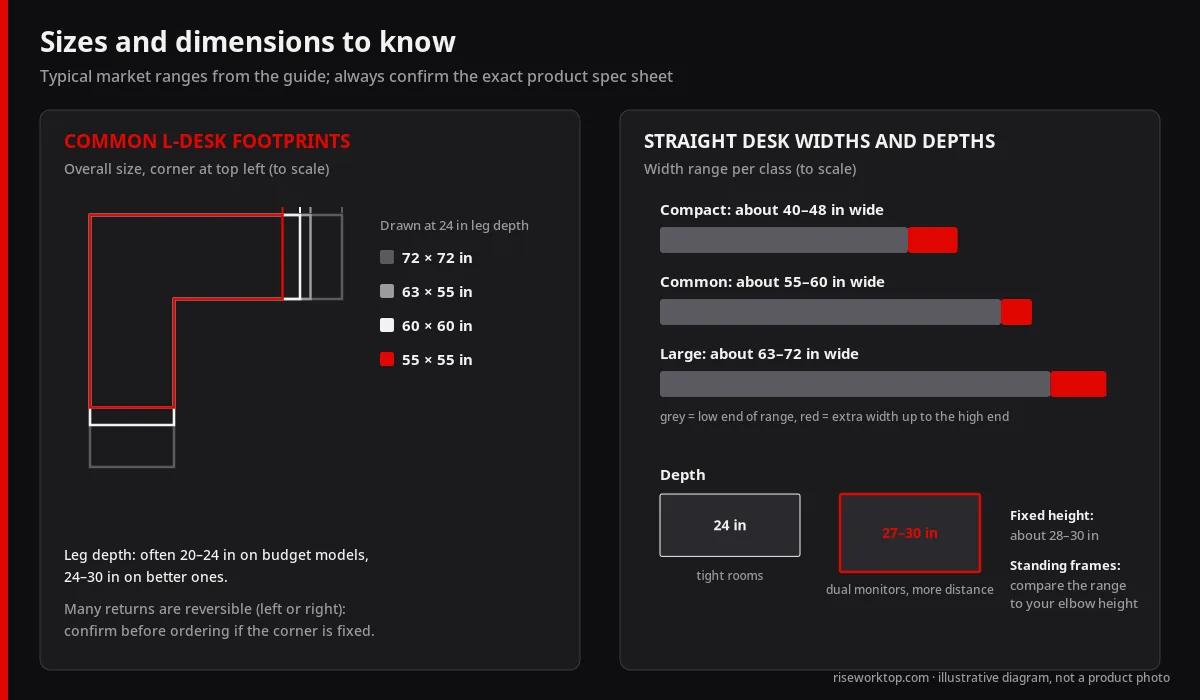
- Common overall footprints: about 55×55, 60×60, 63×55, and 72×72 inches
- Desk depth on each leg: often 20–24 inches on budget models, 24–30 inches on better ones
- Reversible returns: many can be assembled left or right — confirm before ordering if your corner is fixed
- Corner joint: look for a solid connector plate; flimsy corner joins can sag over time
Straight desks
- Widths: about 40–48 inches (compact), 55–60 inches (common), 63–72 inches (large)
- Depths: 24 inches (tight rooms), 27–30 inches (dual monitors, more comfortable viewing distance)
- Height: fixed desks are commonly around 28–30 inches; standing frames list a range, which you should compare against your seated and standing elbow height
Sit-stand considerations
Standing L-shaped desks usually have three legs and often three motors. They can be excellent, but:
- They are heavy — boxes often total well over 100 pounds
- Price is significantly higher than a comparable straight standing desk
- The whole L rises together, so everything on the return moves too
- Assembly takes longer and usually needs two people
Straight standing desks have the widest choice and the easiest cable planning. If you want sit-stand on a budget, a straight desk (or a converter on a fixed L-desk) is the practical route. Our how to choose a standing desk for beginners covers height range, motors, and stability.
A practical middle path is a straight standing desk plus a separate fixed side table placed at a right angle as a “return.” The side table stays at seated height for paperwork or a printer, while the main desk moves. Just leave a small gap so the rising desk never catches the table edge.
Autonomous DuoSpace: a spec-checked standing L-desk
If you have already decided on a standing L-desk, the Autonomous DuoSpace — now listed on Autonomous's product page as the Autonomous Desk 2 L-Shaped — is one candidate worth measuring your corner against. We have not tested it hands-on; everything below comes from the official product page, checked October 31, 2026, when it was listed at $1,149.
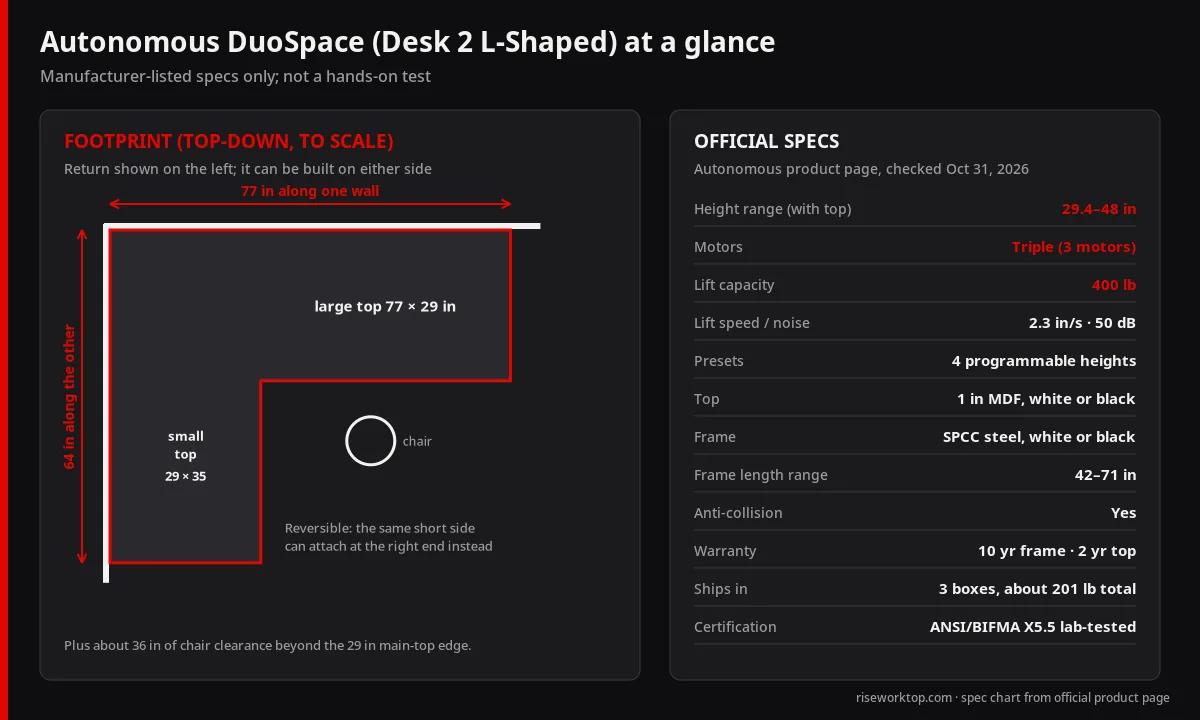
- Footprint: 77 × 64 in overall — a 77 × 29 in main top plus a 29 × 35 in return section, 1-inch MDF
- Return side: reversible; the short side attaches at either end, so one desk covers a left or right corner
- Height range: 29.4–48 in with the top
- Lift: three motors, 400 lb capacity, 2.3 in per second, 50 dB, four presets, anti-collision
- Warranty: 10 years on the frame, 2 years on the top
- Shipping: three boxes, about 201 lb combined — plan for two people
- Spec source: Autonomous DuoSpace product page (affiliate link; we may earn a commission)
Our call: on paper, DuoSpace suits the "cockpit" buyer. Three motors and a 400 lb rating on a 77-inch run are what we want to see before loading an L with three monitors and a tower, and the reversible return removes the left-or-right gamble if you move. The trade-off is commitment: you need about 77 inches of clear wall on one side and 64 on the other before chair clearance, the return always rises with the main top, and roughly 200 lb of boxes is not a casual return. If your corner is smaller than that, or you mainly want a seated-height paperwork surface, the straight standing desk plus side table above is the better buy. Taller users should also confirm that a 48-inch top height reaches their standing elbow height.
Cable management differences
- L-desks hide cables in the corner nicely, but the corner can become a dust-and-cable trap. An under-desk tray on the main run plus clips along the return keeps things reachable.
- Straight standing desks need slack loops so cables travel with the desk. Our cable management for standing desks system applies to both styles.
Stability and build quality checklist
- Steel frame with crossbars or a solid corner plate
- Desktop thickness around 0.7–1 inch (about 18–25 mm) or more on larger spans
- Adjustable leveling feet for uneven floors
- Published weight capacity that comfortably covers monitors, arms, and a desktop PC
- Clear, printed return policy — large furniture returns can cost money or need original packaging
Budget guidance (approximate, as of September 2026)
- Under about $200: basic fixed straight desks and entry-level L-desks; expect thinner tops and more flex
- About $200–$500: sturdier fixed L-desks and budget straight standing desks
- About $500–$1,200+: standing L-desks, thicker tops, better frames and warranties
Spend first on stability and the correct size. A beautiful top on a wobbly frame is a poor trade.
FAQ
Is an L-shaped desk good for a small room?
It can be, if the room has a clean corner and you can keep about 36 inches of chair clearance. In very small bedrooms, a compact straight desk usually leaves more usable floor.
Can I put dual monitors on an L-shaped desk?
Yes. Most people place both on the longer run. Putting monitors across the corner needs a deep corner and often a monitor arm.
Are L-shaped standing desks worth it?
For heavy multi-zone users, they can be. For most people, a straight standing desk is simpler, lighter, and cheaper for similar comfort.
Left-hand or right-hand return?
Put the return on the side where you do secondary tasks — often the side of your writing hand for paperwork. Many desks are reversible, but confirm before ordering.
What size L-shaped desk do I need?
About 55–60 inches on the main run handles a monitor plus laptop; 48 inches or more on the return fits a notebook or second laptop comfortably.
Bottom line
Pick an L-shaped desk when you have a real corner, two kinds of work, and room for your chair to roll. Pick a straight desk for flexibility, easier moves, and the best sit-stand value. Measure both walls, keep clearance behind the chair, and prioritize a stable frame over extra square inches.