
We may earn a commission if you buy through links on this page, at no extra cost to you. How we make money
Most buyers check whether the bottom of a standing desk's range fits them. Put a walking pad under the desk and the problem flips. The bottom barely matters. The top does: you're now standing 4–7 inches above the floor, so the desk has to climb that much further to meet your elbows. Then it has to stay steady while you walk near the end of its travel, which is where telescoping legs are weakest.
This is the desk-side checklist: how high, how wide between the legs, and how stable. It doesn't compare walking pads or dig into noise; those get a line each here.
Research note: AI-assisted research and writing, not hands-on tested. Written by Rhett Varley. No desk or walking pad was set up, walked on or tested for this page. Every call below is a judgment from published specs, list prices and public guidance. Walking pad dimensions come from WalkingPad, UREVO and Egofit product pages, and desk specs from Autonomous, FlexiSpot and UPLIFT Desk pages and spec sheets, all checked on October 26, 2026. Body dimensions are the ANSUR II rows in our desk height calculator (how we research). The Autonomous links on this page are affiliate links (we may earn a commission); the other brand links are not.
Quick answer: the three numbers
- Maximum height: your standing desk height + the walking pad's unfolded height + about 1 in of spare travel. For an average-height woman (5′4″) on a 5 in pad, that's about 45.5 in. For an average-height man (5′9″), it's about 48.6 in, and that rules out a lot of desks that top out around 46–47.5 in.
- Width between the legs: at least the pad's width plus about 6 in, measured between the feet at floor level, not between the columns. Under-desk pads run 19.3–26.5 in wide on the makers' spec sheets, and no desk maker I checked publishes that inner gap. You'll have to measure it or ask.
- Stability: dual motor or better, 3-stage legs, no low crossbar in the pad's path, and a maximum height that leaves you at least an inch short of full extension. A 4-leg frame is the strongest answer if you can fit and afford one.
If your desk misses the first number, nothing else here fixes it. A 5′9″ walker on a desk that stops at 46.5 in types with shrugged shoulders, and I'd rather they skip the pad.
Number 1: how high the desk has to go
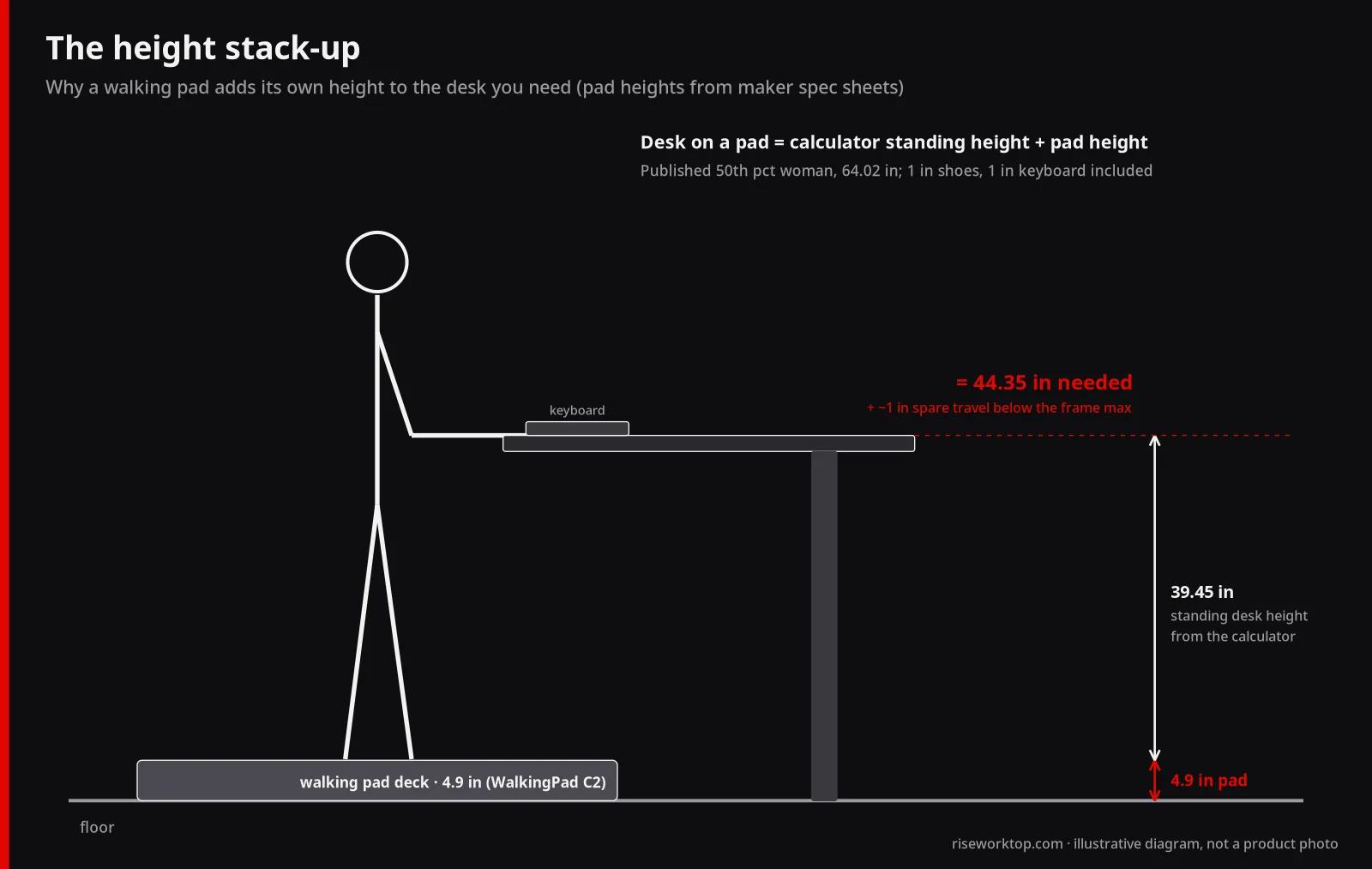
Here's the arithmetic. Your desk height calculator result already assumes shoes (1 in) and a keyboard (1 in thick), so it gives the desk surface height for standing on the floor. On a walking pad, you're standing on the deck instead:
Desk height needed on a pad = standing desk height from the calculator + the pad's unfolded height
Worked example. The calculator's default is the published 50th percentile woman, 64.02 in tall. Her standing elbow height is 39.45 in. Add 1 in for shoes and take off 1 in for the keyboard, and the standing desk height stays at 39.45 in. Put her on a WalkingPad C2, which WalkingPad lists at 4.9 in tall unfolded, and the desk has to reach 39.45 + 4.9 = 44.35 in. On a UREVO SpaceWalk 5L (6.1 in), it's 45.55 in.
Three details change that number in practice:
- The listed height is usually the tallest point, often the motor cover. The belt may sit a little lower, so the listed figure builds in a small margin. Use it anyway; you can't measure the belt before you buy.
- Incline adds height. UREVO's SpaceWalk 5L goes to 9% and the CyberPad for Office to 14%; Egofit's Walker Pro M1 has a fixed 5% incline. UREVO's own page says a flat or low-incline setting is "generally more comfortable for typing." Plan the desk for flat.
- A mat under the pad adds its thickness. If you put a treadmill mat underneath, measure it and add it to the stack.
There's one trap in the ergonomics guidance. OSHA's standing keyboard window of about 36–46.5 in assumes you're standing on the floor. On a pad, the right keyboard height is the same distance above the deck, so a desk at 48 in isn't "too high" if you're standing 6 in up. The rule is elbows at keyboard height, not a fixed number off the floor.
Here's the same math across the four published body rows the calculator uses, for the thinnest and thickest pads in the spec table below:
| Published body row | Standing desk on the floor | + 4.1 in pad (WalkingPad Z1) | + 5.0 in pad (WalkingPad A1 Pro) | + 6.1 in pad (WalkingPad R3, UREVO 5L) | + 6.9 in pad (Egofit M1) |
|---|---|---|---|---|---|
| 5th percentile women, 5′0″ | 36.69 in | 40.79 in | 41.69 in | 42.79 in | 43.58 in |
| 50th percentile women, 5′4″ | 39.45 in | 43.55 in | 44.45 in | 45.55 in | 46.34 in |
| 50th percentile men, 5′9″ | 42.64 in | 46.74 in | 47.64 in | 48.74 in | 49.53 in |
| 95th percentile men, 6′2″ | 45.94 in | 50.04 in | 50.94 in | 52.04 in | 52.83 in |
These figures include 1 in for shoes and assume a 1 in keyboard; the pad heights are the makers' unfolded heights. Then add your spare inch.
The walking pad side: heights and widths from the makers
You only need two numbers from the pad for desk fit: unfolded height and unfolded width. Length matters for the floor, which I'll get to. I'm not ranking these machines here; that's what our under-desk walking pad comparison is for. This table is just what each maker publishes, checked October 26, 2026:
| Walking pad | Unfolded L × W × H | Max user weight (maker) | Speed range | Incline |
|---|---|---|---|---|
| WalkingPad Z1 | 56.1 × 22 × 4.1 in | 242 lb | 1–4 mph | Not listed |
| UREVO SpaceWalk E1L | 42.1 × 19.3 × 4.2 in | 265 lb | 0.6–4.0 mph | Not listed |
| WalkingPad C2 | 56.9 × 20.4 × 4.9 in | 220 lb | 1–4 mph | Not listed |
| WalkingPad A1 Pro | 56.5 × 21.5 × 5 in | 230 lb or 300 lb version | 0.5–3.75 mph | Not listed |
| WalkingPad R3 | 57.8 × 26.5 × 6.1 in | 330 lb / 265 lb (both listed) | 1–4 mph | Not listed |
| UREVO SpaceWalk 5L | 48.8 × 20.3 × 6.1 in | 400 lb | 0.6–4.0 mph | Up to 9% |
| UREVO CyberPad for Office | 42.9 × 22.8 × 6.3 in | 400 lb | 0.6–4.0 mph | Up to 14% |
| UREVO SpaceWalk 3S | 51.6 × 22.1 × 6.5 in | 265 lb | 0.6–4.0 mph | Not listed |
| Egofit Walker Pro M1 | 38.39 × 21.85 × 6.89 in | 220 lb | 0.62–3.11 mph | Fixed 5% |
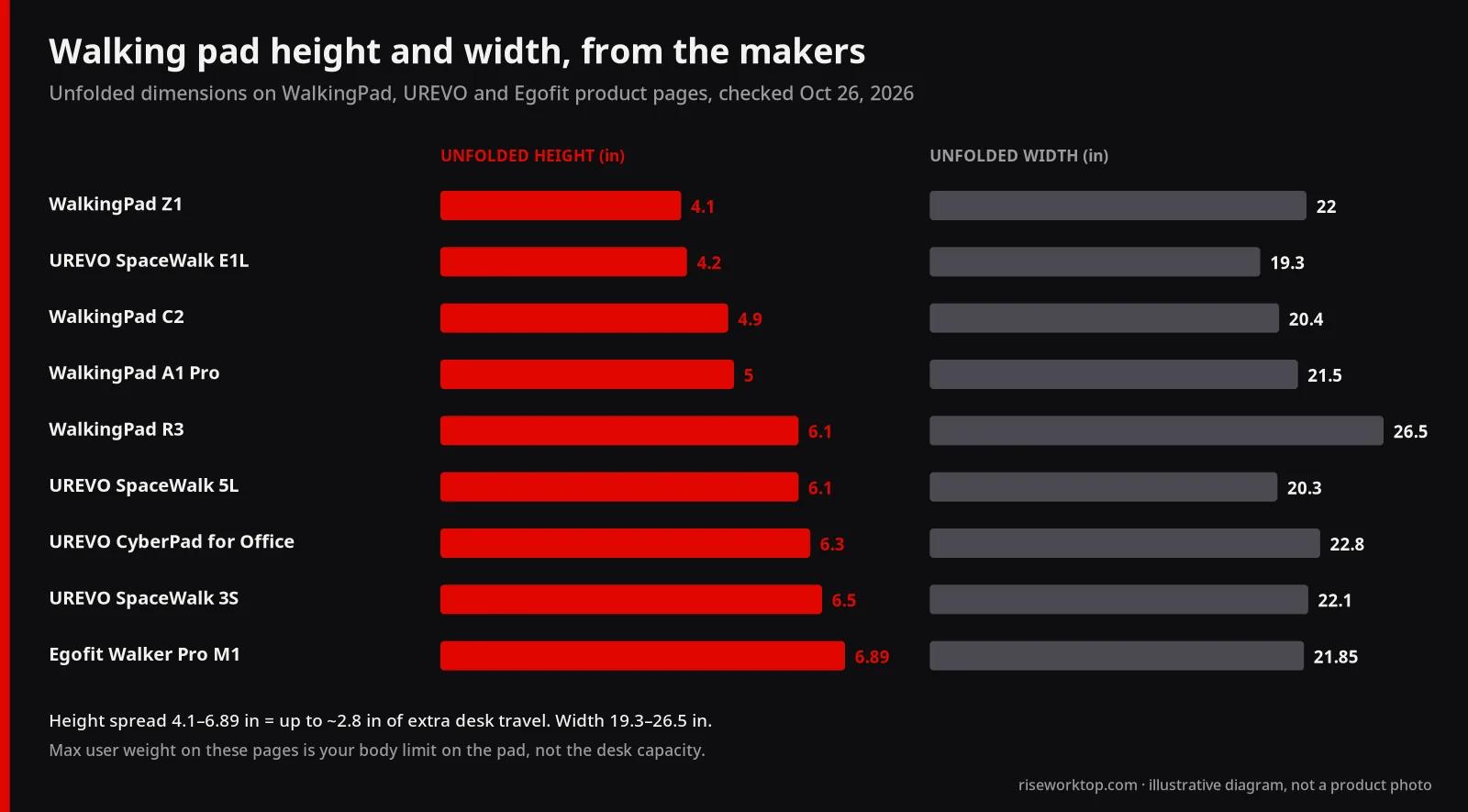
The height spread is almost 3 in, and that's 3 in of desk travel you either need or don't. If your desk is borderline, a thin pad is the only fix short of a new desk. And "max user weight" is your body limit on the pad; it has nothing to do with the desk's lifting capacity.
One line each on the rest: compare pads on belt size, warranty and returns too, and treat apartment noise as its own question, because footfall travels through floors in a way a dB rating doesn't capture.
Which desks actually reach
Now hold those numbers against real frames. These are maker-published maximums, with prices from the makers' US sites on October 26, 2026:
| Desk | Height range (maker) | Motors / legs | Capacity (maker) | Inner leg gap | Price (Oct 26, 2026) |
|---|---|---|---|---|---|
| Autonomous Desk 2 (53 × 29 in top) | 27.2–46.5 in | Dual, 2-leg | 250 lb | Not listed (frame footprint 39.8–59 in long) | $449 |
| Autonomous Desk Core (48 × 24 in top) | 29.4–47.5 in with top | Single, 2-leg | 176 lb lifting | Not listed (frame 40.3 in long) | $349 |
| FlexiSpot E7 | 22.8–48.4 in without top | Dual, 2-leg | 355 lb static | Not listed (frame 43.4–74.8 in wide) | Varies by top; check the page |
| UPLIFT V3 4-Leg | 22.6–48.7 in with a 1 in top | Quad, 4-leg | 535 lb incl. desktop | Not listed (frame 41.3–72.2 in wide) | $919 as shown on the frame page |
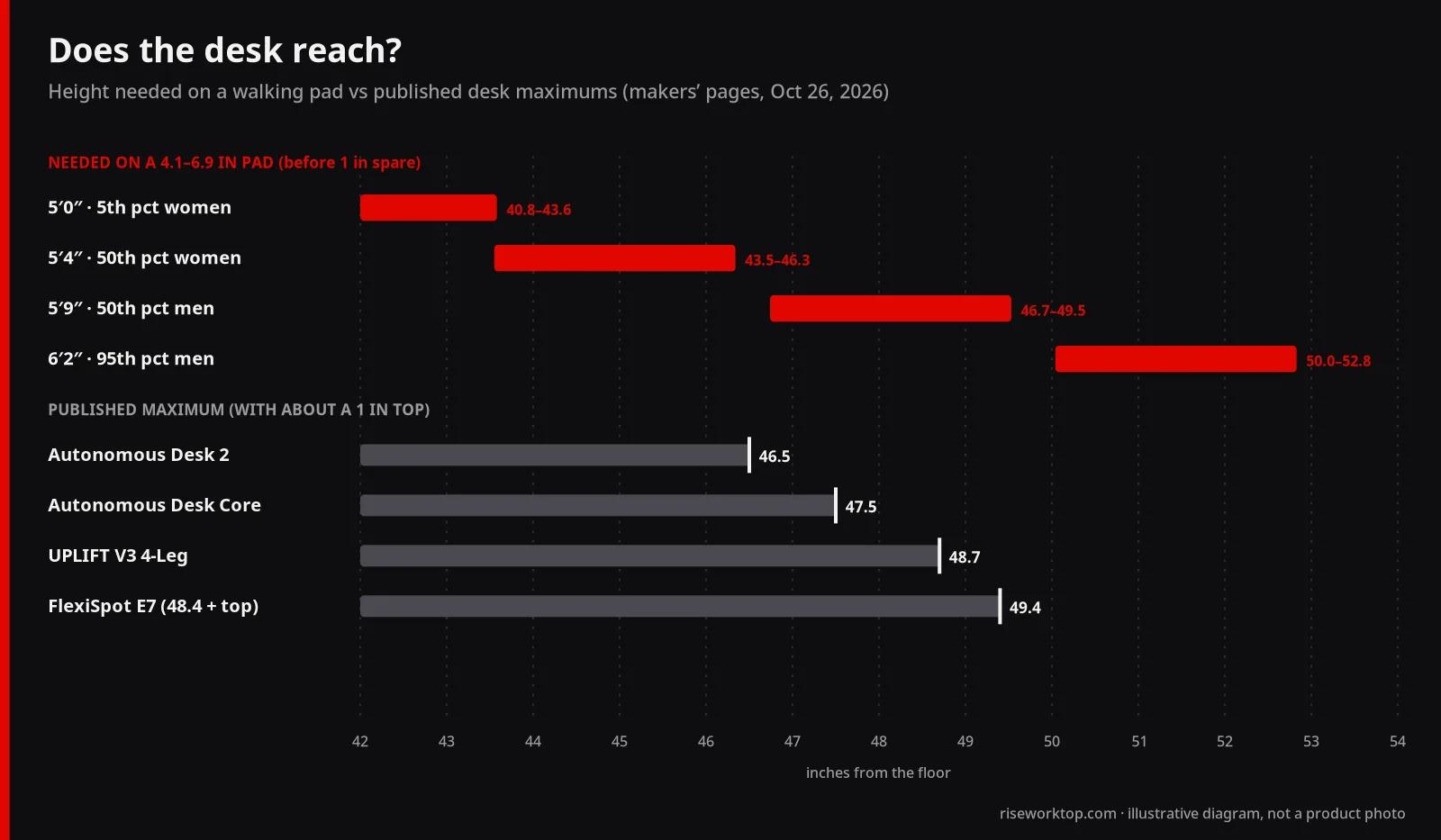
My calls from that table:
- Autonomous Desk 2 works for an average-height woman on any pad here, though with only 0.2 in to spare on the 6.9 in Egofit. For an average-height man it doesn't reach even with the thinnest pad (46.74 in needed, 46.5 available). Good desk, wrong desk for a 5′9″ walker.
- Autonomous Desk Core gets the average man onto a 4.1 in Z1 with 0.76 in left, and nothing thicker. With no spare inch on a single-motor frame, I'd hesitate. It suits shorter users who want a 48 in top.
- FlexiSpot E7 has the most headroom of the 2-leg frames once you add a top (48.4 in plus about 1 in). The average man clears a 6.1 in pad with a little to spare. The catch is that FlexiSpot's 355 lb rating is a static load, not a lifting figure.
- UPLIFT V3 4-Leg is the stability pick, but notice the height: 48.7 in with a 1 in top means the average man on a 6.1 in pad misses by 0.04 in. Four legs don't buy you extra reach. UPLIFT does sell thicker tops, which add their thickness to the maximum.
The awkward truth is the bottom row of the earlier table: a 6′2″ user needs about 50–53 in, and none of these reaches it. Look for extended-range frames and check the maximum with your top first.
Number 2: the gap between the legs (and the floor around it)
Width is the number everyone assumes is fine, and on most desks it is. But nobody publishes it. Autonomous, FlexiSpot and UPLIFT list the frame's overall length or width; none of the pages I checked lists the clear gap between the legs.
Measure it this way:
- Measure between the inner edges of the feet at floor level, because the pad sits on the floor between them. Feet usually stick out wider than the columns.
- Subtract the pad's published width. I'd want at least about 6 in left over (3 in a side). That lets you center the pad, keep the side rails off the steel and keep the power cord out of a pinch point. That margin is my judgment, not a standard.
- Look for a low crossbar between the legs. Most frames run their crossbar just under the desktop, where it doesn't matter. A bar near the floor would block the pad entirely. UPLIFT says its V3 frame doesn't need a lower crossbar, which is the kind of statement I'd look for.
Example: the Desk Core frame is listed at 40.3 in long. If the feet and columns took 8 in combined (my assumption; it isn't listed), about 32 in would remain, enough for a 26.5 in WalkingPad R3. That assumption is exactly why you measure.
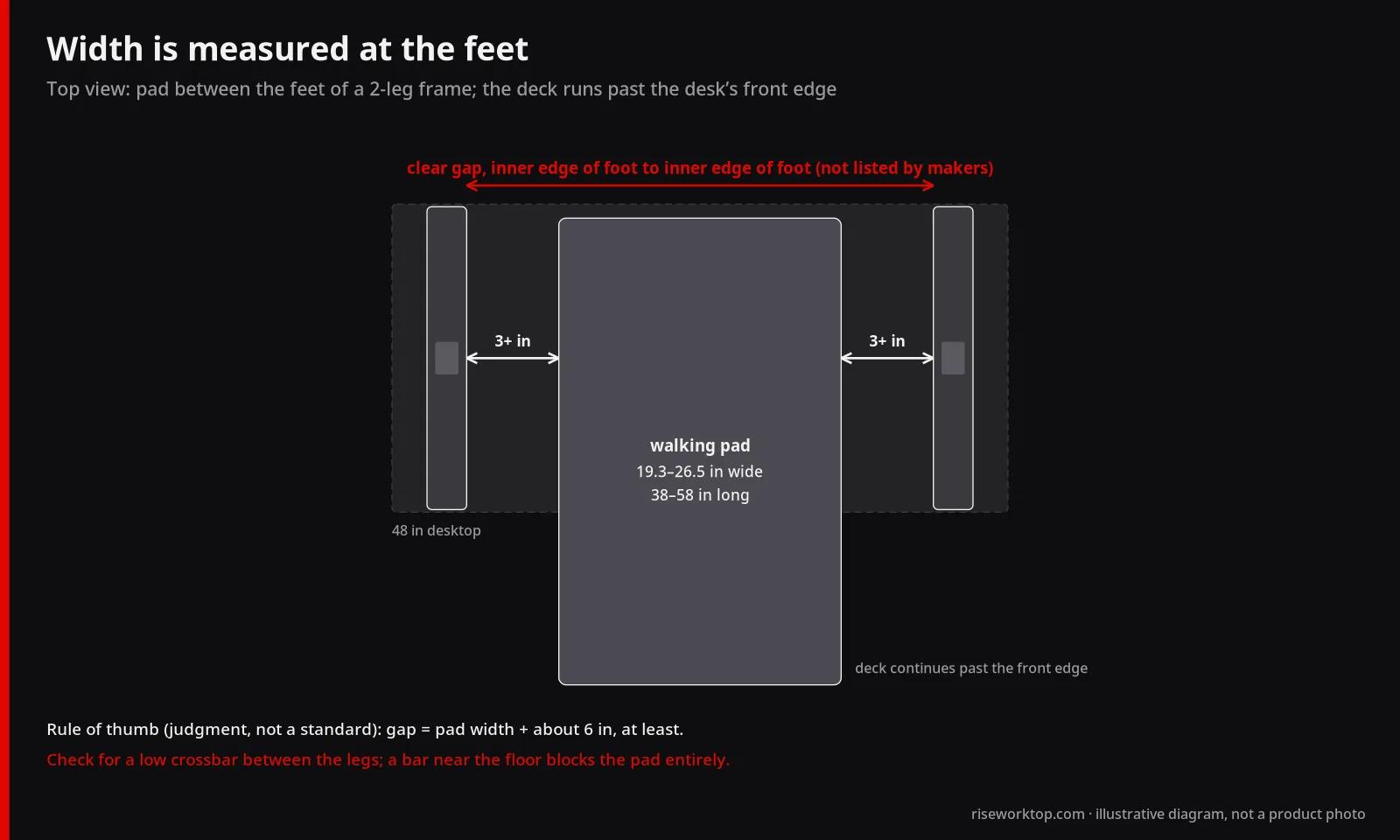
Floor depth is the other half. Pads run 38–58 in long; desks are 24–30 in deep. Push a 30 in deep desk against a wall with a 57.8 in R3 under it, and roughly 28 in of deck sits in front of the desk edge. Plan the floor for that, plus room to step off the back.
UPLIFT's instructions say to keep at least 1 in between the moving desk and everything around it through the full range. That includes the pad: don't lower the desk onto the deck.
Number 3: stability at full height
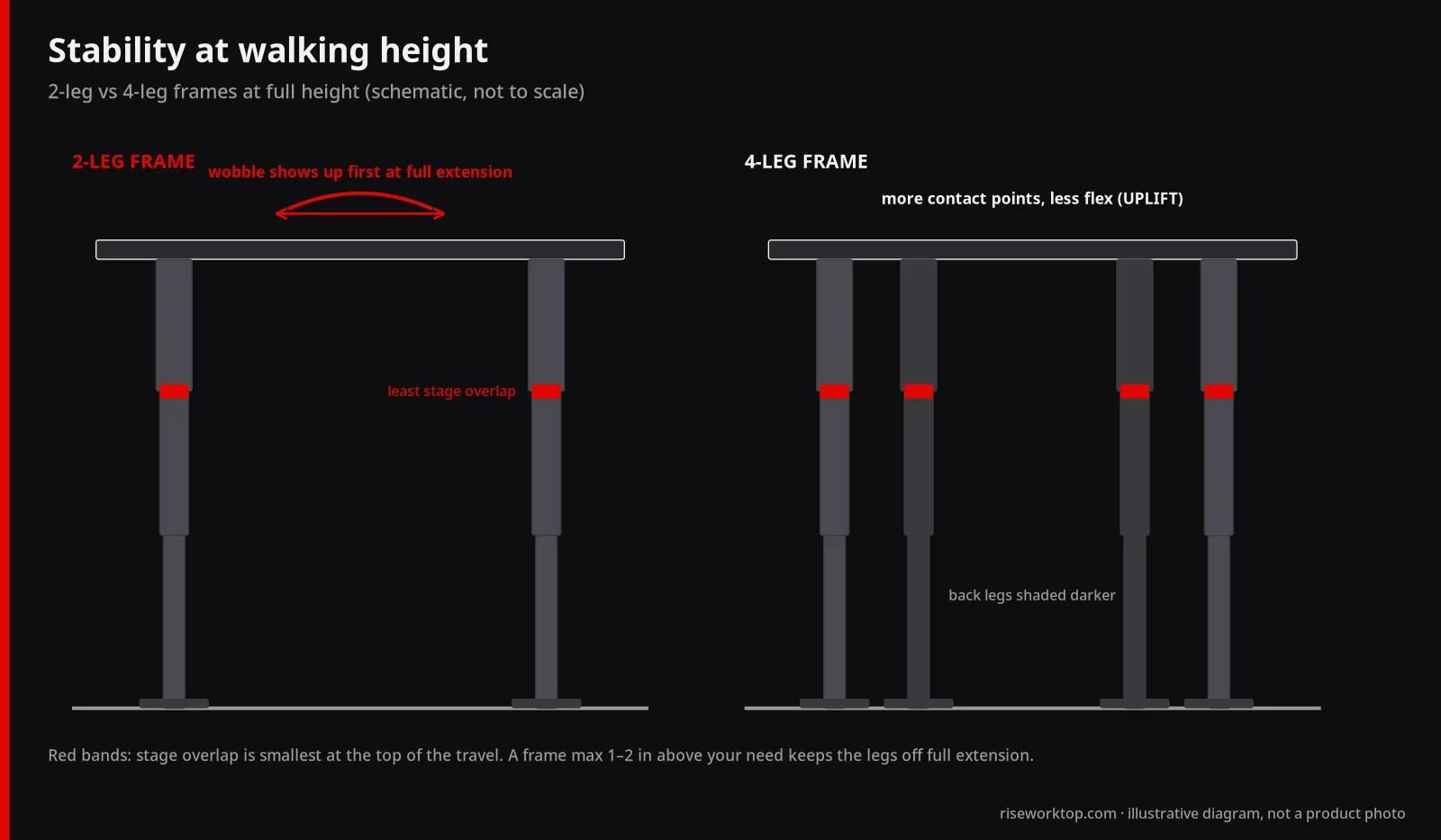
A standing desk is least stiff near the top of its travel, because each telescoping stage overlaps the next by the least amount there. A walking pad user lives near the top and adds a steady rhythm of small pushes through the forearms. That's a frame's worst case, every day.
What I'd look for, in order:
- Headroom you don't use. Need 46 in? A 46.5 in maximum runs you at full extension; a 48–49 in one leaves overlap in the legs. It's the cheapest stability upgrade there is.
- Dual motor and 3-stage legs. The Desk 2, E7 and UPLIFT V3 are dual or quad motor; the Desk Core is single.
- Long feet. Autonomous lists 23.6 in feet on both frames; UPLIFT's 4-leg sheet shows 27.6 in. Longer feet resist front-to-back rocking, which is the direction you walk.
- Four legs if you can fit one. UPLIFT puts it plainly: more contact points mean less flex. Its 4-leg desk is configured with 60–80 in wide tops, so it's a big-room answer.
- Weight low and close to the legs. A tall monitor on a pole near the back edge acts like a lever. Arms that keep screens close to the frame help, and our dual monitor arm guide covers mounting.
- A real return window. Autonomous lists free 30-day returns on the Desk Core (flash sales excluded). Do the wobble test inside it: monitors loaded, desk at walking height, a light push both ways.
I wouldn't buy a single-column or C-frame desk for a walking pad, and I wouldn't fix a too-short desk by stacking a converter on it; that stacks two wobbly things. For the general trade-off, see converter vs standing desk. With a walking pad, a converter on a fixed desk is the weakest option.
When you sit back down
The minimum height barely matters: every pad here is under 7 in tall. What matters is where the pad goes. Left under the desk, it's a 4–7 in step among your chair casters and feet. Slid out, it needs floor space; WalkingPad's folding models list folded lengths of about 32–34 in, while UREVO and Egofit don't publish folded sizes on these pages. For standing still, swap in a mat; our footrest and anti-fatigue mat guide covers that.
Typing, screens and cables while you walk
Pads list top speeds of 3–4 mph, but desk work happens at the slow end, and stopping the belt for precise mouse work is normal. Desk-side details:
- Screens don't change. The whole desktop rises, so monitors keep their relation to your eyes. On a laptop, the laptop stand vs external monitor guide matters more, because you'll be looking down while moving.
- A keyboard tray works against you. It drops the keyboard below the desktop, so the desk must climb higher still. The keyboard tray guide has the drop numbers.
- Cables need more slack for the extra travel, and the pad's cord must stay clear of the belt and your feet. See the cable management guide.
- Electric beats crank. Walking height is your tallest setting, and memory presets earn their place.
The checklist
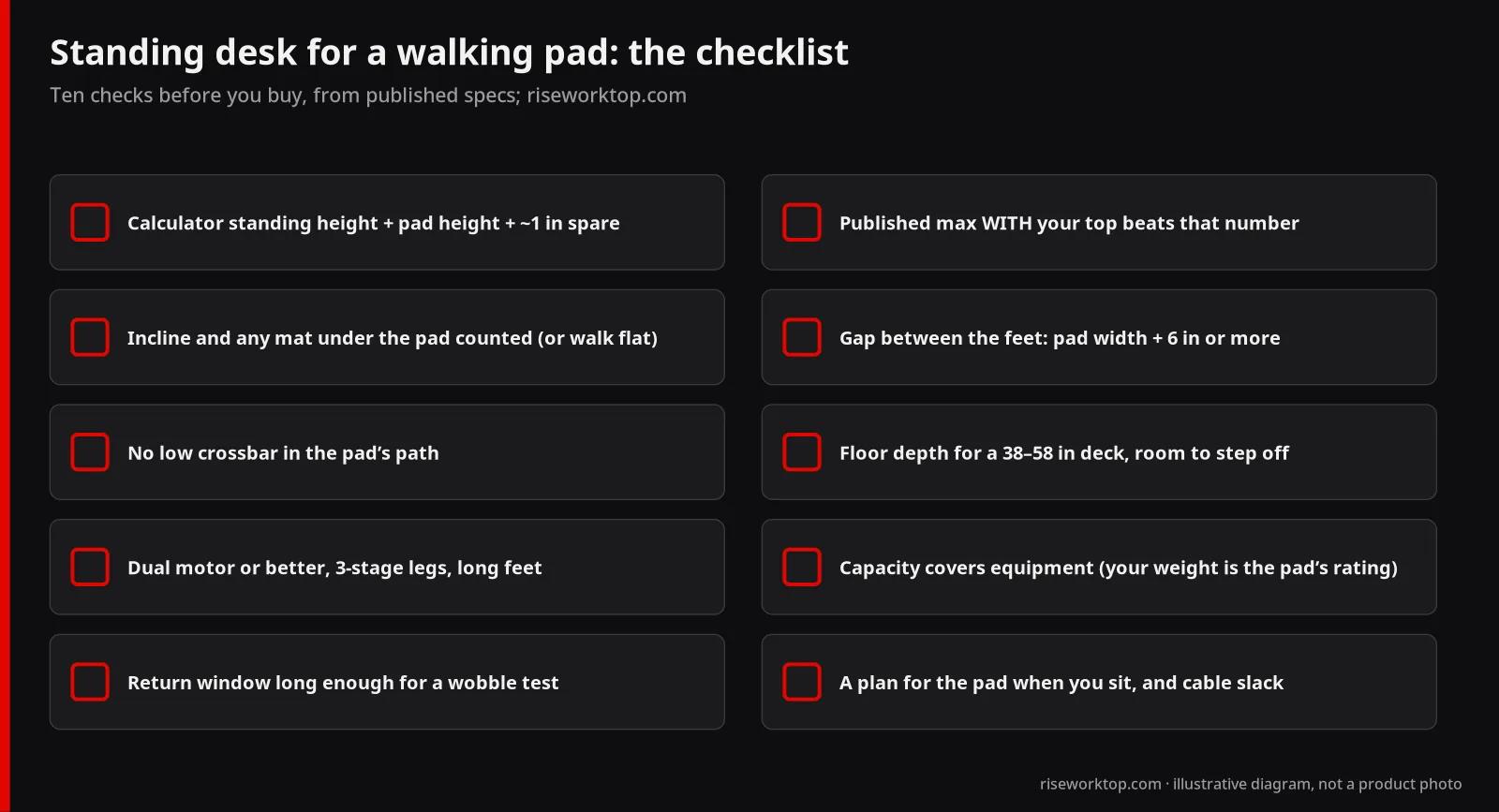
- Standing desk height from the calculator, plus the pad's unfolded height, plus about 1 in of spare travel
- The desk's published maximum, with your top's thickness, beats that number
- Incline and any mat under the pad are added in, or you'll walk flat while working
- Gap between the inner edges of the feet is at least the pad width + about 6 in
- No low crossbar in the pad's path
- Floor depth covers the pad length, with room to step off the back
- Dual motor or better, 3-stage legs, long feet
- Desk capacity covers monitors, arms and accessories, not your body (that's the pad's rating)
- A return window long enough for a wobble test at walking height
- A plan for the pad when you sit, and cable slack for the extra travel
FAQ
How tall does a standing desk need to be for a walking pad?
Your standing desk height plus the pad's unfolded height, plus an inch spare. On 4.1–6.9 in pads, that's about 43.5–46.5 in for an average-height woman and 46.7–49.5 in for an average-height man before the spare inch. Many desks stop around 46–48 in.
Is a 2-leg standing desk stable enough for a walking pad?
It can be: dual motor, 3-stage legs, long feet, and not run at full extension, which is the part people skip. A 4-leg frame is stiffer but needs a wider top. Either way, do a loaded wobble test at walking height inside the return window.
Can I run on an under-desk treadmill?
Most aren't built for it. The pads in this guide list top speeds between 3.11 and 4 mph, which is walking pace. A desk at running height with a keyboard on it isn't a good idea either. Running needs a different machine, and usually not one under a desk.
Will a walking pad work with a manual crank standing desk?
It's possible, but annoying. Walking height is your tallest setting, so you'd crank the full distance every time you switch between sitting, standing and walking. Electric presets make that a one-button change.
Do I still need an anti-fatigue mat if I have a walking pad?
Not on the belt while you're walking. Keep a mat for standing still when the pad is put away; the mat guide covers sizes and thickness.
How many hours a day should I use a walking pad at my desk?
There's no desk-side rule for this. Many people start with short blocks and adjust to how their focus and joints feel, not to an influencer's schedule. If you have a condition affected by walking or balance, ask a clinician; this isn't medical advice.
Sources
- WalkingPad Z1, C2, A1 Pro and R3 product pages (checked October 26, 2026)
- UREVO SpaceWalk E1L, SpaceWalk 5L, CyberPad for Office and SpaceWalk 3S product pages (checked October 26, 2026)
- Egofit Walker Pro M1 product page (checked October 26, 2026)
- Autonomous Desk 2 and Autonomous Desk Core product pages (affiliate links; checked October 26, 2026)
- FlexiSpot E7 product page (checked October 26, 2026)
- UPLIFT 4-Leg Standing Desk Frame, V3 4-Leg spec sheet and V2 4-Leg instructions and high-capacity desks note (checked October 26, 2026)
- OSHA: Computer Workstations eTool, Desks
- ANSUR II rows as published in the desk height calculator
If it were my desk
I'd do the height math before looking at a single pad. If my desk cleared it with an inch to spare, I'd buy the thinnest pad that fits my weight and floor, and run the wobble test the first week. If it didn't, I wouldn't buy a pad yet. I'd either pick a thinner pad that gets me under the limit, or replace the desk with a dual-motor frame that reaches at least 49 in with its top. For anyone choosing a desk from scratch, start with our standing desk buying guide, then check the maximum against this page. For a budget, the standing desk under $500 guide has the same Autonomous and FlexiSpot frames with full spec notes.